

If you have just started studying cybersecurity, you have probably noticed that almost every course, job posting, and vendor page throws around the term “network security” without ever slowing down to explain what actually holds it together day to day.
That connective layer—the planning, monitoring, and maintenance work that keeps a network defensible over time—is what professionals call network security management, and it is a far bigger discipline than installing one firewall and hoping for the best.
This guide breaks down what network security management actually involves, why it has become non-negotiable for organizations in 2026, and which core skills a beginner should focus on first. Along the way, we will look at firewall configuration, intrusion detection, network segmentation, vulnerability assessment, and the security protocols that tie all of it together.
None of these ideas require a computer science degree to grasp—they are practical habits, and every working professional in this field learned them one small mistake at a time.
What Is Network Security Management?
At its core, network security management is the ongoing process of designing, monitoring, and adjusting the controls that protect a network’s traffic, devices, and data from unauthorized access.
It is not a single tool or a one-time project. It is a cycle: you set policies, enforce them through technical controls, watch for anomalies, and update everything as new threats and new parts of the network appear.
A useful way to think about it is as four connected jobs happening at once—visibility (knowing what is on your network), control (deciding what is allowed to talk to what), detection (noticing when something breaks the rules), and response (fixing it before it spreads).
Skip any one of those jobs, and the other three lose most of their value. This is why practitioners usually describe the field as an ongoing discipline rather than a checklist you finish once—the work never really ends; it just shifts focus as the network changes shape.
Why Does This Matter More in 2026 Than Ever Before?
Corporate networks today rarely look like the simple office-and-server-room setup from a decade ago. Cloud workloads, remote employees, IoT sensors, and SaaS applications have all multiplied the number of places an attacker can try to get in.
According to the 2026 Data Breach Investigations Report from Verizon, exploitation of software vulnerabilities has now overtaken stolen credentials as the single most common way attackers gain their first foothold, accounting for roughly a third of the breaches analyzed this year—and the median time it takes organizations to patch a known flaw has actually gotten longer, not shorter.
That single statistic explains a lot about why this field has become a board-level concern rather than a back-office task. Attackers are moving faster than most patch cycles, which means a disciplined vulnerability assessment process and careful firewall configuration are no longer optional extras—they are the baseline expectation.
Analysts tracking the broader market echo the same urgency: spending on network security management platforms is projected to keep growing at a double-digit rate through the rest of the decade, driven largely by demand for centralized, AI-assisted tools that can keep pace with hybrid and multi-cloud environments.
The Five Pillars Every Beginner Should Know
Most programs, regardless of the size of the organization, lean on the same five building blocks. Learn these well and you will understand the logic behind almost every security tool you encounter later in your career.
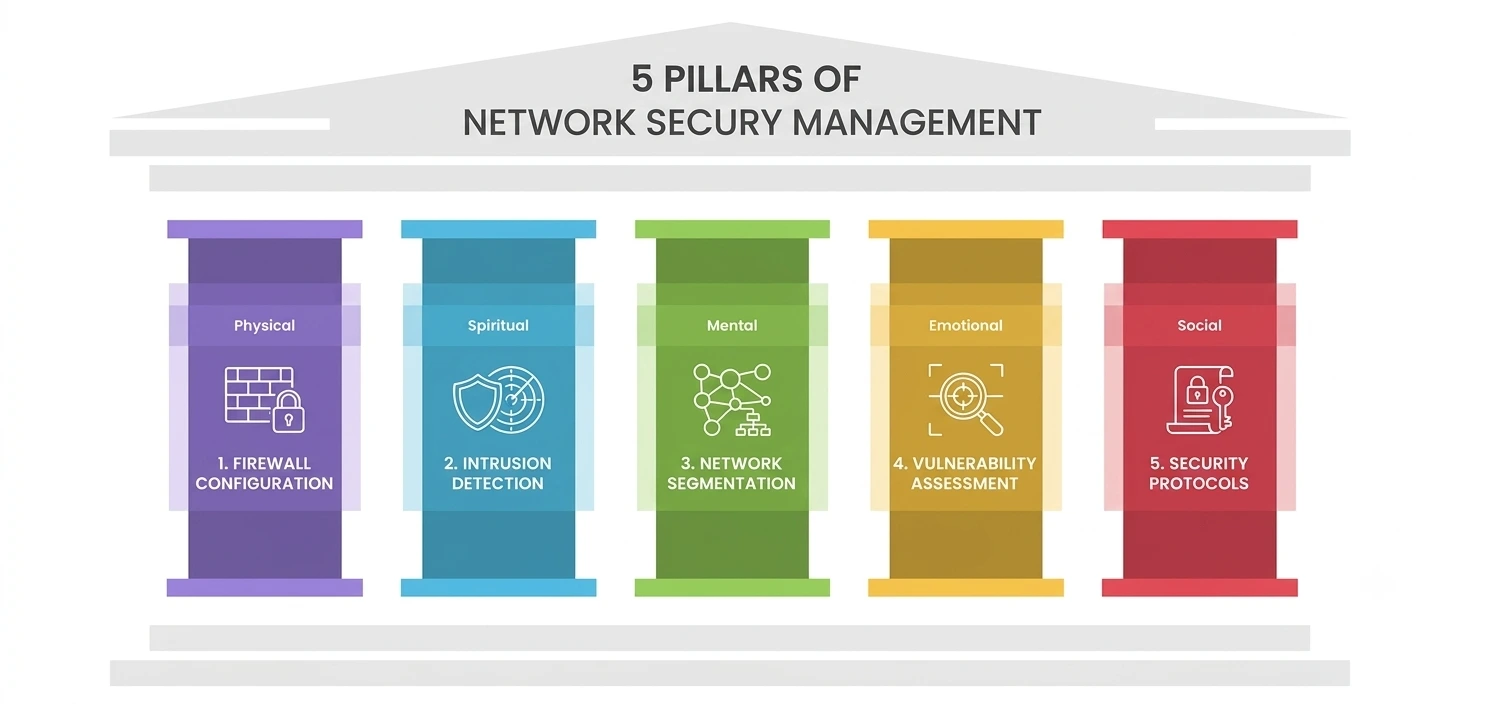
1. Firewall Configuration
A firewall is the gatekeeper that decides which traffic is allowed to enter or leave a network segment. But a firewall is only as good as its rules. Poor firewall configuration—overly broad “allow all” rules, forgotten temporary exceptions, or default settings left untouched—is one of the most common reasons breaches happen even when expensive security tools are already in place.
Beginners should practice writing least-privilege rules: block everything by default, then open only the specific ports and services a system actually needs. Reviewing configuration logs regularly also teaches you what “normal” traffic looks like, which makes anomalies much easier to spot later on.
2. Intrusion Detection
Firewalls stop known-bad traffic at the door, but intrusion detection systems watch what is already happening inside the network and flag behavior that looks suspicious—a login attempt from an unusual location, a sudden spike in outbound data, or repeated failed authentication attempts.
Modern intrusion detection tools increasingly rely on behavioral baselines and machine learning to catch attacks that do not match a known signature, which matters because, as Fortinet’s 2026 threat predictions point out, attackers themselves are now using automation and AI to move faster and blend in with legitimate activity.
3. Network Segmentation
Imagine a building with no interior walls: once an intruder is through the front door, every room is exposed. Network segmentation fixes that problem by dividing a network into smaller zones, each with its own access rules, so a compromise in one area does not automatically spread everywhere else.
The Cybersecurity and Infrastructure Security Agency describes this kind of segmentation as one of the most effective ways to limit lateral movement and reduce the overall impact of an attack. For students, a simple exercise is to sketch out a small office network and decide which devices genuinely need to talk to one another—you will usually find the honest answer is “far fewer than you would assume.”
4. Vulnerability Assessment
You cannot protect what you do not know is broken. A vulnerability assessment is the structured process of scanning systems, ranking the weaknesses you find by severity, and tracking them until they are resolved. NIST’s Technical Guide to Information Security Testing treats this as a core phase of any security assessment program, distinct from but connected to penetration testing.
Beginners often assume this kind of assessment is a once-a-year audit; in practice, it needs to run continuously, because new flaws are disclosed daily and attackers now weaponize them within hours of publication rather than months.
5. Security Protocols
None of the above works without agreed-upon rules for how devices communicate securely—protocols like TLS, IPsec, and SSH that encrypt traffic and verify identity before data ever moves. Weak or outdated security protocols are a quiet but serious risk: a network can have excellent access rules and tight segmentation and still leak data if it is still allowing an old, broken encryption standard out of habit.
The NIST Cybersecurity Framework is a useful reference point here, since it ties protocol and configuration standards back to measurable organizational outcomes instead of treating them as a purely technical checkbox.
How Do the Five Pillars Work Together?
These five pillars rarely operate in isolation, and treating them that way is one of the fastest ways for a security program to develop blind spots. Firewall rules decide what is allowed to cross a boundary, but they only know about the boundaries that network segmentation has actually created—a flat network gives a firewall far less useful work to do.
Detection systems depend on that same segmentation for context, since traffic between two zones that should never talk to each other is a much stronger signal than traffic on a single flat subnet. Scanning results, in turn, tell you where to prioritize both isolation and monitoring effort, because a system with a critical unpatched flaw deserves tighter walls and closer attention than one that is fully up to date.
Effective network security management is really the practice of keeping these feedback loops running continuously, rather than treating each pillar as a project with a fixed start and end date. Once you see the pillars as connected, a lot of confusing vendor marketing starts to make more sense too—most “next-generation” tools are simply trying to automate the handoff between two or more of these functions.
A Quick Comparison
|
Pillar |
What It Does |
Common Beginner Mistake |
|
Firewall Configuration |
Filters traffic in and out based on defined rules |
Leaving default “allow all” rules active |
|
Intrusion Detection |
Monitors internal traffic for suspicious behavior |
Ignoring alert fatigue instead of tuning rules |
|
Network Segmentation |
Divides the network into isolated zones |
Treating the whole office as one flat network |
|
Vulnerability Assessment |
Scans and ranks system weaknesses |
Treating it as an annual event, not a continuous one |
|
Security Protocols |
Encrypts and authenticates communication |
Keeping legacy protocols active “just in case” |
Common Mistakes Beginners Make
Most students studying this field make the same few errors early on. They treat each control as a separate tool rather than part of one connected system—buying a detection product without ever tightening basic access rules first, for example.
They also underestimate how much of the job is documentation and communication rather than pure configuration; an assessment report nobody reads does not protect anything.
And many overlook the human side entirely, forgetting that phishing and social engineering remain the entry point for a large share of real-world incidents, no matter how strong the underlying technical controls are.
Career Paths and Why Employers Care
Job titles in this space vary widely—SOC analyst, network security engineer, security operations engineer, compliance analyst—but almost all of them trace back to the same five pillars covered above. Entry-level roles typically start with monitoring: watching dashboards, triaging alerts, and escalating anything that looks unusual.
As you gain experience, the work shifts toward design decisions—where new segmentation boundaries should sit, which access rules a new application actually needs, and which outdated security protocols are finally safe to retire.
Employers care about this skill set because the cost of getting it wrong keeps climbing. A single unpatched, internet-facing system can now be found and exploited within hours rather than weeks, which means teams that used to rely on quarterly reviews are being pushed toward continuous processes instead.
For a student, this is genuinely good news: the field rewards people who can demonstrate hands-on habits—a home lab, a documented scan, a segmentation diagram—over people who can only recite definitions.
Hiring managers in this space consistently say they would rather train a candidate who understands why network security management decisions get made than one who has memorized every acronym but never configured a single rule.
How to Start Building These Skills?
You do not need an enterprise budget to start practicing. A home lab with two or three virtual machines is enough to experiment with firewall rules, set up a basic detection tool, and practice dividing a small virtual network into separate zones.
Free, well-documented tools make this genuinely achievable on a laptop: an open-source firewall distribution like pfSense to practice writing rules, Wireshark to watch what real traffic actually looks like, an open scanner such as OpenVAS to find weaknesses on purpose, and a virtual router or switch to build separate zones without buying any hardware.
Most operating systems already support the encryption standards worth learning first, so there is no need to install anything exotic before you get comfortable with the basics.
Keep a simple lab notebook as you go. Write down what you changed, what you expected to happen, and what actually happened—that habit alone will separate you from most beginners, because it forces you to notice when your mental model of the network is wrong.
Start small, break things intentionally in a sandbox, and read post-incident reports from real breaches; they teach the practical side of this field faster than any single textbook chapter ever could.
Good network security management, in the end, is less about owning the most expensive tools and more about consistency: reviewing rules on a schedule, treating every alert as worth a second look, and never assuming last year’s configuration is still good enough for this year’s threats.
A Personal Note
I started learning this material the same way most students do—memorizing definitions without really understanding why each control mattered. What changed things for me was building a tiny home lab and deliberately misconfiguring it, then trying to detect and fix my own mistakes.
That turned out to be the fastest way to actually understand this field: not by reading about firewall rules in the abstract, but by writing bad ones first and watching what broke as a result. Give yourself permission to be clumsy early on. Every security professional you will ever admire started exactly there too.