
If your company’s entire vendor list still lives inside a color-coded spreadsheet that only one person fully understands, you already know the problem. Contracts get buried in email threads, compliance certificates expire without anyone noticing, and nobody can say with real confidence how many active vendors the business actually has. This is exactly the gap that vendor management software was built to close.
For students studying procurement, supply chain, or business operations, this is a genuinely useful real-world case study in how companies solve operational problems—not the textbook version, the messy version. It also explains why finance and procurement teams are quietly retiring their spreadsheets in favor of dedicated vendor management tools.
In this guide, we’ll walk through what vendor management software actually does, how it differs from basic supplier management software, and why procurement leaders increasingly treat it as a non-negotiable part of running an efficient operation.
Why Do Spreadsheets Quietly Break Vendor Management?
Spreadsheets are free. They’re familiar, flexible, and nobody needs training to open one. That is also exactly why they fail at scale.
A joint survey by SpendHQ and Procurious found that 73% of procurement teams are still tracking performance metrics with spreadsheets and other manual tools, and most of those same teams admitted they don’t fully trust the data they’re presenting to leadership. Separately, IBM’s research into spreadsheet risk found that up to 90% of spreadsheets in active business use contain some form of error—a broken formula, an outdated reference, or a “stealth” mistake nobody has caught yet.
Now multiply that risk across dozens of vendor relationships. A missed renewal date buried in row 214 can cost a company its best negotiated pricing. A compliance certificate that quietly expired in a hidden tab can trigger a failed audit months later.
Teams that outgrow this pattern usually don’t switch to a slightly better spreadsheet template—they switch to a dedicated system, because the underlying problem was never the file format. It was the fact that a spreadsheet has no memory, no alerts, and no owner beyond whoever last touched it.
This is precisely the itch that dedicated vendor management tools are designed to scratch—not more columns and more tabs, but actual working memory for the business, the kind that doesn’t forget things just because the person who built the file went on vacation or left the company.
What Is Vendor Management Software?
Vendor management software is a centralized platform that helps organizations track, evaluate, and manage every vendor relationship from one single source of truth. Instead of scattering contracts, performance reviews, invoices, and compliance paperwork across shared drives and inboxes, everything lives in one system the whole procurement team can see, search, and trust.
It’s easy to confuse this with generic supplier management software, and the two terms genuinely overlap in casual conversation. In practice, most platforms marketed narrowly as sourcing tools focus on supplier discovery and qualification, while a complete vendor management software suite also covers contract lifecycle tracking, performance scorecards, automated risk flags, and renewal workflows—the full operational relationship, not just the sourcing stage.
Think of sourcing software as the “finding” tool and vendor management as the “keeping track of what happens after” tool. Most platforms in this category share a similar backbone underneath their individual branding: a searchable vendor directory, a document repository with expiry tracking, a workflow engine for approvals, and some form of scoring or rating system for ongoing performance.
Where platforms genuinely differ is in depth—how configurable the risk rules are, how well the reporting holds up for an audit, and how painless it is for an actual vendor on the other end to submit their information in the first place.
Spreadsheets vs. Vendor Management Software: A Side-by-Side Look
|
Task |
Spreadsheet Approach |
Dedicated Software Approach |
|
Contract renewal tracking |
Manual reminders, easy to miss |
Automated alerts before expiry |
|
Vendor onboarding |
Scattered emails and PDFs |
Structured digital workflow |
|
Compliance documentation |
Stored in random folders |
Centralized and audit-ready |
|
Performance scoring |
Subjective, inconsistent |
Standardized scorecards |
|
Access and version control |
One file, one “owner” |
Role-based, real-time access |
|
Risk visibility |
Usually discovered too late |
Flagged proactively |
The pattern across every row is the same: spreadsheets are passive, and software is active. A spreadsheet waits for a human to check it. A properly configured system checks itself and only interrupts a human when something actually needs attention.
Vendor Onboarding Software: Where the Cracks Show First
If there’s one place the absence of proper tools shows up fastest, it’s onboarding. Bringing on a new vendor manually usually means chasing tax forms, banking details, insurance certificates, and signed agreements across a mix of emails and phone calls.
According to Stripe’s guide to supplier and vendor onboarding, a well-run onboarding process protects a business against compliance risk and keeps payments moving on time—but only if the process itself doesn’t become the bottleneck.
This is exactly the gap that vendor onboarding software closes. Instead of manually chasing documents through email, a new vendor fills out a structured digital form once, uploads the required paperwork, and the system automatically routes it for internal approval.
Good vendor onboarding software also builds in validation rules, so a vendor literally cannot submit an incomplete tax form or an already-expired certificate. The same logic applies to supplier onboarding more broadly, whether the company calls the other party a “vendor” or a “supplier.”
Supplier onboarding that runs on structured software instead of scattered email typically takes days instead of months, because nothing sits quietly in an inbox waiting for someone to notice it. A third round of supplier onboarding for a repeat vendor can even be near-instant, since most of their information is already validated and on file.
For students entering procurement or operations roles, this is worth remembering: the maturity of a company’s onboarding process is often a direct, visible signal of how seriously that company takes vendor risk overall.
Procurement Automation: The Bigger System Vendor Management Fits Into
Vendor management software rarely operates alone. It’s usually one module inside a broader procurement automation strategy that also touches purchase orders, invoice matching, and spend approvals.
Procurement automation matters because manual procurement work doesn’t just waste time—it introduces inconsistency. When every purchase request, vendor evaluation, and renewal decision runs through the same automated workflow, the whole procurement function becomes easier to audit and easier to improve.
That’s the real promise here: not replacing procurement professionals, but removing the repetitive administrative work so they can spend their time on negotiation, strategy, and supplier relationships instead.
Well-designed onboarding tools typically integrate with a company’s existing ERP or accounting system, so vendor data never has to be re-typed by hand in three different places.
That single point of integration is often what finally convinces a finance team to approve the budget for Procurement Automation in the first place—the pitch stops being “buy new software” and starts being “stop paying people to copy-paste.”
Procurement Risk Management: The Reason Leadership Actually Cares
Here’s the part that gets a company’s leadership team paying close attention: Procurement Risk Management.
Every vendor relationship carries some level of risk—financial risk if a supplier suddenly runs into trouble, compliance risk if certifications quietly lapse, reputational risk if a vendor is linked to unethical practices, and operational risk if a single supplier failure can halt production.
Procurement risk management is the discipline of identifying and monitoring these risks before they turn into expensive, public problems. This is where a proper system earns its keep. Instead of discovering a lapsed certificate during an external audit, the system flags it weeks in advance.
Instead of realizing after the fact that a large share of spend sits with a single risky supplier, the platform surfaces that concentration automatically, long before it becomes a crisis. Strong procurement risk management turns vendor oversight from a reactive scramble into a proactive, ongoing habit—the difference between finding out about a problem from a news headline versus finding it out from a dashboard.
For any student studying supply chain resilience, this is the practical takeaway: risk oversight isn’t a compliance checkbox tucked into an appendix; it’s a direct input into business continuity planning.
How to Choose the Right Vendor Management Software?
Not every platform fits every business, and picking one is a genuine decision, not a checkbox exercise. A few things worth evaluating before committing:
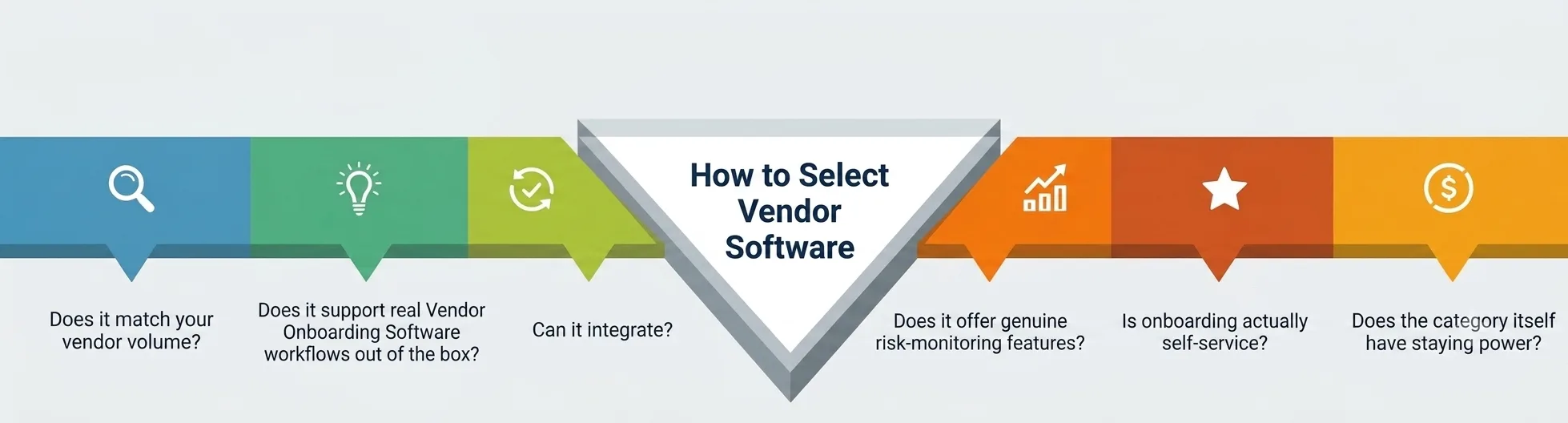
- Does it match your vendor volume? A five-person startup with a dozen vendors doesn’t need the same heavyweight vendor management tools as an enterprise managing thousands of supplier relationships.
- Does it support real vendor onboarding software workflows out of the box, or will your team need custom development just to get vendors into the system?
- Can it integrate with the accounting, ERP, or procurement systems you already run, so data isn’t duplicated by hand?
- Does it offer genuine risk-monitoring features—automated compliance alerts, concentration-risk flags, financial-health monitoring—rather than just a static vendor directory?
- Is onboarding actually self-service for the vendor’s side, or does your team still end up doing most of the data entry?
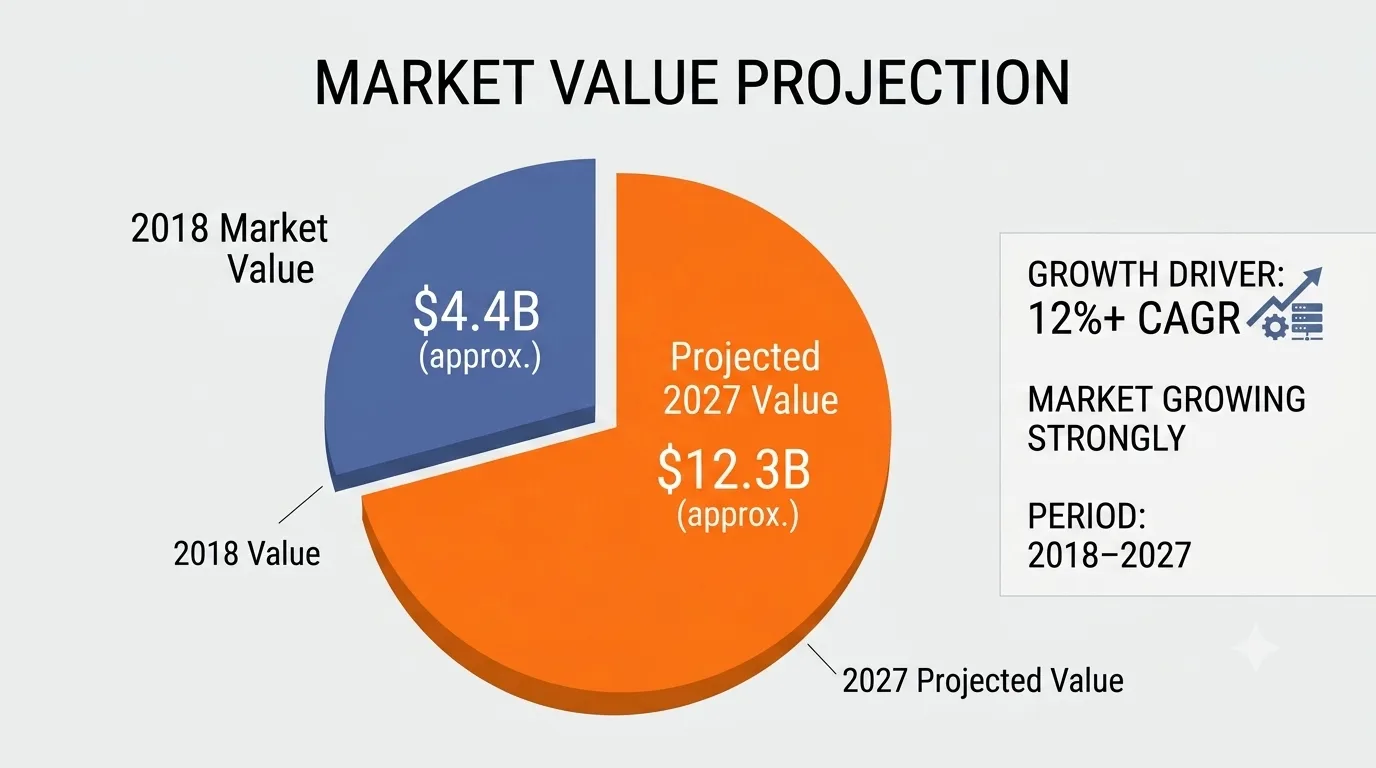
- Does the category itself have staying power? Independent market research has tracked steady, multi-year growth in this exact space—one analysis projected the market growing from roughly $4.4 billion in 2018 toward $12.3 billion by 2027, at a compound annual growth rate above 12%. That kind of sustained investment from buyers and vendors alike is a reasonable proxy for whether supplier management software has matured into a real category, rather than just having a moment
Common Mistakes Students and Beginners Make When Evaluating Supplier Management Software
Even after deciding to move away from spreadsheets, teams—and students studying these decisions from the outside—tend to stumble in the same predictable places.
The first mistake is treating every piece of supplier management software as interchangeable. Some tools are built almost entirely for sourcing and RFPs; others are built for ongoing relationship and risk tracking. Buying the wrong one solves half the problem and quietly leaves a spreadsheet in charge of the other half.
The second mistake is skipping the setup phase of the software itself and assuming the tool will configure itself around existing habits. A platform that’s powerful but painful to set up rarely gets fully adopted—teams slide back into old habits, and within a year the “new system” is just another underused tab next to the spreadsheet it was supposed to retire, with a much bigger monthly bill attached.
The third mistake is ignoring change management entirely. Buying a new platform doesn’t automatically fix a broken process; it exposes one. If nobody agrees on who owns vendor risk reviews or renewal timelines, good vendor management tools will surface that ownership gap loudly—which is uncomfortable in the short term, but genuinely useful once the team actually assigns an owner.
A fourth, quieter mistake is measuring success by how fast the initial data got loaded rather than by whether supplier onboarding actually got faster for real people afterward. A dashboard full of migrated records looks like progress, but the real test is whether a brand-new vendor can complete supplier onboarding without a single phone call to your team.
If the answer is still no six months in, the Vendor Management Tools you bought aren’t being used the way they were designed to be used, and that’s a process problem far more than it’s a software problem.
A 90-Day Roadmap From Spreadsheets to a Working System
Moving off spreadsheets doesn’t have to happen overnight, and trying to do it overnight is usually how these projects quietly fail.
Days 1–30: Audit what you actually have. Pull every vendor contract, certificate, and payment record out of scattered files and spreadsheets into one inventory. This step alone usually reveals duplicate vendors, expired agreements, and forgotten renewals nobody remembered existed.
Days 31–60: Shortlist and trial two or three platforms, testing real onboarding and risk-tracking workflows with a small batch of vendors rather than the entire list at once. This is also the stage to confirm the tool actually integrates with the automation you already have in place instead of sitting beside it as one more disconnected system.
Days 61–90: Migrate the rest of your vendor data, assign clear internal ownership for renewals and risk reviews, and set a recurring review cadence so the system doesn’t quietly decay back into a spreadsheet with extra steps and a login page.
A Note From the Author
I’ve watched more than one team lose a genuinely good vendor relationship over something completely avoidable—a renewal notice that got buried in someone’s inbox during a busy quarter. It wasn’t a strategy failure. It was a tooling failure.
That’s really the whole argument for moving off spreadsheets: not that they’re unsophisticated, but that they ask a human being to be the safety net for a process that should have one built in from the start.
If you’re a student reading this before you’ve ever managed a real vendor relationship, take the lesson early—the businesses that get burned usually aren’t the ones with bad vendors; they’re the ones with no system watching the details while everyone is busy doing something else.