

Amazon ElastiCache is a fully managed AWS caching service and in-memory data store and caching service that makes it easy to deploy, operate, and scale an in-memory cache in the cloud. It provides fast access to your data by storing the most frequently accessed information from your web applications, databases, or serverless functions. This blog post will focus on what Amazon ElastiCache is as well as how you create it to boost performance and achieve AWS performance optimization!
Understanding Amazon ElastiCache and AWS Pricing
Amazon ElastiCache is a fully managed in-memory data store service offered by AWS. It enhances the performance of applications by providing a high-speed and reliable cloud caching solution and distributed caching system caching layer. ElastiCache supports two popular open-source in-memory engines: Redis and Memcached. It helps alleviate database loads and reduces latency by storing frequently accessed data in memory, making it a powerful low latency database solution.
When considering AWS ElastiCache pricing, factors such as instance types, cache engine choices, data transfer, and storage options play a role. Pricing structures can vary based on your specific requirements and AWS pricing model. It’s essential to assess your anticipated cache utilization, data size, and traffic patterns to choose the most cost-effective configuration and ensure proper ElastiCache cost optimization.
Incorporating Amazon ElastiCache into your architecture can significantly enhance application responsiveness improve high availability in AWS, and overall efficiency, but evaluating the pricing nuances ensures optimal cost-management strategies are in place.
What is Caching?
Caching is the act of keeping information that people use frequently in a location where they can find it more quickly. This might be on a computer or the internet. The most suitable thing to put in this area is something that people use often and need to access quickly, such as the Internet This process is widely used in web performance optimization, serverless caching, and modern cloud infrastructure solutions.
What is Amazon Elasticache?
In the cloud, Elasticache serves as an in-memory data store and cache and acts as a managed caching service AWS. Elasticache is a web service. As a result, it’s simple to set up, manage, and scale within your AWS infrastructure.
Amazon ElastiCache is the ultimate solution for in-memory data storage, offering unparalleled performance and reliability. However, while harnessing the power of ElastiCache, it’s crucial to consider AWS ElastiCache pricing and cost optimization strategies to ensure you’re getting the most value out of this service. Understanding ElastiCache pricing can help you optimize your usage and make informed decisions, ultimately saving you money while still benefiting from this powerful AWS in-memory caching service data NoSQL database AWS storage solution. In this blog, we’ll explore the intricacies of ElastiCache pricing and cost optimization techniques, empowering you to make the most of this exceptional AWS service.
Elasticache is a type of database technology that provides in-memory caching for web applications and read-heavy applications. This means the most recently queried data is kept in server memory, allowing access to it rapidly no matter how large or complex the dataset is. By keeping frequently accessed items readily available and reducing demands on databases such as AWS RDS performance optimization, Elasticache can improve latency and reduce resource consumption and support scalable cloud applications.
As of today, Elasticache is available in 6 regions:
US East (Northern Virginia), US West (Oregon), EU (Ireland), Asia Pacific (Tokyo), and two regions in Brazil (Sao Paulo) supporting global AWS scalability solutions.
Boost your earning potential with AWS expertise. Explore our certified AWS Courses for a high-paying career in AWS cloud computing.
Elasticache handles:
The service allocations and instances you create through ElastiCache affect your Amazon EC2 capacity usage because every allocation must be fulfilled with an Amazon EC2 instance from one of your Availability Zones. Each Amazon EC2 instance has some overhead as well as the cost associated with running an application, so it’s important not to make too many unnecessary Elasticache nodes in your ElastiCache architecture.
The more nodes you have, the faster your queries will run, improving application speed AWS, but only up to a point. You don’t need very large numbers of nodes to get fast performance for most common use cases. We recommend setting the number of cache nodes based on how frequently you access data in Elasticache and whether caching that data can save overall costs by reducing the amount of time you spend running queries against an RDS database or ElastiCache node and ensuring effective database load reduction.
Main advantages of AWS Elasticache
The main advantages of the AWS Elasticache service are:
- By storing critical pieces of data in memory, applications will run faster and achieve low latency performance.
- Using Elasticache, which supports Master/Slave replication and multi-AZ for cross-AZ redundancy, you can achieve redundancy between AZs and ensure high availability architecture.
- It is fully managed and scalable making it one of the best cloud database services.
- Increase latency and throughput for many read-heavy applications, such as social media, games, and media sharing.
Types of AWS Elasticache
The following types can be considered:
1)Redis Cache: Redis is one of the most reliable and widely known open-source caching software that runs on TCP/IP protocol and stores data in memory just like its name suggests. It provides high availability for uptime, scalability of the application, easy management through scripting language(Redis), quick access of multiple databases(NoSQL), and supports Redis cluster configuration, master-slave replication Redis, and real-time data processing.
2)Memcache: Memcached has taken over from Redis as it works more effectively than Redis. As it is inbuilt with the operating system, you need not install any other software. Also, it stores data on a disk unlike Redis so data is persistent and not lost when the server crashes. But some of its features like replication, cluster support, etc are restricted to the paid version. It is widely used as a distributed memory caching system for high-traffic applications.
So let’s get started!
- Go to AWS Management Console and in the search bar type “Elasticache”
- ElastiCache dashboard will be shown

- Click on Get Started Now
- Select the Cluster engine as “Redis”
- Give it a name as “MyFirstRedis” and in the Description give as “My first Redis instance”
- Come to Node type open it and click on t2 and then select cache.t2.micro because we don’t want any charges
- Give the number of replicas to 0 because we want things free.
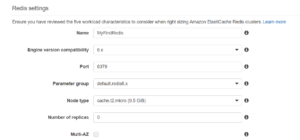
- In a subnet group create one and name it as “my-first-subnet-group” and description as “My first subnet group”.
- Scroll down and select any one of the subnets listed below.
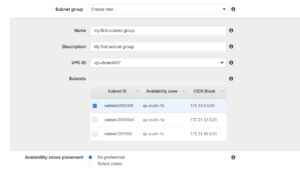
- Scroll down and check Enable automatic backups are enabled.
- Keep the Backup retention period as 1 day.
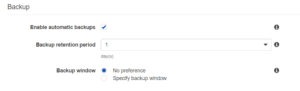
- Click on Create.
- Wait for the status to show as Available.
- Our first Elasticache Redis Cluster or you can say instance is created.

- This is an application-specific concern so to use it you have to install Redis drivers for interacting with your Redis Cache.
AWS is really interesting and fruitfull to study. Explore our more services to give your knowledge a sharp edge.
- Explore AWS IAM interview questions and answers.
- Practice with AWS live projects.
- Practice with Azure live projects.
- Learn AWS fundamental services.
- Explore Azure DBA interview questions.
- Get prepared with EC2 interview questions.
Conclusion:
In this blog post, we’ve introduced you to the concept of ElastiCache and how it can help your website run faster using AWS caching service, cloud caching solutions, and in-memory database technology. We hope that you found these insights valuable, but if not feel free to contact us anytime with any questions or comments. You can also check out our blog for more information on other topics related to web performance optimization as well as our training courses.

