
If you’ve ever saved a file to Google Drive, streamed a show on Netflix, or submitted an assignment through your college portal, you’ve already used cloud computing without even thinking about it. It quietly runs in the background of almost everything we do online, yet most students and professionals rarely stop to ask, “Is it actually worth it?”
That’s exactly what I want to unpack here. I’m going to walk you through the pros and cons of cloud computing in plain, everyday language—no unnecessary jargon, no fluff. Whether you’re a student researching this for an assignment, a small business owner thinking about migrating your data, or just someone curious about how the internet’s “invisible infrastructure” works, this guide is for you.
What Exactly Is Cloud Computing?
Before diving into the pros and cons of cloud computing, let’s get the basics straight. According to the National Institute of Standards and Technology (NIST), cloud computing is a model that gives users on-demand access to a shared pool of computing resources—servers, storage, networks, and applications—that can be quickly set up and released with very little effort from the provider.
In simpler words: instead of buying your own physical servers and hard drives, you rent computing power and storage from a company like Amazon (AWS), Microsoft (Azure), or Google (Google Cloud), and someone else handles the maintenance and hardware headaches.
This is why understanding the pros and cons of cloud computing matters so much today—nearly every industry, from healthcare to education to finance, now depends on it in some form.
Why Is Everyone Talking About Cloud Computing Right Now?
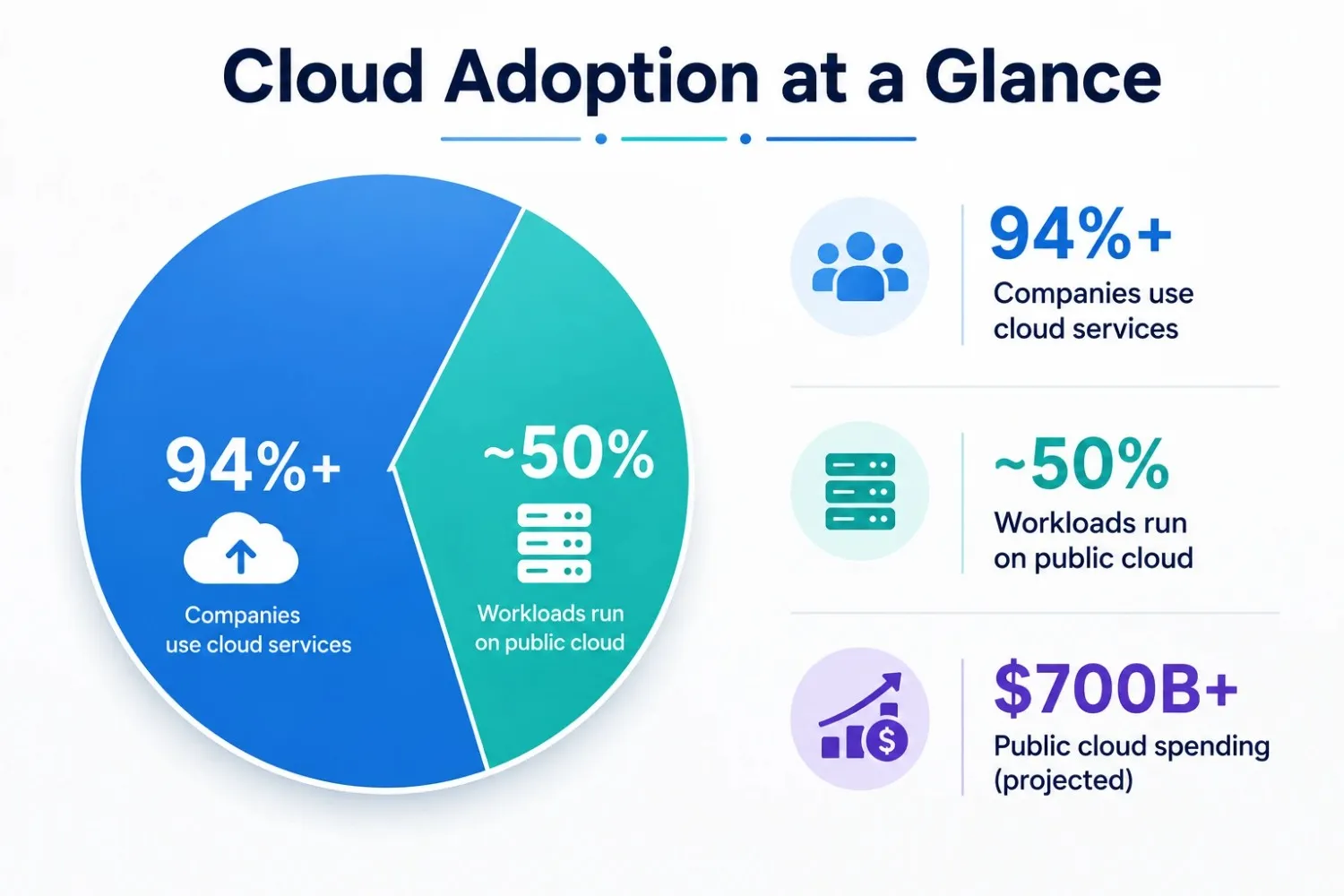
Cloud adoption isn’t a niche trend anymore — it’s mainstream. Recent industry data shows that over 94% of companies now use some form of cloud service, and on average, businesses run about half of their workloads on public cloud platforms. Global spending on public cloud services is also projected to soar past $700 billion, reflecting just how deeply embedded this technology has become in modern business.
Because so many organizations are jumping in, it’s worth pausing to weigh the pros and cons of cloud computing honestly, rather than assuming the cloud is automatically the right choice for every situation.
The Pros of Cloud Computing
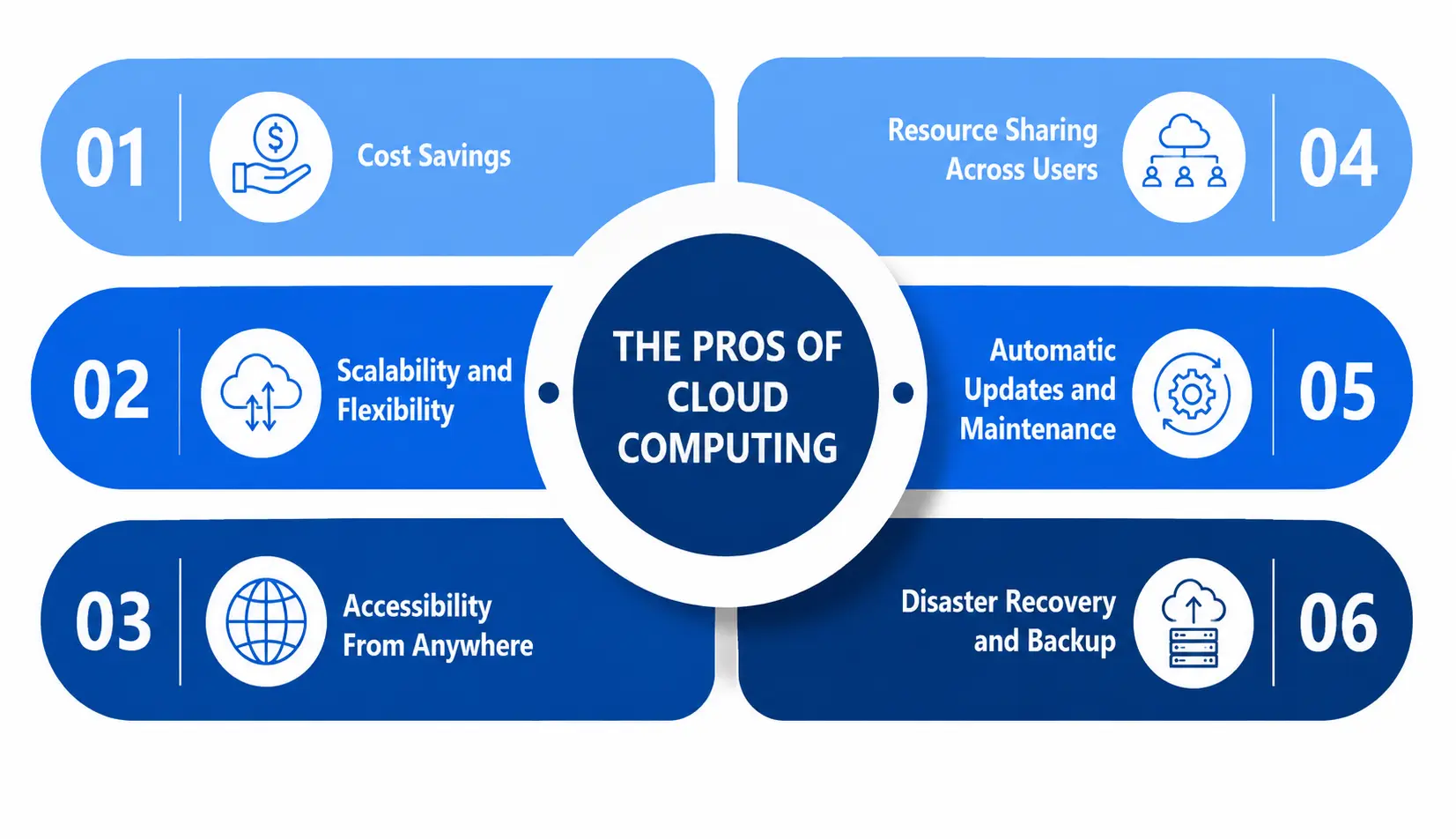
1. Cost Savings (No Heavy Hardware Investment)
One of the biggest advantages tied to the pros and cons of cloud computing discussions is cost. Traditionally, businesses had to buy expensive servers, maintain physical data centers, and hire IT staff just to keep the lights on. With cloud computing, you skip most of that. You pay a subscription or usage-based fee, and the provider takes care of the infrastructure.
Reports indicate that cloud adoption can reduce IT maintenance costs by close to 17% on average. For students building projects or startups with limited budgets, this is often the single biggest reason to choose cloud services over on-premise setups.
2. Scalability and Flexibility
Need more storage during exam season because your video lectures are piling up? Cloud platforms let you scale up or down instantly instead of buying a giant server “just in “case”—you simply adjust your plan as your needs change.
3. Accessibility From Anywhere
This is a personal favorite for students. Cloud computing means your files and applications aren’t trapped on a single laptop. Whether you’re at home, in a library, or on a different device entirely, you can log in and continue exactly where you left off — a habit that became essential during the shift to remote learning and remote work.
4. Resource Sharing Across Users
A major structural advantage behind cloud computing is resource sharing. Cloud providers pool computing power, storage, and networking resources across thousands of customers, allocating capacity dynamically based on demand. This resource sharing model is what makes the “pay only for what you use” pricing possible in the first place. Without efficient resource sharing, cloud services would be nowhere near as affordable or scalable as they are today.
However, this same resource-sharing setup—often called multi-tenancy—is also something you need to be aware of when we get to the disadvantages, because sharing infrastructure with other customers isn’t entirely risk-free.
5. Automatic Updates and Maintenance
With cloud services, software updates, security patches, and bug fixes are usually handled by the provider automatically. You don’t need an in-house team constantly patching systems—it happens behind the scenes.
6. Disaster Recovery and Backup
Cloud platforms typically offer built-in backup and disaster recovery options. If your laptop crashes or gets stolen, your cloud-stored data is usually still safe and recoverable, which is a huge relief compared to relying solely on local storage.
The Cons of Cloud Computing
Now let’s flip the coin. No conversation about the pros and cons of cloud computing is complete without an honest look at the downsides—and there are real ones worth understanding before you commit.
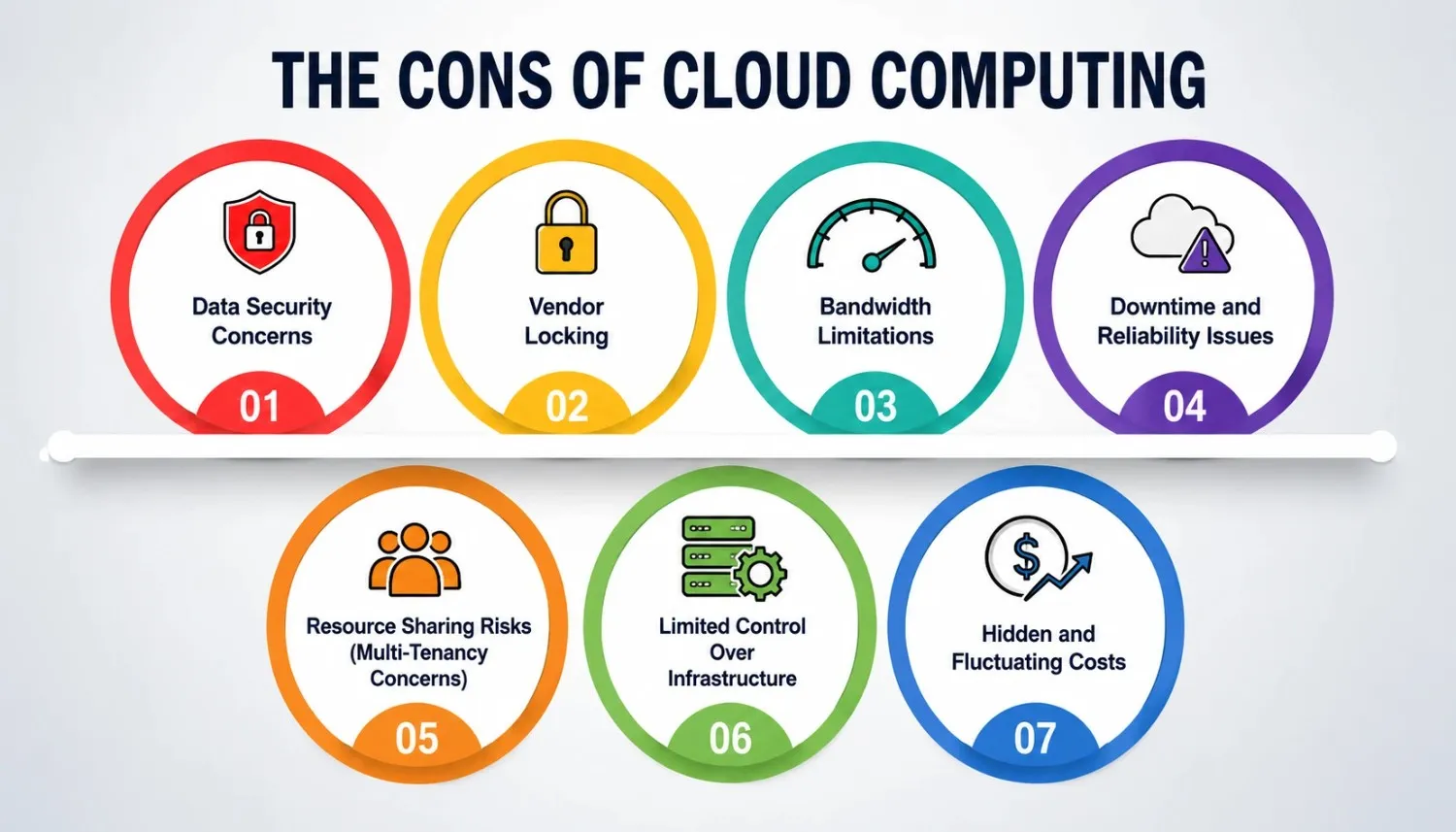
1. Data Security Concerns
Perhaps the most talked-about issue in any pros and cons of cloud computing discussion is data security. When your information sits on someone else’s servers, you’re trusting that provider to protect it from breaches, unauthorized access, and misuse.
NIST’s own guidelines highlight that cloud environments can aggregate huge volumes of sensitive customer data, which requires a high degree of confidence that providers can keep that data properly isolated and protected, as explained in this official NIST cloud security publication. If a provider’s system is compromised, your data security is only as strong as their weakest link — and that’s a genuine worry for businesses handling sensitive customer or financial records.
Most reputable providers use a “shared responsibility model,” meaning data security for the physical infrastructure is on them, but protecting your own data, accounts, and access controls is still your job.
2. Vendor Lock-in
Vendor lock-in (also called “vendor lock-in”) is a real headache that often gets underestimated. Once you build your systems around one cloud provider’s tools, APIs, and storage formats, switching to a different provider later can become extremely complicated and expensive.
According to research on cloud architecture, vendor lock-in happens because providers use proprietary technologies, data formats, and services that aren’t standardized across platforms—for example, an app built using AWS Lambda can’t easily move to Azure Functions without significant rework. This is made worse by “egress fees”—the costs providers charge just to move your own data out of their system, which makes vendor lock-in an important factor to weigh before choosing one provider over another.
3. Bandwidth Limitations
Cloud computing depends entirely on your internet connection, and bandwidth limitations can seriously affect your experience. If your internet is slow or unstable, uploading large files, running cloud-based applications, or accessing stored data becomes frustratingly sluggish—sometimes even impossible.
For students in areas with unreliable internet or businesses in regions with limited infrastructure, bandwidth limitations aren’t just an inconvenience—they can directly affect productivity and access to critical work. Unlike a local hard drive, the cloud simply doesn’t work well without a decent connection, and bandwidth limitations during peak usage hours can further slow things down.
4. Downtime and Reliability Issues
Even the biggest cloud providers occasionally experience outages. When their servers go down, so does your access to your own files — and there’s usually nothing you can personally do to speed up the fix.
5. Resource Sharing Risks (Multi-Tenancy Concerns)
Remember the resource sharing advantage we talked about earlier? It comes with a flip side. Because multiple customers share the same physical infrastructure, there’s a theoretical risk that a vulnerability affecting one tenant could, in rare cases, spill over and affect others on the same shared servers. This is one of the well-documented cloud risks cybersecurity researchers continue to study closely.
Providers invest heavily in isolation techniques to prevent this, but the underlying resource-sharing model means you’re never operating entirely alone—and that’s simply the tradeoff you accept for lower costs and flexibility.
6. Limited Control Over Infrastructure
You give up a certain amount of control when you move to the cloud. You can’t physically inspect the servers, choose exact hardware configurations in most cases, or troubleshoot problems the way you could with your own on-premise setup. For businesses with highly specific compliance or performance requirements, this lack of control can be a genuine drawback.
7. Hidden and Fluctuating Costs
While cloud computing can save money, costs can also spiral if not monitored carefully. Industry research shows organizations waste a significant chunk of their cloud spending due to poor optimization and forecasting, according to this cloud adoption statistics report. What starts as a “pay-as-you-go” model can quietly become an expensive surprise on your monthly bill if usage isn’t tracked properly.
Why Risk Assessment Matters Before Going All-In on the Cloud?
Given everything above, doing a proper risk assessment before adopting cloud computing isn’t optional — it’s essential. A thoughtful risk assessment helps you weigh data security requirements, potential vendor lock-in, bandwidth limitations, and broader cloud risks against the very real benefits of scalability, cost savings, and accessibility.
A solid risk assessment process typically involves asking the following:
- How sensitive is the data we’re planning to store or process?
- What happens if we need to switch providers later?
- Do we have reliable, high-speed internet access where this will be used?
- What compliance or legal regulations apply to our industry?
- Have we accounted for the cloud risks tied to shared infrastructure?
Skipping this risk assessment step is one of the most common mistakes both students researching the topic and businesses making real decisions tend to make. The pros and cons of cloud computing aren’t universal—they depend heavily on your specific situation, industry, and risk tolerance.
Quick Comparison: Pros vs Cons at a Glance
|
Aspect |
Pros of Cloud Computing |
Cons of Cloud Computing |
|
Cost |
Lower upfront investment, pay-as-you-go pricing |
Hidden fees, unpredictable billing if unmonitored |
|
Accessibility |
Access data/apps from anywhere with internet |
Limited by bandwidth limitations and connectivity issues |
|
Security |
Providers invest heavily in advanced protection |
Data security depends on trusting a third party |
|
Flexibility |
Easy to scale resources up or down |
Vendor lockin can make switching providers difficult |
|
Maintenance |
Automatic updates, less IT burden |
Limited control over hardware and infrastructure |
|
Infrastructure |
Efficient resource sharing lowers costs |
Resource sharing introduces shared-tenant risks |
|
Recovery |
Built-in backup and disaster recovery |
Outages can temporarily block access to your data |
This table sums up why every decision around the pros and cons of cloud computing should be treated as a balancing act rather than a one-size-fits-all answer.
Who Should Actually Consider Cloud Computing?
If you’re a student working on group projects, a freelancer needing flexible storage, or a small business without the budget for physical servers, the benefits of accessibility and cost savings usually outweigh the downsides. Organizations handling extremely sensitive data—hospitals, government agencies, and financial institutions—need a more rigorous risk assessment before committing, since data security stakes are higher and the consequences of cloud risks are heavier.
Final Thoughts
So, is cloud computing worth it? Based on everything we’ve covered, the honest answer is it depends on your needs, but for most people and businesses, yes—with caution.
The pros and cons of cloud computing show us a technology that has genuinely transformed how we store, access, and share information. It’s cost-effective, flexible, and accessible in ways traditional infrastructure never was. But it’s not without real challenges—data security concerns, vendor lock-in, bandwidth limitations, and broader cloud risks tied to resource sharing all deserve serious thought before you dive in headfirst.
The smartest approach isn’t blind adoption or complete avoidance — it’s an informed one. Do your risk assessment, understand what you’re trading away for convenience, and choose a setup (single cloud, multi-cloud, or hybrid) that actually fits your specific needs.
A Personal Note From the Author
I’ll be honest — when I first started researching cloud computing years ago, I assumed it was simply “better” in every way compared to traditional storage. It took actual experience, some frustrating outages, and a few confusing billing cycles to understand that the pros and cons of cloud computing are genuinely a two-sided coin. There’s no universal right answer here. What I’ve learned is that the smartest decisions come from asking the right questions upfront rather than getting swept up in hype. If this blog helps even one student or small business owner pause and think it through properly before committing, I’ll consider it a job well done. Thanks for reading all the way to the end—I appreciate it.