
You already know what a server is. You’ve dealt with provisioning, patching, capacity planning, and the quiet frustration of paying for compute that sits idle 80% of the time. The question isn’t whether serverless is a real thing — it’s whether AWS Lambda is actually worth the architectural shift for your workload.
Short answer: for event-driven, unpredictable, or bursty workloads, Lambda doesn’t just save money — it removes an entire category of operational work. This guide covers how Lambda works under the hood, where it fits (and where it doesn’t), and everything you need to make informed decisions about it in 2026.
Whether you’re evaluating Lambda for a new project or exploring cloud architecture on AWS, the fundamentals here apply directly.
What Is AWS Lambda?
AWS Lambda is Amazon’s serverless compute service—a Function-as-a-Service (FaaS) platform where you deploy individual functions, define what triggers them, and AWS handles everything else: provisioning, scaling, availability, and infrastructure patching.
The model is fundamentally different from a traditional server or even a containerized service. There’s no always-on process waiting for requests. Your function doesn’t exist in memory until something triggers it—it initializes, runs, and the environment is either kept warm for reuse or discarded.
You pay for the milliseconds your code actually executes. Zero traffic means zero cost.
AWS Lambda is one of the most widely adopted serverless platforms and is used by organizations ranging from startups to large enterprises worldwide. The broader serverless computing market hit $26.33 billion in 2025 and is projected to reach $116.58 billion by 2033 at a 20.6% CAGR — this isn’t a niche pattern anymore.
How AWS Lambda Actually Works — The 4 Stages
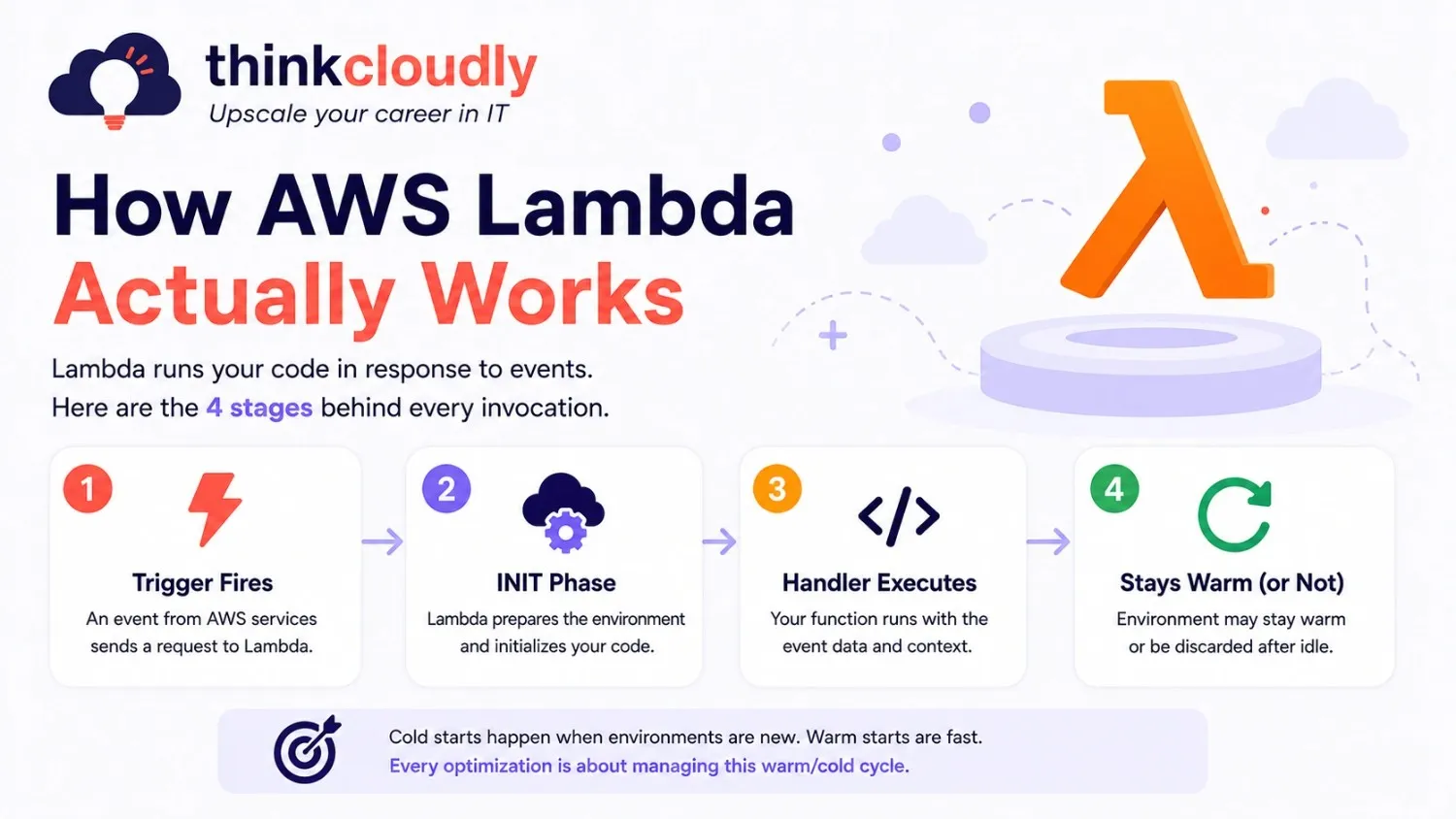
Understanding Lambda’s execution model is what separates people who use it well from people who run into cold start surprises and unexpected billing.
Stage 1 — Trigger Fires An event source sends a payload to Lambda. Common triggers: S3 file upload, API Gateway HTTP request, SQS message, DynamoDB stream record, EventBridge schedule, or SNS notification. Lambda supports 220+ AWS service integrations natively.
Stage 2 — Execution Environment Initializes (the INIT Phase), Lambda provisions a Firecracker micro-VM, loads your deployment package, starts your runtime, and runs initialization code outside your handler function. This is the cold start. Since August 2025, AWS has billed this INIT phase at the same rate as execution time—making it a cost concern, not just a latency one, for Java and .NET workloads with longer initialization.
Stage 3 — Handler Executes Your function receives two objects:
- event — the trigger payload (HTTP request body, S3 object metadata, SQS message content, etc.)
- context — runtime metadata: time remaining before timeout, memory limit, function name, request ID
python
def lambda_handler(event, context):
# All your business logic lives here
# context.get_remaining_time_in_millis() tells you how close you are to timeout
return {“statusCode”: 200, “body”: “processed”}
Stage 4 — Environment Stays Warm or Gets Discarded After execution, Lambda may keep the environment alive for a period—subsequent invocations reuse it and skip the INIT phase entirely. If idle too long, the environment is discarded, and the next invocation triggers a cold start.
This warm/cold cycle is the core mechanic driving Lambda’s performance characteristics. Every optimization technique — Provisioned Concurrency, SnapStart, and package size tuning—is a strategy for managing it.
Lambda vs. EC2 — The Honest Comparison
Lambda and EC2 are not competing for the same workloads. Choosing between them is an architectural decision, not a preference.
|
Factor |
AWS Lambda |
Amazon EC2 |
|
Billing |
Per request + per millisecond of execution | Per hour, running or idle |
| Scaling | Automatic, instant, no config |
Manual or via Auto Scaling Groups |
|
Infrastructure management |
Fully managed by AWS | OS, patches, capacity — your responsibility |
| Max runtime per job | 15 minutes |
Unlimited |
|
Startup time |
Milliseconds to seconds | Minutes |
|
Storage |
Ephemeral — S3, DynamoDB, or EFS for persistence |
Persistent EBS volumes |
| Best for | Event-driven, bursty, stateless workloads |
Long-running, stateful, CPU-intensive services |
Use Lambda when your workload is triggered by events, traffic is variable or unpredictable, and jobs complete within 15 minutes. The operational savings compound significantly as scale increases.
Use EC2 when you need persistent processes, full OS-level control, or are running workloads that don’t map well to stateless execution — monolithic applications, long-running data jobs, or services with consistently high, steady throughput where per-hour billing becomes cheaper than per-millisecond.
Most production AWS architectures use both. EC2 or ECS for persistent services; Lambda as the event-driven processing layer — handling webhooks, file processing, queue consumers, and scheduled automation.
Not sure which AWS services belong in your architecture? The AWS Solutions Architect Associate (SAA-C03) course at Thinkcloudly teaches you how to make exactly these decisions—with real scenarios, not just theory.
AWS Lambda vs Azure Functions vs Google Cloud Functions — Which One Should You Use?
All three platforms offer serverless compute, but there are meaningful differences in pricing, ecosystem depth, and developer experience. Here’s the honest breakdown:
|
Factor |
AWS Lambda | Azure Functions |
Google Cloud Functions |
|
Free Tier |
1M requests + 400K GB-sec/month | 1M requests + 400K GB-sec/month | 2M requests + 400K GB-sec/month |
| Max Timeout | 15 minutes | 60 minutes (Flex) |
60 minutes (2nd gen) |
|
Max Memory |
10 GB | 14 GB | 16 GB |
| Cold Start (Python) | 200–400ms | 300–600ms |
200–500 ms |
|
Supported Runtimes |
Python, Node, Java, Go, Ruby, .NET, custom | Python, Node, Java, C#, PowerShell, custom | Python, Node, Java, Go, Ruby, .NET, PHP |
| Ecosystem Integration | Deepest — 220+ AWS services | Strong within Azure (Office 365, DevOps) |
Best for GCP data stack (BigQuery, Pub/Sub) |
|
Container Support |
Up to 10 GB via ECR | Yes, via Docker | Yes, via Cloud Run |
| VPC Support | Yes | Yes |
Yes (2nd gen) |
| Pricing Model | Per-request + GB-sec | Per-request + GB-sec |
Per-request + GB-sec |
When to pick AWS Lambda: You’re already on AWS, or you need the deepest integration with managed services—RDS, DynamoDB, S3, Kinesis, and API Gateway. Lambda has the most mature tooling, the largest community, and the most production battle-testing.
When to pick Azure Functions: Your organization runs Microsoft workloads—Azure DevOps, Office 365, and Active Directory. Azure Functions integrates natively with these, and the Durable Functions extension makes stateful workflows easier to manage than Step Functions equivalents.
When to pick Google Cloud Functions: Your data stack lives on GCP — BigQuery, Pub/Sub, and Dataflow. GCF triggers integrate more cleanly with GCP’s data services, and if your team already uses Firebase, the integration is seamless.
The bottom line: If you’re not locked into a cloud provider yet, Lambda is the safest default — it has the widest ecosystem, the most available documentation, and the largest pool of engineers who know it. If you’re building for multi-cloud or greenfield, the differences matter less than your existing team’s expertise.
Hands-On: Deploy Your First Lambda Function (Hello World + S3 Trigger)
Theory is good. Working code is better. Here’s how to go from zero to a deployed Lambda function in under 10 minutes.
Part 1 — Hello World via AWS Console
Step 1: Create the function
- Open the AWS Lambda Console
- Click Create function
- Choose Author from scratch
- Set Function name: hello-world-lambda
- Runtime: Python 3.12
- Architecture: arm64 (Graviton2—better price-performance, no code change needed)
- Click Create function
Step 2: Write the handler
In the inline code editor, replace the default code with:
python
import json
def lambda_handler(event, context):
print(f” Received event: {json.dumps(event)}”)
name = event.get(“name”, “World”)
return {
“statusCode”: 200,
“body”: json.dumps({
“message”: f”Hello, {name}!”,
“requestId”: context.aws_request_id
})
}
Step 3: Test it
- Click Test → Create new test event
- Event name:
test-hello
- Payload:
json
{
“name”: “Thinkcloudly”
}
-
Click Test
Expected output:
{“statusCode”: 200,“body”: “{\”message\”: \”Hello, Thinkcloudly!\”, \”requestId\”: \”abc-123…\”}”
}
You’ve deployed and invoked your first Lambda function. Now let’s do something real.
Part 2 — S3 Trigger: Auto-Process Files on Upload
This is Lambda’s most common real-world pattern. Every time a file is uploaded to an S3 bucket, Lambda fires automatically and processes it. Here we’ll log the file metadata — the same pattern you’d extend for image resizing, CSV parsing, virus scanning, or document indexing.
Step 1: Create an S3 bucket
- Open the S3 Console
- Click Create bucket
- Bucket name: lambda-trigger-demo-yourname (must be globally unique)
- Region: same as your Lambda function
- Leave defaults, click Create bucket
Step 2: Create the Lambda function
Back in the Lambda Console → Create function → Author from scratch:
- Name: s3-file-processor
- Runtime: Python 3.12
- Architecture: arm64
Replace the handler with:
import json
import urllib.parse
def lambda_handler(event, context):
# Extract S3 event details
for record in event[‘Records’]:
bucket = record[‘s3’][‘bucket’][‘name’]
key = urllib.parse.unquote_plus(
record[‘s3’][‘object’][‘key’],
encoding=‘utf-8’
)
size = record[‘s3’][‘object’][‘size’]
event_type = record[‘eventName’]
print(f”Event: {event_type}”)
print(f”Bucket: {bucket}”)
print(f”File: {key}”)
print(f” Size: {size} bytes”)
# Your processing logic goes here:
# – Resize image with Pillow
# – Parse CSV and write to DynamoDB
# – Send notification to SNS
# – Extract text from PDF
return {
“statusCode”: 200,
“body”: json.dumps(f”Processed {len(event[‘Records’])} file(s)”)
}
Step 3: Add S3 trigger
- In your Lambda function → click Add trigger
- Select S3
- Bucket: select lambda-trigger-demo-yourname
- Event types: PUT (fires on upload)
- Click Add
AWS will automatically add the necessary permissions for S3 to invoke your Lambda function.
Step 4: Test the trigger
Upload any file to your S3 bucket:
- Open your bucket → Upload → add any file → click Upload
- Back in Lambda → Monitor tab → View CloudWatch Logs
- Open the latest log stream—you’ll see your file’s name, bucket, and size printed
That’s a production-ready S3 trigger pattern. From here, you’d swap the print statements for actual business logic.
Step 5: Clean up (avoid charges)
Delete the S3 bucket contents, then the bucket itself. The Lambda function stays within the free tier for low usage.
Want to Go From Lambda Basics to AWS Solutions Architect?
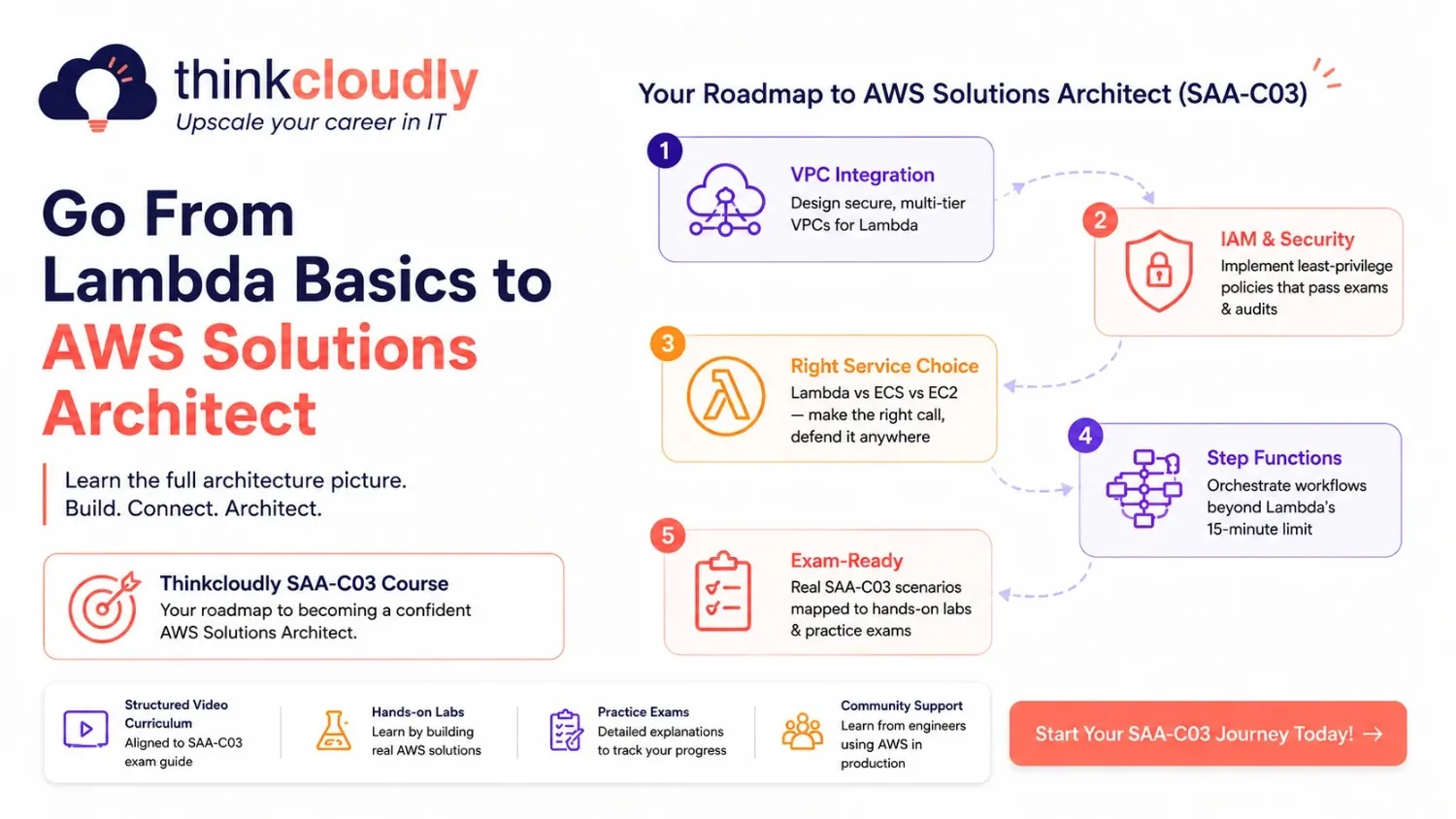
Most people learn Lambda in isolation. That’s why they get stuck when real architecture problems show up.
In production, Lambda doesn’t live alone. It connects to VPCs, IAM roles, API Gateway, RDS Proxy, CloudWatch alarms, Step Functions, and a dozen other services—and every one of those connections has its own gotchas, limits, and best practices.
The AWS Solutions Architect Associate (SAA-C03) course at Thinkcloudly is built around exactly this: not just Lambda, but the full architecture picture that makes production AWS systems work.
What you’ll learn that this blog can’t fully cover:
- How to design multi-tier VPC architectures that Lambda integrates with correctly
- IAM least-privilege policies for Lambda—the ones AWS exams and security audits actually test
- When to use Lambda vs ECS vs EC2 — and how to defend that decision in a system design interview
- Step Functions workflows for orchestrating Lambda beyond the 15-minute limit
- Real exam scenarios mapped to hands-on labs
Thinkcloudly SAA-C03 gives you
- Structured video curriculum aligned to the latest SAA-C03 exam guide
- Hands-on labs — not just slides
- Practice exams with detailed explanations
- Community support from engineers who’ve passed the exam and are using AWS in production
If you’re serious about AWS — whether for a job, a promotion, or building production systems—this is the course that connects the dots.
→ Start the SAA-C03 Course at Thinkcloudly
AWS Lambda Pricing — Real Numbers for 2026
Lambda pricing has two billable components. All figures are from the official AWS Lambda pricing page.
|
Allowance |
Amount |
|
Requests |
1,000,000 per month |
| Compute |
400,000 GB-seconds per month |
This is not a trial — it applies to all accounts indefinitely. Most low-to-medium traffic workloads never leave the free tier.
Paid Tier
- Requests: $0.20 per 1 million
- Duration: $0.0000166667 per GB-second
Duration cost = execution time (seconds) × memory allocated (GB) × rate
Real-World Example
Serverless API backend: 256 MB memory, 200ms average execution, 5 million monthly requests.
|
Component |
Calculation | Cost |
| Requests | 4M billable × $0.20/million |
$0.80 |
|
Duration |
5M × 0.2s × 0.25 GB × rate | $4.17 |
| Monthly total |
~$4.97 |
An EC2 t3.small running 24/7 costs $15–18/month before it handles a single request. Lambda’s cost advantage grows proportionally with traffic variability.
Critical 2025 billing change: Since August 2025, the INIT phase (cold start initialization) is billed at the same rate as execution. For Python and Node.js, the impact is minimal. For Java and C#, where initialization can run 500ms–2s, this makes cold start optimization a direct line item on your bill.
AWS Lambda Use Cases — Where It Fits in Production
According to the CNCF 2024 Annual Survey, nearly 70% of enterprises in North America are running production serverless workloads. Here’s where Lambda delivers the most value:
Event-Driven API Backends Lambda paired with API Gateway gives you a fully serverless REST or GraphQL API that scales from zero to millions of concurrent requests automatically. Each route maps to a function. No capacity planning, no idle cost between requests.
Real-Time File and Media Processing S3 triggers Lambda the moment a file lands—image resizing, PDF text extraction, video transcoding, and virus scanning. Thousands of files process in parallel with no queue management required on your side. This is the pattern Lambda was originally designed for.
Stream Processing and Data Pipelines Lambda consumes Kinesis Data Streams and DynamoDB Streams in real time, transforming records and writing to Redshift, S3, or other destinations. No batch windows, no scheduler to maintain.
Scheduled Automation EventBridge replaces cron. Nightly database cleanups, daily report generation, hourly cache invalidations — all run as Lambda functions on a schedule, with full CloudWatch visibility and automatic retries on failure.
Serverless AI Workflows Since May 2025, Lambda functions can act as MCP (Model Context Protocol) servers, making them a natural execution layer for AI agent pipelines connected to Amazon Bedrock.
Lambda Layers: Managing Shared Dependencies
When multiple Lambda functions share the same libraries or utility code, packaging those dependencies into every deployment ZIP creates bloat and a maintenance problem. Lambda Layers solve this.
A layer is a versioned ZIP archive—containing libraries, configuration, or shared utilities—that mounts into your function’s execution environment at /opt. Any function can reference it. Update the layer once; all functions that reference it pick up the change on the next deploy.
Why this matters in practice: deployment packages stay small (directly improving cold start times), shared internal libraries live in one place, and you can attach up to 5 Layers per function while pinning specific versions for stability across environments.
VPC Integration: Reaching Private Resources
By default, Lambda runs inside AWS-managed infrastructure—internet access included, private VPC access excluded. If your function needs to reach an RDS database, ElastiCache cluster, or any resource inside a private VPC, you need VPC integration.
Lambda creates an Elastic Network Interface (ENI) in your specified subnet, giving the function a private IP and full access to resources in that VPC.
What to know before configuring it:
- Run Lambda functions in private subnets: Route outbound internet traffic through a NAT Gateway in a public subnet if your function also calls external APIs.
- Use RDS Proxy: Lambda’s concurrency model can open hundreds of simultaneous database connections during a traffic spike. RDS Proxy pools and manages those connections, preventing connection exhaustion.
- Cold starts are no longer a VPC blocker: AWS’s Hyperplane ENI improvements brought VPC cold start overhead down to under 100ms for properly configured functions.
VPC configuration, private subnets, NAT Gateways, and RDS Proxy are all core SAA-C03 exam topics—and real production gotchas. The Thinkcloudly SAA-C03 course covers all of these with hands-on labs so you understand them before they bite you in production.
Monitoring and Debugging with CloudWatch
Lambda’s observability layer is CloudWatch, and it’s automatic — every function ships metrics and logs without any configuration.
Default Metrics (Available Immediately)
- Invocations — total trigger count
- Duration — execution time in ms (average, p99, max)
- Errors — failed invocations (exceptions, timeouts, out-of-memory)
- Throttles — requests rejected due to concurrency limits
- Concurrent Executions—real-time parallel execution count
Alerts Worth Setting Up
- Error rate threshold — errors exceeding 1% of invocations over a 5-minute window
- Duration approaching timeout—if p99 duration hits 80% of your configured timeout, you’re close to silent failures
- Any throttles—throttling means requests are being dropped; concurrency limits need attention
For production workloads, enable Lambda Insights in your function configuration. It adds CPU time, actual memory consumption versus allocated, and initialization duration—metrics standard CloudWatch doesn’t capture.
Cold Starts — The Real Picture
In frequently invoked production workloads, cold starts generally represent a small percentage of total invocations. The concern is real, but it’s often overstated for workloads that aren’t latency-critical.
Cold Start Latency by Runtime
|
Runtime |
Typical Cold Start | Notes |
| Python / Node.js | 200–400 ms |
Acceptable for most use cases |
|
Java / C# |
500–2,000 ms | Needs active mitigation |
| Rust on ARM64 | ~16 ms |
Best-in-class baseline |
Mitigation Options
Provisioned Concurrency—pre-initializes a fixed number of execution environments. Cold starts disappear entirely for those instances. It adds a flat hourly cost—worth it for user-facing APIs where p99 latency matters.
Lambda SnapStart — snapshots the initialized environment and restores from the snapshot on invocation. Reduces Java cold starts from up to 2 seconds to under 200ms. AWS is expanding SnapStart coverage to Python and .NET through 2025–2026.
Package optimization is the cheapest fix — smaller deployment packages initialize faster. Audit dependencies, avoid bundling the AWS SDK, and use tree-shaking for Node.js projects.
Switch to ARM64/Graviton2 — one toggle in your function configuration. No code changes required for most runtimes. Up to 20% better price-performance and meaningfully faster cold starts for compiled languages.
Cost Optimization Beyond the Free Tier
Right-size memory: Lambda allocates CPU proportionally to memory. A function running at 512 MB may complete in half the time of the same function at 256 MB — for the same or lower total cost. Use AWS Lambda Power Tuning to find the optimal memory setting automatically.
Use ARM64/Graviton2: 20% better price-performance than x86 for most runtimes. One configuration change.
Set realistic timeouts: Configure timeouts at roughly 3–5x your typical execution time—not the 15-minute maximum. Tight timeouts surface failures fast and prevent silent budget drain.
Reserved Concurrency as a cost cap: Setting a Reserved Concurrency limit on non-critical functions prevents them from consuming your full account concurrency budget during unexpected volume spikes.
Increase batch sizes for queue consumers: For SQS and Kinesis triggers, larger batch sizes mean fewer total Lambda invocations for the same data volume — directly reducing request charges and initialization overhead.
2025–2026 Updates — What’s Changed in Lambda
- Lambda Managed Instances (November 2025): A new execution mode combining serverless management with EC2-style dedicated compute—up to 32 GB memory and 16 vCPUs. Targets memory-intensive workloads that previously required full EC2 instances.
- Response Streaming up to 200 MB (October 2025): Functions can now stream large responses progressively, improving time-to-first-byte for analytics dashboards, large document generation, and media delivery.
- MCP Server Integration (May 2025): Lambda functions can act as Model Context Protocol servers, enabling direct integration with AI agent frameworks via Amazon Bedrock.
- Scaling Rate Doubled: Lambda now initializes 1,000 new execution environments per 10 seconds, up from 500, for faster handling of sudden traffic spikes.
- INIT Phase Billing (August 2025): Cold start initialization time is now billed at execution rates. Direct cost impact for Java and C# workloads.
- Amazon Linux 2 End of Life—June 30, 2026: Functions running on AL2 runtimes—python3.11, java17, and nodejs16.x—must migrate to AL2023 equivalents before this deadline.
Lambda Limits Reference (2026)
|
Limit |
Value |
|
Max execution timeout |
15 minutes (900 seconds) |
| Memory |
128 MB – 10,240 MB (10 GB) |
|
Ephemeral storage (/tmp) |
512 MB default, up to 10 GB |
| Deployment package (zipped) |
50 MB direct upload |
|
Deployment package (unzipped) |
250 MB |
| Container image size |
10 GB via Amazon ECR |
|
Concurrent executions (default) |
1,000 per region — increasable via AWS Support |
| Layers per function |
5 |
|
Invocation payload (sync) |
6 MB request / 6 MB response |
| Response streaming max |
200 MB |
The three limits that actually bite teams in production are the 15-minute timeout (restructure long jobs with Step Functions), the 1,000 concurrent executions default (request an increase before you need it), and the 6 MB sync payload limit (use response streaming for large API responses).
Deployment Options — Choosing the Right Tooling
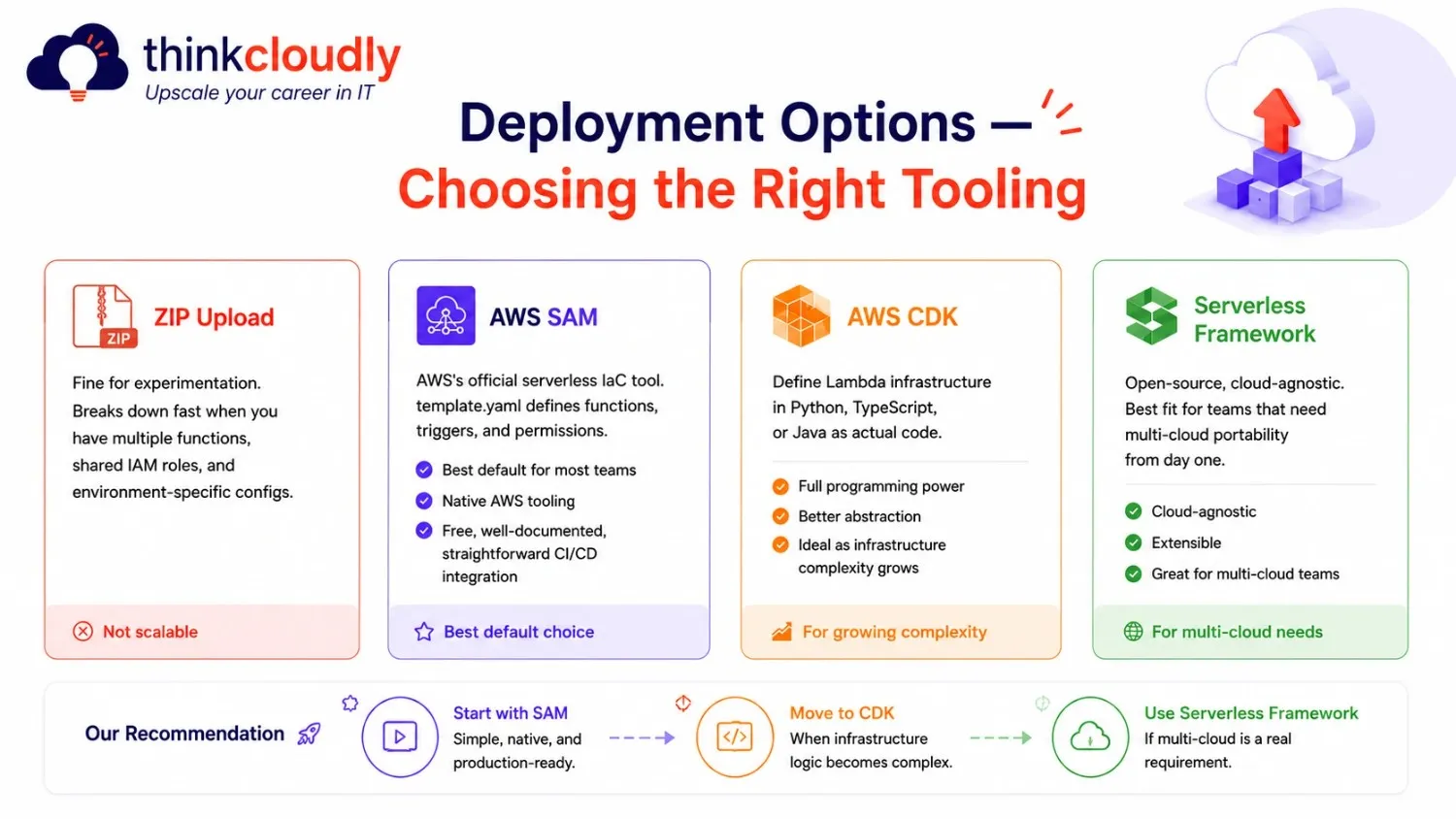
ZIP Upload—fine for experimentation. Breaks down fast when you have multiple functions, shared IAM roles, and environment-specific configs.
AWS SAM — AWS’s official serverless IaC tool. template.yaml defines functions, triggers, and permissions. Best default for most teams — native AWS tooling, free, well-documented, straightforward CI/CD integration.
AWS CDK — define Lambda infrastructure in Python, TypeScript, or Java as actual code. The right choice as infrastructure complexity grows.
Serverless Framework—open-source, cloud-agnostic. Best fit for teams that need multi-cloud portability from day one.
Start with SAM. Move to CDK when infrastructure logic becomes complex. Use Serverless Framework if multi-cloud is a real requirement.
Final Thoughts
AWS Lambda is not a replacement for servers — it’s a different model for a specific class of problems. When your workload is event-driven, stateless, and variable in traffic, Lambda eliminates an entire layer of operational overhead while scaling more precisely than any server-based approach.
The platform has matured significantly since 2014. Managed Instances, 200 MB streaming, MCP integrations, and doubled scaling rates in 2025 alone signal that AWS is expanding Lambda well beyond its original FaaS scope.
The architecture decisions you make around Lambda today—VPC configuration, cold start mitigation, concurrency limits, and layer strategy—are the same ones that appear in production system design at scale. That systems-level thinking is the real skill.