

A lot of people don’t know how to create user and user groups on AWS IAM. In this blog post, I’ll show you the basics so that you can get started using AWS. Before managing users, many beginners first create account on aws to access the cloud platform and its services. We’ll be talking about what is needed to create an IAM User and User Groups, as well as some best practices for creating them.
By the end of this article, you will have a better understanding of how to create AWS IAM User and User Groups successfully while maintaining proper iam security and strong cloud data security practices!
Managing Access: Creating AWS IAM Users and User Groups
AWS user groups play a pivotal role in managing user access and permissions within AWS Identity and Access Management (IAM). This system is a key component of aws identity management, helping organizations securely manage users and resources.
To create an IAM user in AWS, you can follow a simple process using the AWS Management Console or command-line tools. By specifying user details, granting necessary permissions through policies, and assigning the user to relevant groups, you can establish a secure and organized user management structure.
This approach ensures that users have appropriate access to AWS resources while adhering to the principle of least privilege. The flexibility of IAM user creation empowers organizations to tailor user access and permissions to match their specific operational needs while strengthening iam security.
Adding users to your AWS account is a crucial step in managing access to your resources securely. AWS Identity and Access Management (IAM) makes this process seamless by allowing you to create IAM users and organize them into IAM groups.
First, you can create IAM users with specific permissions and access levels tailored to their roles and responsibilities. Then, by organizing these users into IAM groups, you can simplify access management, making it easier to grant and revoke permissions collectively.
This not only enhances security but also streamlines user management, ensuring that your AWS resources are accessed only by authorized individuals or teams. Such practices are essential for maintaining strong cloud data security across cloud environments.
What is AWS IAM?
AWS Identity and Access Management (IAM) enables you to securely control access to AWS services and resources for your users. With a few clicks in the AWS Management Console, you can create IAM users, each with its own login credentials and permissions for accessing AWS resources.
You can also define groups of users who can access a set of resources. This system plays a critical role in aws iam administration and effective aws identity management for organizations.
You can use IAM to control who has access to each of your AWS accounts and enable or restrict their activities based on specific needs, such as performing backups or operating services at specified times.
You can also manage your users’ credentials by creating and assigning AWS security credentials (access key IDs and secret access keys) to a set of users in your AWS account. This process helps maintain strong iam security policies.
AWS Identity and Access Management (IAM) is a web service that helps you securely control access to AWS services and resources for your users. You can use IAM to do the following:
- Manage access keys for your AWS account
- Create and manage AWS users, groups, and roles
- Securely control access to AWS programmatic interfaces
- Provision and manage AWS Shared Responsibility Model accounts for your business associates, such as service providers that access your AWS resources
These capabilities make aws iam an essential part of aws identity management and cloud infrastructure security.
In this post we will talk about IAM users, roles, and groups.
Please watch the video about “IAM User Creation Made Easy: A Beginner’s Guide”?
What is an AWS IAM user?
An IAM user is a uniquely identifiable entity that represents a person, application, or service that uses the resources of AWS. An AWS account can contain any number of individual users and each of them has his own AWS security credentials (access key ID and secret access key).
Each time you sign in to the AWS Management Console with your AWS account credentials, you are accessing the resources that are associated with one of these users. Many organizations set up users only after they create account on aws and configure proper iam security policies.
A user is created within an IAM group and assigned a set of access permissions to various AWS resources. Users can either be an individual or a system/device such as a Web Application Firewall (WAF).
Every user must have at least one associated email address, which is the user’s unique identifier. Proper configuration of users also helps maintain strong cloud data security within AWS environments.
Boost your earning potential with AWS expertise. Explore our certified AWS Courses for a high-paying career
What is an AWS IAM Group?
An IAM user group is a group of people who are using the same account. You can put rules for these people in this group so you do not have to do it for each person.
IAM groups simplify aws iam administration and strengthen aws identity management by allowing administrators to apply permissions to multiple users at once. This approach also improves iam security by ensuring consistent permission policies across teams.
Let’s begin with creating an AWS IAM User And User Groups
-
-
- Login to AWS Management Console and search IAM.
-
You will be now able to interact with your IAM Dashboard.
-
-
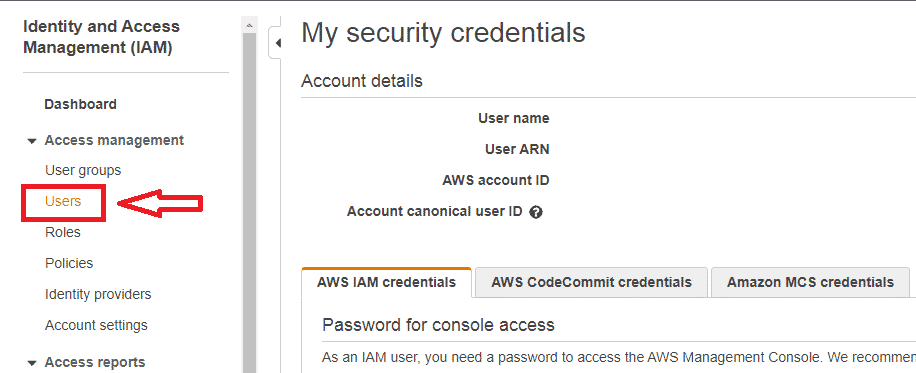
- Click on Users in the left sidebar of the dashboard.
-
-
-
- Click on Add Users in Users.
-

-
-
- Enter User Name and you can click Add Another User to add as many users as you wish in the Set User Details section.
-

-
-
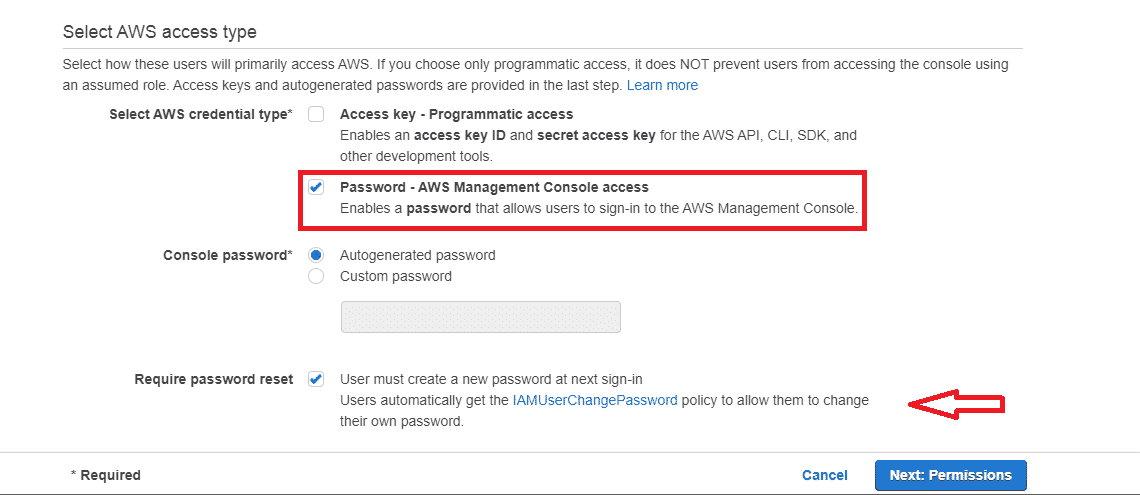
- In Select AWS Access Type, choose Password – AWS Management Console access in Select AWS Credentials Type.
- Select the checkbox against Require password reset to enable IAM User to change the password at the time of account access.
-
-
-
- Click on Next: Permissions.
-
You are now on the Set Permissions page. Here you can add users to a group, copy permissions from existing users or attach existing policies directly.
Here we will attach existing policies directly to the IAM User.
-
-
- Click on Attach existing policies directly.
-

Select the policies from the given Filter Policy list. Now, click Next: tags.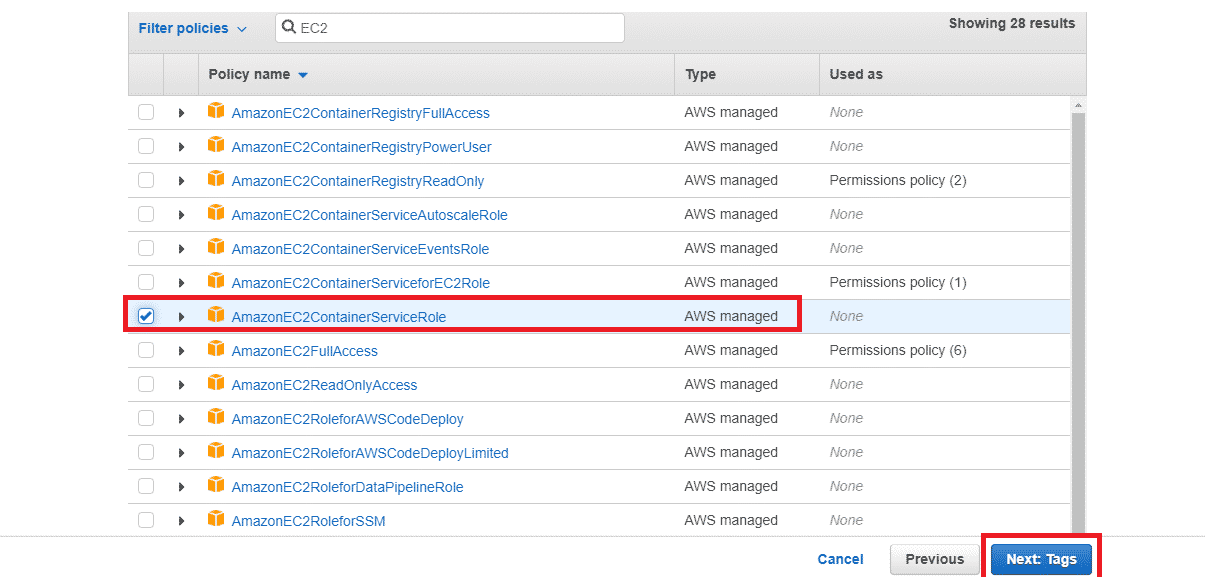
-
-
- Add Tags and select next to Reviews.
- Click on Create User to create a new user.
-

Now, you can download the Download.csv file which contains usernames and passwords for the users created.
Hurray! You have successfully created your first IAM user using your root user.
Creating User Groups:
-
-
- Click on User Group in the left sidebar.
- Now, click on Create Group to add a new group for existing users.
-

-
-
- Enter a Group Name for your user group and add the users to the group.
-


-
-
- Select any permission policies in Attach permission policies you want to add to the specific group. These Permission policies will be inherited by all the users added to this group.
-
This step is optional. You can simply skip this step.
-
-
- Click on Create Group.
-
You have successfully configured to create your first User Groups and added users to them.
Congratulations…!
Conclusion
AWS provides cloud computing services. To make the most of these services, you need to create IAM users and user groups for your account after you create account on aws and configure your environment properly.
Using aws iam and effective aws identity management practices helps organizations maintain strong cloud data security while ensuring only authorized users can access critical resources.
If you want help with this process or if you would like more information about how we can provide a custom solution for your company’s needs, please contact us today.
We offer courses on all things related to technology so that anyone can learn at their own pace — from beginners who are just starting as programmers to seasoned professionals seeking new skills in Java programming language development.
And don’t forget to check out our other blogs where we cover several Cloud computing technologies like EC2 Instance!

