
Here’s something that surprised me when I first looked into this field: the global DevOps market is expected to grow from roughly $19.8 billion in 2025 to $24.3 billion in 2026, projected to cross $125 billion by 2034, according to the EC Council. So if you’ve been wondering whether an Azure DevOps certification is worth your time this year, that number alone answers part of the question. The rest comes down to preparation, and that’s exactly what this roadmap is built to solve—a practical, no-fluff plan for passing the exam.
I’ll be upfront: this isn’t a “study hard and hope” article. I’ve mapped out the current exam structure; the confirmed 2026 changes; a week-by-week plan; and the mistakes that trip up even experienced practitioners—all aimed at helping you build genuine DevOps capabilities, not just memorize answers. Let’s get into it.
What Is Azure DevOps Certification and Why Does It Matter Right Now?
Earning this credential means Microsoft has confirmed you can design and run a complete software delivery pipeline — from the first commit to a stable production release — by building CI/CD pipelines that use both Azure and GitHub tooling together. It’s earned by passing Exam AZ-400, officially titled “Designing and Implementing Microsoft DevOps Solutions,” and pairing it with an existing Azure Administrator or Azure Developer associate credential to unlock the full Microsoft Certified: DevOps Engineer Expert badge.
Unlike entry-level cloud badges that test isolated skills, this one checks whether you can connect the dots across an entire organization within the broader Microsoft DevOps ecosystem: source control strategy, build automation, release management, security scanning, and monitoring. Someone who works as a DevOps engineer with this badge isn’t just familiar with a few tools—they’re trusted to design how a company ships software safely and quickly. That trust is exactly why an Azure DevOps certification tends to sit near the top of Azure’s pay scale year after year.
Exam Format, Domains, and the Confirmed 2026 Update
Here’s the part everyone searches for first: what’s actually on the exam. According to Microsoft’s official page, AZ-400 carries a passing score of 700 out of 1000, and—importantly—the English-language content is scheduled to be refreshed on July 27, 2026, with the DevOps Engineer Expert certification requirements updated a month earlier, on June 27, 2026. If you’re studying right now, confirm which version of the guide you’re following before you build your plan.
The current domain weighting looks roughly like this:
- Design and implement processes and communications (10–15%)
- Design and implement a source control strategy (10–15%)
- Design and implement build and release pipelines (50–55%)
- Develop a security and compliance plan
- Implement an instrumentation and site reliability strategy
That middle domain isn’t a typo — CI/CD pipelines really do make up around half of everything being tested, which tells you exactly where to spend most of your study hours. Microsoft’s guide confirms candidates must design GitHub Actions workflows and Azure Pipelines side by side, manage secrets through workload identity federation, and configure GitHub Advanced Security alongside Microsoft Defender for Cloud DevOps Security.
The Core DevOps Capabilities You Need Before You Book It
Passing AZ-400 isn’t about memorizing dumps for the Azure DevOps certification exam—it’s about genuinely building the DevOps capabilities Microsoft is testing for. Based on the current skills outline, here’s what you need to be hands-on comfortable with, broken into five areas:
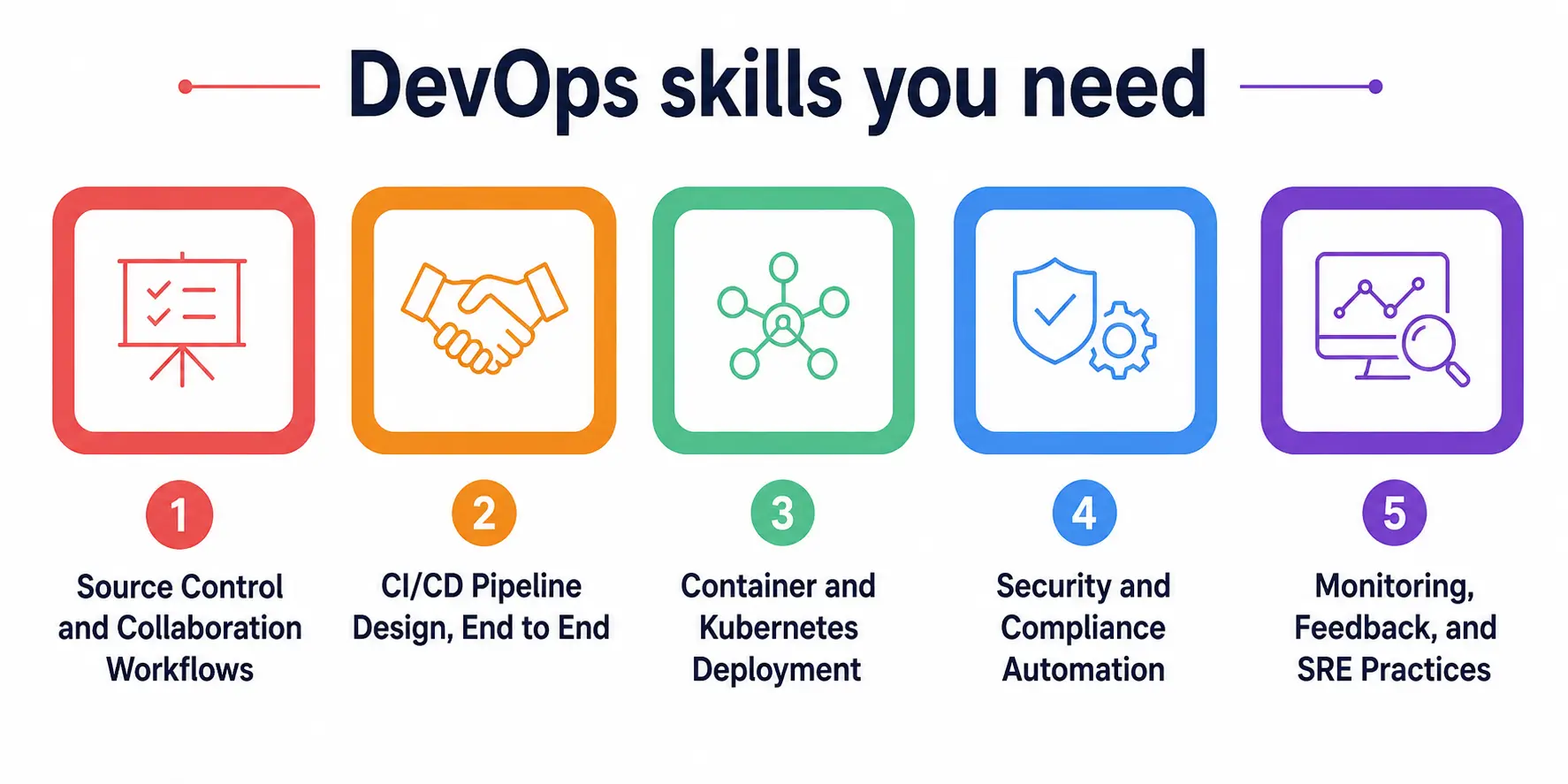
1. Source Control and Collaboration Workflows
You should be able to compare trunk-based development, GitFlow, and GitHub Flow and explain when each fits a team’s size and release cadence. Branch protection rules, CODEOWNERS files, pull request policies, and the GitHub Actions triggers tied to them come up repeatedly.
2. CI/CD Pipeline Design, End to End
This is the heaviest domain, so build real YAML pipelines in Azure Pipelines and real workflows using GitHub Actions until you can write both without checking documentation. Learn multi-stage CI/CD pipelines, reusable templates, self-hosted versus Microsoft-hosted runners, and deployment patterns like blue-green, canary, and ring-based rollouts.
3. Container and Kubernetes Deployment
Expect scenario questions on building container images, scanning them for vulnerabilities, and deploying workloads onto Azure Kubernetes Service. You should know how Azure Kubernetes Service handles rolling updates, autoscaling, and integration with your release pipeline, since container-based deployment is now the default rather than the exception.
4. Security and Compliance Automation
DevSecOps questions carry real weight even though the official domain percentage looks modest. Practice configuring GitHub Advanced Security, Dependabot alerts, secret scanning, and dependency scanning across both platforms.
5. Monitoring, Feedback, and SRE Practices
You’ll need working knowledge of Azure Monitor and Application Insights, plus how to design feedback loops using cycle time, lead time, and mean time to recovery as measurable outcomes.
A Realistic Study Table: Time Investment by Background
Not everyone starts from the same place, so here’s a grounded comparison based on published 2026 guidance from certification providers and Microsoft’s own path structure. These timelines assume you already have baseline DevOps capabilities such as scripting and version control.
|
Background |
Recommended Prep Time | Priority Focus Areas |
Suggested Prerequisite |
|
Azure Administrator (AZ-104 holder) |
8–12 weeks | GitHub Actions, security scanning, IaC |
AZ-104 (active) |
|
Azure Developer (AZ-204 holder) |
8–12 weeks | Release pipelines, monitoring, SRE |
AZ-204 (active) |
|
Experienced DevOps practitioner, new to Azure |
12–16 weeks | Azure tooling, YAML syntax, Azure Kubernetes Service |
AZ-104 or AZ-204 |
|
Complete beginner to cloud |
5–7 months | Fundamentals first, then CI/CD pipelines |
AZ-900 recommended |
My Own Experience Preparing for This Exam
I’ll share something personal here because I think it matters more than another bullet list. When I sat down to prepare for my own Azure DevOps certification, I made the classic mistake of treating it like a reading exam. I went through the Microsoft Learn modules cover to cover, felt confident, and then badly underestimated how much of the real test leans on scenario-based judgment rather than fact recall.
My first practice attempt was humbling, and I remember closing the laptop that night wondering if I had wasted a month. What actually turned things around was building a small but complete environment: a sample application, a real GitHub repository, and a working pipeline that deployed to a test cluster on Azure Kubernetes Service, using the same Microsoft DevOps tooling described in the official curriculum.
Once I had something concrete to break and fix, ideas like workload identity federation and canary deployments stopped being abstract definitions and became things I had configured with my own hands. If there’s one honest piece of advice I can pass on from that experience, it’s this: don’t just read about how CI/CD pipelines work, build one badly, fix it, and build it again. That repetition is what earns the badge, not the reading.
Week-by-Week Roadmap to Exam Day
Here’s a structured 12-week plan that works well for someone who already holds AZ-104 or AZ-204:
- Weeks 1–2: Review the official skills outline, set up a free Azure subscription and a GitHub account, and revisit Azure fundamentals if they feel rusty.
- Weeks 3–5: Build source control workflows, practice branch policies, and design your first multi-stage Azure Pipelines file alongside a matching GitHub Actions workflow.
- Weeks 6–8: Deploy a containerized application to Azure Kubernetes Service, practice rolling updates, and wire vulnerability scanning into your build stage.
- Weeks 9–10: Focus entirely on security and compliance — GitHub Advanced Security, Dependabot, secret scanning, and Microsoft Defender for Cloud DevOps Security.
- Weeks 11–12: Configure Azure Monitor and Application Insights, sit full-length practice exams, and review every missed question against the official guide.
Throughout this plan, keep returning to the official Microsoft Learn resources, since Microsoft DevOps documentation is updated directly by the exam owners and reflects the most current skills measured.
Career Payoff: What This Credential Is Actually Worth in 2026
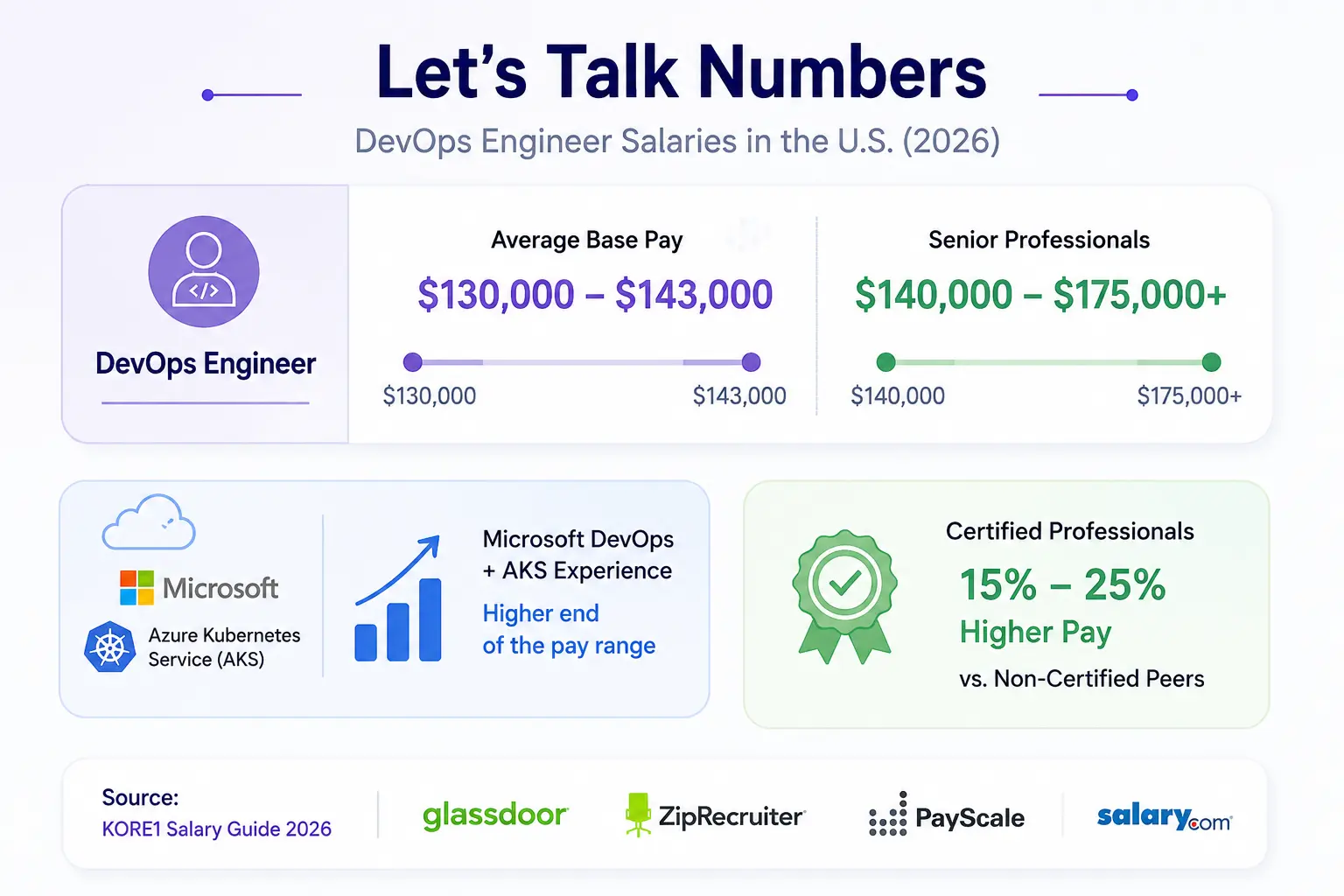
Let’s talk numbers, because this is usually the real reason people commit months to studying. In the United States, a general DevOps engineer role currently averages between roughly $130,000 and $143,000 in base pay, with senior professionals regularly clearing $140,000 to $175,000 or more, according to KORE1 Salary Guide 2026 compiled from Glassdoor, ZipRecruiter, PayScale, and Salary.com data. People who combine strong Microsoft DevOps experience with real Azure Kubernetes Service exposure tend to sit at the higher end of that band, and certified professionals often see a premium of 15 to 25 percent over non-certified peers across major cloud platforms.
Location still matters enormously. A DevOps Engineer in Berlin might earn €67,000 to €96,000, while the same skill set in Seattle can reach $280,000 at the top end, largely due to differences in company scale and cost of living. Regardless of geography, the underlying trend holds: with over 80 percent of organizations now running some form of Microsoft DevOps or equivalent practice, companies keep paying a premium for people who can prove—not just claim—they can run the full pipeline end to end, and an Azure DevOps certification remains one of the clearest ways to prove it.
Final Thoughts
Earning an Azure DevOps certification in 2026 isn’t a quick badge to add to a resume—it’s proof that you can hold together the messy, high-stakes work of shipping software reliably at scale. Between the confirmed July 2026 content refresh, the growing weight placed on security and GitHub integration, and a job market that keeps rewarding proven DevOps capabilities with strong pay, there’s rarely been a better moment to commit to this path. Build real pipelines, break them on purpose, fix them again, and treat the study guide as a living document rather than a one-time read. That combination is what actually gets people across the finish line.