

Web apps are becoming more and more popular these days and it’s not hard to see why. They allow you to reach customers on the web using one of the most popular standards around – HTML, CSS, and JavaScript – without having to worry about your own infrastructure, maintenance, or scalability – Azure Web Apps do all that for you in the cloud through microsoft azure cloud infrastructure.
The Microsoft Azure App Service not only adds security, load balancing, auto-scaling, and automated management functions to your application. Additionally, it offers features such as continuous deployment via Azure DevOps, GitHub, Docker Hub, and other sources, as well as package management, staging environments, custom domains, and TLS/SSL certificates.
These capabilities make Azure App Service one of the most powerful azure cloud services used for modern application hosting and deployment. It also enables developers to deploy applications through azure web hosting environments managed within the microsoft cloud service ecosystem.
If you are looking at creating an Azure web app that your customers can access from a browser (on their desktop, laptop, tablet, or mobile phone) then read on to learn what an Azure Web App is and how easy it is to get started with one and deploy it as an azure site on the microsoft azure cloud platform.
Azure Web App Development: Effortless Deployment and Management
Building a web application in Azure offers developers a dynamic platform to deploy, manage, and scale their applications with ease. By utilizing Azure’s Web App Service, users can quickly create and publish web apps using their preferred programming languages and frameworks.
Azure provides a range of tools for monitoring, scaling, and automating deployment, enabling seamless management of web applications. These tools are part of the broader azure services ecosystem available within the microsoft cloud service platform.
This service ensures high availability and security, with features like auto-scaling, traffic management, and integrated authentication. Security capabilities also align with best practices used across platforms such as google cloud security, helping organizations maintain strong cloud protection standards.
With Azure Web App Service, developers can focus on building exceptional web experiences while Azure handles the complexities of infrastructure management. This approach allows teams to deploy scalable applications through azure web hosting while leveraging the reliability of azure cloud services.
Getting started with Azure Web App development is a breeze, and you can kick off your journey in just two quick tasks. Azure Web Apps provide a robust platform for building and deploying web applications effortlessly.
Whether you’re a seasoned developer or just starting, Azure’s intuitive interface and powerful tools make the development process a seamless experience. These tools are part of the broader azure services framework provided within the microsoft azure cloud ecosystem.
So, dive into Azure Web App development today, and unlock the potential to create scalable and reliable web applications that cater to your specific needs and can easily be deployed as a secure azure site.
Are you interested in becoming a Microsoft certified Azure Administrator?
Check out the Thinkcloudly Azure Administrator certification today!
What is Azure Web App?
Azure App Service lets you host web applications, REST APIs, mobile apps, and mobile backends on HTTP. You can use any language that you want – .NET, .NET Core, Java, Ruby, NodeJS, PHP, or Python.
This platform operates within the microsoft azure cloud infrastructure and is widely used for modern azure web hosting solutions.
- Web apps can be built with ASP.NET, PHP, Node.js, and Python.
- Besides Visual Studio and GitHub, they also incorporate common development environments that integrate smoothly with azure cloud services.
- Azure Web Apps enable you to build apps in Azure without having to deploy, configure, and maintain Azure VM. This simplified development approach makes it easier for developers to launch an azure site quickly using integrated azure services.

Azure Web Apps Features
- Multi-language support: Web Apps offers a wide variety of languages, including .NET, .NET Core, Java, Ruby, Node.js, PHP, and Python. Scripts or executables can also be used as background services.
- Deployment is Easy: Using DevOps, we can deploy our web apps directly from a repository such as Microsoft Visual Studio Team Services, GitHub, and Bitbucket.
- Serverless code: Start a piece of code running on-demand, without having to provision or manage any infrastructure and paying only for the time that it actually runs.
- Application Templates: The Azure Marketplace offers a wide selection of application templates, including WordPress, Joomla, and Drupal.
- Security: The App Service is ISO, SOC, and PCI compliant. You can log in with your Azure Active Directory account, Google, Facebook, Twitter, or Microsoft account.
Boost your earning potential with Azure expertise. Explore our certified Azure Courses for a high-paying career
- Explore Azure DevOps Certification
Azure Web Apps: Deploying Web Apps
Deploying to Azure App Service is also supported by Web Deploy, which is an option with Visual Studio, WebMatrix, and Visual Studio Team Services. To upload code to the new web app and make it accessible for browsing, you need to configure deployment credentials.
If you are deploying through Git or FTP, you will need to configure deployment credentials. Knowledge of deployment credentials will allow you to upload the web app’s code and content to the new web app, to make it available for browsing.
Become certified in the most popular cloud technology Azure!
How to deploy an Azure Web App?
Task 1: Create
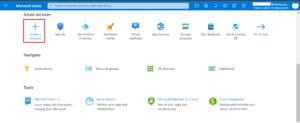
- Go to the Azure portal and click + Create a resource.
- To create a Web App resource, click on Web App.

- Next, you need to fill out the app service plan, resource group, and name.
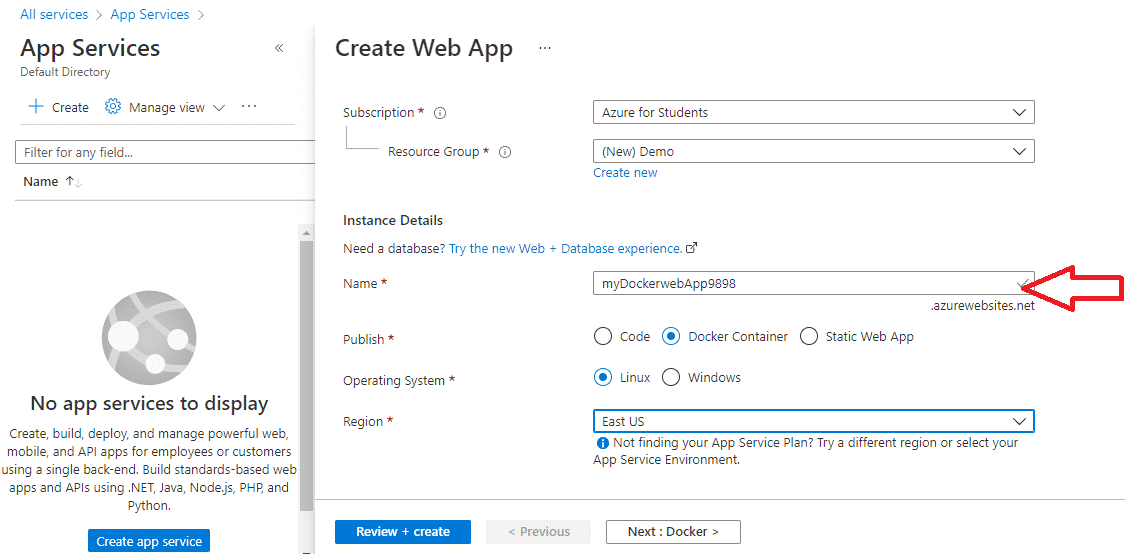
- Click on Next: Docker > and now do the following configurations.
Image and Tab: mcr.microsoft.com/azuredocs/aci-helloworld
- Startup command is optional keep it blank as it is not required.
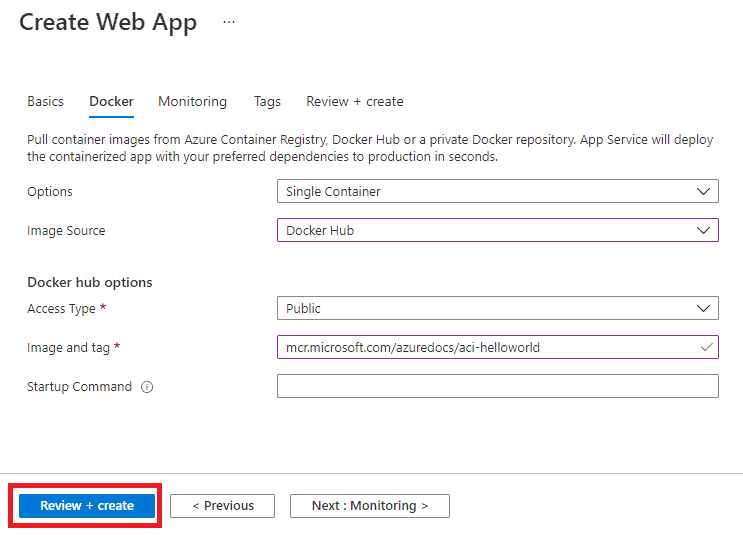
- Click on Review + Create and then Create.
Task 2: Test the Web App
Before testing the web app, wait for the app to deploy.
- Click on Go to Resource.
- Copy the URL from the Overview tab.
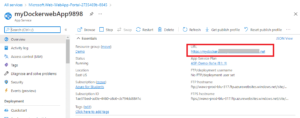
- Open the URL in the new tab or new browser. The welcome message: Welcome to Azure Container Instances! will be displayed on the screen.


You can scroll down in Overview Tab to observe several charts which track Data in, Data out, Response time, Requests, etc. You can try refreshing the URL page in step 3 to see the difference in charts.
Hurray! You have finally learned how to create your first Web App using Azure Services.
Azure is really interesting to study and it lands you in your dream company. Our students with experience in Azure are making $100,000 at an average. Explore our more free resources on Azure:
- Practice with Azure live project training.
- Read the blog over Azure live projects.
- Read top Azure interview questions and answers.
- Don’t forget to register for our free zoom webinars on Azure.
Final Thoughts:
In a nutshell, Azure Web Apps are basically pre-configured solutions that provide you with a server/platform for your web application within the microsoft cloud service ecosystem.
You can create one with just a few clicks. Using one also frees you from having to deal with hardware and infrastructure issues so you can focus on writing great code while Azure manages the underlying azure cloud services.
Many organizations also compare cloud platforms and security frameworks such as google cloud security when evaluating cloud providers, but microsoft azure cloud remains a powerful platform for scalable web application hosting.
We hope you’ll give it a try! Leave us some feedback in the comments section below if you have any questions or thoughts. Thanks for reading!

