


Two people. Same city. Same years of experience. Both have AWS on their resume. One gets three recruiter messages a week. The other has been waiting six months.
The difference is not skill. It is not luck either. It is a LinkedIn profile that either works or does not.
Here is something most people do not know: cloud recruiters in 2026 do not wait for applications. They open LinkedIn, type something like “AWS Terraform DevOps engineer,” and get back a list of profiles. They spend about six seconds on each one. Six seconds to decide if you are worth a message.
This is the guide that fixes that. Every section that matters, every mistake worth avoiding, and the small changes that make a recruiter stop and reach out instead of moving on.
Your Headline Is Not Your Job Title—Stop Treating It Like One
Most people open LinkedIn, see their headline auto-filled with something like “Cloud Engineer at TechCorp,” and leave it. That is a mistake that is costing them interviews every single week.
Your headline is not just a label. It is the line that shows up in every recruiter search result, every InMail preview, and every comment you leave across the platform. LinkedIn gives you 220 characters. That space determines whether you show up when a recruiter types “AWS cloud security engineer” or whether some other profile does instead.
The formula that actually works is simple: Role you want + platforms you work on + what you focus on or deliver.
Something like this:
Cloud Engineer | AWS · Terraform · Kubernetes | Infrastructure Automation for Growing Teams
DevOps Engineer | GitHub Actions · Azure · CI/CD | Cutting Release Cycles Without Breaking Things
Cloud Security Analyst | GCP · IAM · Zero Trust | Keeping Infrastructure Locked Down at Scale
See what those do? They hit the exact keywords a recruiter searches for. They show the tools. They give a tiny glimpse of what this person is actually good at. A recruiter scanning results can tell in two seconds whether to click—and they will.
Go change your headline before you finish reading this. It takes three minutes, and it is the single highest-return fix on this entire page.
The About Section That Makes Recruiters Keep Scrolling
There is a version of the About section that kills profiles silently. It sounds like this: “Results-oriented cloud professional with experience in AWS environments, delivering scalable solutions across enterprise systems.
The About section is the one place on LinkedIn where you can sound like a real person. Use it. Write in first person. Tell someone what you do, show them one thing you have actually delivered, and make it easy for them to reach out.
Here is the difference between what most people write and what actually works:
Walk through any ten cloud profiles right now, and you will find the same thing: “Dynamic cloud professional with deep expertise in AWS-based infrastructure delivery and cross-functional team collaboration.” Nobody sat down and wrote that. It got copy-pasted, tweaked slightly, and called done. Recruiters have seen that paragraph so many times that it has stopped meaning anything to them.
What gets recruiter messages: “I build cloud infrastructure on AWS—mostly the parts that make deployment faster and less stressful for engineering teams. ” At my last job, I rebuilt the CI/CD pipeline using GitHub Actions and cut release time from four days to about six hours. I care about work where the setup is clean and the problem is actually hard. Currently open to cloud engineering and DevOps roles—feel free to message me directly.”
One of those tells a recruiter your platform, your function, a real result, and how to reach you. The other tells them nothing they will remember. Keep your About section between 200 and 300 words. Make every sentence earn its place.
The Skills Section Is What the Algorithm Actually Uses to Find You
LinkedIn in 2026 does not just match words. It uses something called a Semantic Skill Graph—a system that maps relationships between skills, job titles, and industries. When a recruiter searches for a cloud security engineer, the algorithm checks whether your entire profile makes sense as one, not just whether those two words appear somewhere in your bio.
The Skills section is one of the biggest signals that the system reads. You can list up to 50 skills. Most people add ten and call it done. That is leaving search visibility on the table.
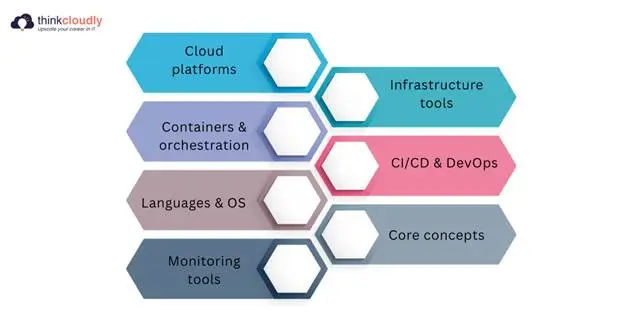
For cloud roles, fill those slots with the things that actually show up in job descriptions. Start with these:
- Cloud platforms—AWS, Microsoft Azure, Google Cloud Platform
- Infrastructure tools—Terraform, Ansible, CloudFormation
- Containers & orchestration — Kubernetes, Docker, EKS
- CI/CD & DevOps — GitHub Actions, Azure DevOps, Jenkins
- Languages & OS—Python, Linux, Bash
- Core concepts—Infrastructure as Code, CI/CD, Cloud Security, DevOps
- Monitoring tools—CloudWatch, Datadog, Prometheus
Then add the role-specific tools that match your actual background—whatever you use day to day goes in too.
After updating your skills, reach out to a couple of people you have worked with and ask them to endorse the ones they have seen you use. It feels like a small thing—but profiles with peer-endorsed skills attract 17 times more attention from recruiters than those without any endorsements at all. That kind of gap does not come from anything complicated. It comes from a two-minute message to someone who already knows your work.
One more thing that almost no one does: take the LinkedIn Skill Assessments for your core tools. Passing one earns a verified badge for that skill, and profiles with verified skills receive up to 30% more recruiter messages. It takes 15 minutes per test. Most of your competition has not done it. That gap is yours to take.
Nobody Cares What Your Responsibilities Were—They Care What You Did
The experience section is where most cloud profiles go quiet. People list what they were supposed to do, not what they actually delivered. “Looked after the cloud setup.” “Played a part in keeping pipelines moving.” “Worked alongside different teams.” Bullets like these fill up space without saying a single useful thing. A recruiter reads them and still has no idea what you actually did, how well you did it, or why they should pick up the phone. Every candidate on the list has bullets like this. They blur together.
What makes a recruiter slow down is a result. A number. A before and after. Something that shows the work was real and the impact was measurable.
If you do not have exact numbers, use ranges or rough estimates. “Cut deployment time from days to hours” is still a hundred times better than nothing.
Forgettable: “Worked on infrastructure migration to AWS.”
Worth reading: “Moved the entire server setup from on-premise to AWS—used Terraform to automate provisioning, brought environment build time down from two days to just under an hour, and knocked 35% off the monthly hosting bill in the process.”
And if you are early in your career and don’t have any full-time cloud roles yet, use your projects. A serverless app on AWS Lambda, a monitoring setup on Google Cloud, and a CI/CD pipeline you built for a personal project. List them in the experience section with a clear description of what you built and what it involved. Recruiters looking at junior candidates know the difference between someone who has done hands-on work and someone who has only watched courses.
The Section at the Top of Your Profile That You Probably Left Empty
Right below your About section, before anyone scrolls into your experience, there is a section called Featured. Most cloud professionals scroll right past it without adding a thing — which means the people who do use it stand out immediately.
This is where you pin the things that prove you can do what you say you can. Your GitHub portfolio. A post about a project you completed. Your most relevant certification. A short screen recording of something you built. When a recruiter lands on your profile, they see this before they see anything else below the fold. A GitHub link right there says the work is one click away; go look. That is a stronger signal than any bullet point you could write.
Recruiters spend longer on profiles that show tangible proof of work. Add your three best items and keep them current. It is one of the easiest ways to separate yourself from everyone else applying for the same roles.
Certifications Are a Recruiter Filter, Not Just a Resume Line
Cloud certifications on LinkedIn are not just decoration. They are searchable. When a recruiter filters specifically for AWS-certified or Terraform-certified candidates, only profiles with those certifications properly listed in the Licenses and Certifications section will appear in the results. If your cert is sitting in a PDF somewhere and not on your LinkedIn, you are invisible to that search.
Add every relevant certification with the full name, the issuing organization, and the date. The ones showing up most in cloud recruiter searches right now:
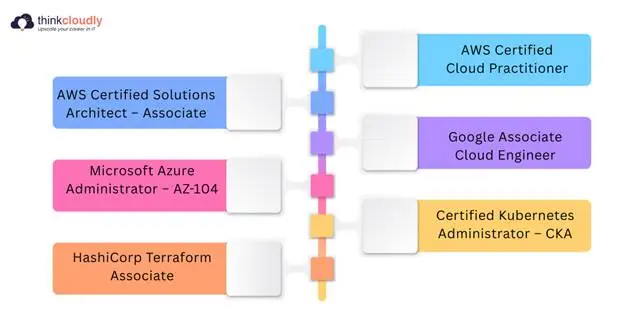
- AWS Certified Solutions Architect Associate (Amazon Web Services)
- AWS Certified Cloud Practitioner (Amazon Web Services)
- Microsoft Azure Administrator – AZ-104 (Microsoft)
- Google Associate Cloud Engineer (Google Cloud)
- HashiCorp Terraform Associate (HashiCorp)
- Certified Kubernetes Administrator – CKA (Cloud Native Computing Foundation)
Working toward one right now? Add it with an expected completion date. It shows you are moving, which matters when a hiring manager is comparing you to someone who finished a cert two years ago and has not touched anything since.
Open to Work: The Setting Most People Get Wrong
Turning this on takes under two minutes—and it makes you 40% more likely to hear from a recruiter directly. But the public green banner on your photo can sometimes send the wrong signal—especially if you are currently employed and do not want your employer or clients to see it.
The better setting is recruiters-only mode. It pushes your profile directly into recruiter search filters without making your job search visible to your whole network. When you set it up, add multiple target job titles—not just one. LinkedIn uses those titles for matching, so a wider list means you show up in more searches. A cloud engineer open to DevOps, platform engineering, and infrastructure roles will appear in far more relevant searches than someone who only listed one title and left the rest blank.
What Each Section Should Do for You
|
Profile Section |
What to Put There |
What It Does |
|
Headline |
Role + platforms + focus area (use all 220 characters) |
Controls which recruiter searches you appear in |
|
About |
First person, what you do, one real result, how to reach you |
Makes a recruiter want to message instead of scroll |
|
Skills |
All 50 slots—cloud tools, IaC, DevOps, languages |
Endorsed skills = 17x more recruiter views |
|
Experience |
Results with numbers, tools used, and actual scope |
Proves you do the work, not just list it |
|
Featured |
GitHub, project post, top cert |
Tangible proof before the recruiter scrolls anywhere |
|
Certifications |
Full name, issuer, date—AWS/Azure/GCP/Terraform |
Surfaces you in certification-filtered searches
|
|
Open to Work |
Recruiters-only, multiple job titles listed |
40% more InMail messages stay private from the employer
|
The Last Thing—And the Most Honest One
None of this needs to happen in one sitting. Fix the headline today. Rewrite the About section tomorrow. Spend a weekend filling in skills and adding your GitHub to Featured.
What matters is that you start. LinkedIn data shows hiring through the platform happens constantly—around the clock, across every industry, for roles that were never posted anywhere publicly. The people landing those roles did not find them by searching. The roles found them because their profile was built to be found. Yours can do the same. Everything you need is already above. The only step left is doing it.
Sources & Further Reading
The data and statistics in this article are drawn from the following sources:
- SalesSo — LinkedIn Hiring Statistics 2026—Six people hired through LinkedIn every minute; complete profiles 40x more likely to receive opportunities
- JobSprout — LinkedIn Profile Complete Guide 2026 — Skill endorsements driving 17x more recruiter views; 87% of recruiters use LinkedIn to source candidates
- CareerBldr — LinkedIn Profile Optimisation Guide 2026—LinkedIn Skill Assessments verified badge driving up to 30% more recruiter messages
- The Interview Guys — LinkedIn Open to Work Complete Guide 2026 — Open to Work feature increasing InMail response rates by up to 40%
- ResumeVera — LinkedIn Profile Best Practices 2026—LinkedIn 2026 algorithm: activity-based visibility, semantic relevance ranking, and weekly posting impact
- RecruitBPM — LinkedIn Optimisation for Recruiters 2026—LinkedIn Semantic Skill Graph: how the algorithm maps skills to job titles and industries
- ThinkCloudly — What Cloud Employers Want in 2026—Most in-demand cloud skills and tools from analysis of 500 live cloud job postings
All data reflects the US and global tech job market. Sources are dated 2025–2026 and were accurate at the time of writing.



