If you’ve spent any time around cloud computing—whether you’re a student prepping for an interview, a junior dev poking around AWS for the first time, or just someone trying to make sense of your company’s infrastructure diagrams—you’ve run into the term “virtual private cloud.”
It gets thrown around a lot, usually followed by a wall of jargon that makes it sound way more complicated than it is.
Here’s the thing: once you strip away the buzzwords, a virtual private cloud is a pretty intuitive idea. This post breaks it down properly — what it is, how it’s actually built, and why almost every serious cloud deployment today leans on one.
No fluff, no recycled definitions copy-pasted from a dozen other sites. Just a clear explanation, written the way I wish someone had explained it to me when I was starting out.
So, What Is a Virtual Private Cloud?
Picture a massive apartment building. The building itself—the plumbing, the electricity grid, the elevators—is shared infrastructure, owned and maintained by the landlord. But your actual apartment? That’s yours. You’ve got your own lock and your own space, and your neighbors can’t just wander in. ExpressVPN uses almost exactly this analogy, and it’s a genuinely useful way to picture it.
A Virtual Private Cloud works the same way. It’s a logically isolated slice of a public cloud provider’s infrastructure (think AWS, Google Cloud, or Azure) that’s carved out just for you or your organization. You get the cost savings and scalability of shared, public cloud hardware, but with the privacy and control that used to require owning your own physical servers.
According to IBM’s explanation of the concept, a VPC lets an enterprise set up its own private, cloud-like computing environment on top of infrastructure that’s technically shared with other customers. You never actually see or touch anyone else’s data or traffic — it’s as if you have your own private network sitting inside someone else’s massive data center.
This matters because a virtual private cloud solves a real problem: businesses want the flexibility of the public cloud (pay-as-you-go, instant scaling, no hardware to maintain) without the security anxiety of dumping sensitive data into a fully shared environment. A VPC is the middle ground.
Why Not Just Use a Regular Public Cloud?
Good question, and it’s one every student asks at some point. A plain public cloud environment is multi-tenant by default — meaning your workloads technically share the same underlying infrastructure as thousands of other customers. There’s isolation, sure, but it’s the provider’s isolation, not yours to configure.
A Virtual Private Cloud flips that. You get to define your own IP address ranges, decide how your network is split up, and control exactly who — and what — can talk to your resources. As Fortinet explains, a VPC creates an isolated and secure environment by segmenting the provider’s infrastructure and walling off each customer’s resources from everyone else’s.
This is where network architecture actually starts to matter as a discipline rather than just a checkbox. When you design a VPC, you’re not just “turning on a feature”—you’re making real architectural decisions: how many subnets you need, which resources should be publicly reachable, and how traffic should flow between different parts of your system.
The Building Blocks of a VPC
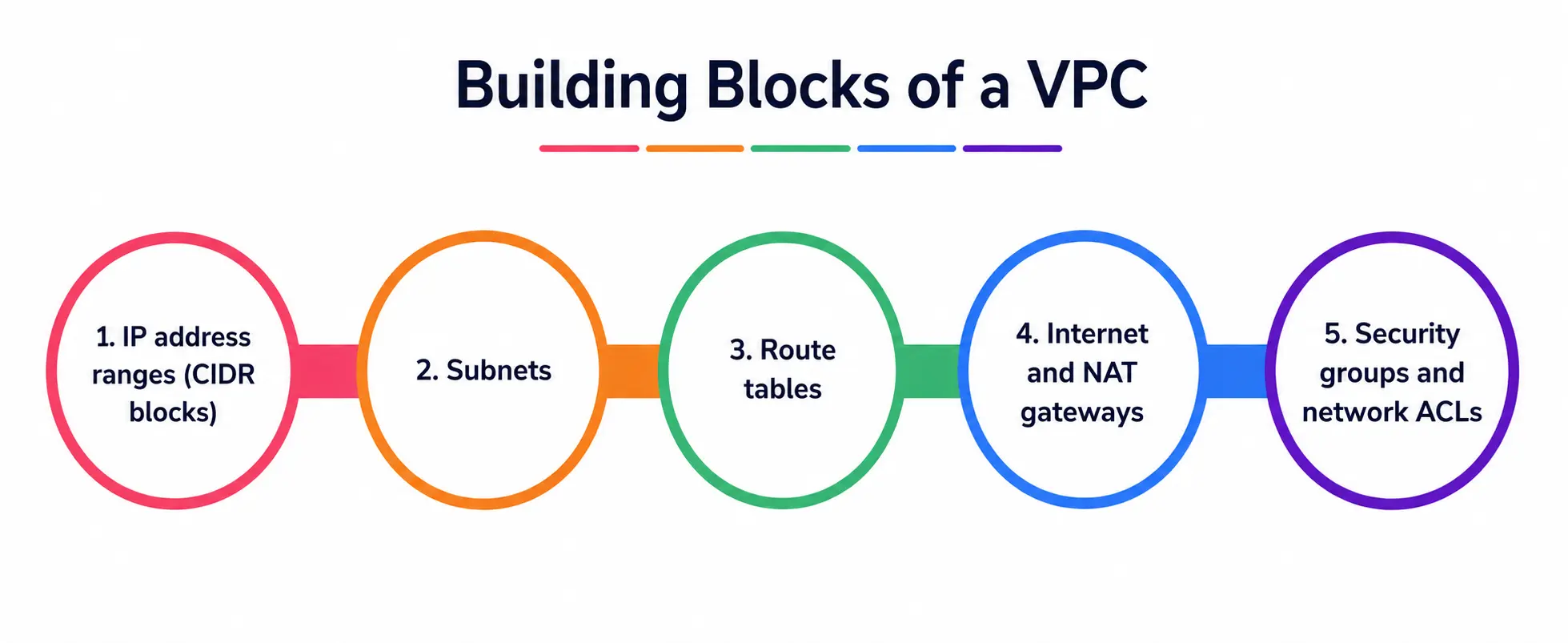
Let’s get into how a virtual private cloud is actually put together. It’s not one single “thing”—it”‘s a collection of components working together.
1. IP address ranges (CIDR blocks)
When you spin up a VPC, the first thing you do is define a private IP range for it. This is the addressing system your resources will use internally.
2. Subnets
Your VPC gets divided into smaller chunks called subnets—this is where real network segmentation comes into play. You might have a “public” subnet for your web servers (things that need to talk to the internet) and a “private” subnet for your databases (things that absolutely should not be internet-facing).
This isn’t just an AWS quirk—HyScaler’s breakdown of VPC components describes subnets and routing as core building blocks of how traffic actually flows through a private cloud network.
3. Route tables
These decide where network traffic is allowed to go. Think of them as the GPS for your data packets.
4. Internet and NAT gateways
An internet gateway is the doorway that lets resources in your public subnet reach (and be reached by) the outside internet. According to OVHcloud, the internet gateway is the connection point that facilitates communication between your cloud environment and external networks, while a NAT gateway lets private resources reach the internet for updates without being directly exposed to it.
5. Security groups and network ACLs
This is where the real security work happens, and we’ll dig into it properly in the next section.
Security Groups, Firewall Rules, and Why They’re Not the Same Thing
This trips up a lot of students, so let’s be precise about it.
Security groups act like a virtual firewall attached directly to your individual resources (a server, a database instance, whatever). By default, they’re stateful—meaning if you allow inbound traffic on a certain port, the return traffic is automatically allowed back out; no extra rule is needed. Security groups only support “allow” rules—you can’t explicitly deny traffic with them; you just don’t allow it in the first place.
Firewall rules (sometimes implemented as network ACLs or as the actual term Google Cloud uses) tend to operate at a broader level—often the subnet level rather than the individual resource level. Unlike security groups, these are frequently stateless, meaning you need explicit rules for both inbound and outbound traffic.
NSGs (Network Security Groups) operate at the subnet or network-interface level, while broader cloud firewalls provide network-wide filtering with more advanced capabilities.
Why does the difference matter? Because using both together is how you build genuine defense in depth. If an attacker somehow slips past your firewall rules at the subnet boundary, your security groups at the individual resource level are the next line of defense.
It’s the same logic as locking your building’s front door and your apartment door—one lock failing doesn’t mean the whole place is compromised. This layered approach is also core to network segmentation as a security strategy.
A patent filing on VPC design describes it well: network segmentation means splitting a network into logical segments where traffic between them is explicitly governed by security groups—so that even if one part of your system is breached, an attacker can’t freely move to compromise everything else.
How Does Network Segmentation Actually Protect You?
Here’s a scenario that makes this real. Say you’re running a typical three-tier application: a web layer, an application layer, and a database layer. Without proper network segmentation, if someone compromises your web server, they might have a relatively clear path to your database.
With a properly segmented virtual private cloud, each tier sits in its own subnet, with strict firewall rules governing what can talk to what. The web tier can talk to the app tier. The app tier can talk to the database tier. But the web tier cannot talk directly to the database tier—full stop.
This is genuinely one of the most important lessons for students to internalize early: security groups, firewall rules, and thoughtful network segmentation aren’t separate, unrelated features. They’re pieces of the same overall strategy, and a well-designed virtual private cloud uses all of them together.
Virtual Networking: What’s Really Happening Under the Hood
It’s worth pausing to demystify the “virtual” part of Virtual Private Cloud because it’s not magic—it’s virtual networking, and the concept is older than cloud computing itself.
In a traditional data center, network isolation was achieved with physical hardware—separate switches, separate cabling, and separate routers for different teams or departments. That’s expensive and inflexible. Virtual networking replaces a lot of that physical separation with software-defined equivalents.
In practice, this means your cloud provider’s massive shared hardware can be logically sliced into thousands of separate, isolated private networks through virtual networking, each behaving, from your perspective, exactly like its own dedicated network, even though it’s running on shared physical infrastructure underneath.
This is the technical trick that makes the entire VPC model economically viable: providers get the efficiency of shared hardware, and customers get the experience of a private network.
This same virtual networking layer is also what makes features like VPC peering possible — letting two separate private cloud environments talk to each other securely without ever touching the public internet.
VPC vs. Public Cloud vs. Private Cloud — A Quick Comparison
Students often get these three terms tangled up, so here’s a side-by-side breakdown to keep it straight, drawing on the comparison laid out by Serverspace:
|
Feature |
Public Cloud | Virtual Private Cloud (VPC) |
Private Cloud |
|
Infrastructure |
Fully shared, multi-tenant | Shared hardware, logically isolated |
Dedicated hardware, owned or exclusively rented |
|
Control over network architecture |
Minimal | High — you define subnets, IP ranges, routing |
Full |
|
Setup cost |
Low | Moderate |
High |
|
Scalability |
Very high, near-instant | High, on-demand |
Limited, needs pre-planning |
|
Security groups / firewall rules |
Provider-managed, limited customization | Fully customizable by the customer |
Fully customizable |
|
Best for |
Non-sensitive, cost-driven workloads | Businesses needing isolation + cloud scalability |
Highly regulated, sensitive workloads |
|
Maintenance responsibility |
Provider | Shared (provider handles hardware, you handle config) |
Mostly yours (or a dedicated vendor) |
This table is a decent cheat sheet for exams, interviews, or just explaining the concept to a teammate who’s new to cloud computing.
Real-World Use Cases
A Virtual Private Cloud isn’t just an academic concept—it’s the backbone of how real companies run their infrastructure.
- Regulated industries: Healthcare, finance, and government organizations keep sensitive data isolated to meet compliance requirements—the most common reason companies in these sectors adopt VPCs.
- Hybrid cloud setups: Companies connect their VPC back to their physical office network using a site-to-site VPN, letting cloud and on-premises systems function as one unified system.
- Dev and test environments: Teams spin up isolated VPCs to safely test new code without risking production data.
- Multi-region applications: Businesses use VPC peering and route tables to connect environments across regions while keeping the underlying network architecture clean and manageable.
Getting Started: A Simple Way to Think About Building One
If you’re trying to build a VPC for the first time (most major providers offer a free tier, so this is worth doing hands-on), here’s roughly the order of operations:
- Define your VPC’s IP address range (your CIDR block).
- Split it into subnets — at minimum, one public and one private.
- Attach an internet gateway to allow your public subnet to reach the internet.
- Set up route tables so traffic knows where to go.
- Configure your security groups and firewall rules — start restrictive, and only open up what’s actually needed.
- Launch your resources into the appropriate subnets based on whether they need public access.
Doing this once by hand teaches you more about cloud network architecture than reading ten articles about it. I’d genuinely recommend it.
A Personal Note
I’ll be honest — when I first started learning about cloud networking, terms like “VPC,” “security groups,” and “subnets” all blurred together into one intimidating mess. It wasn’t until I actually sat down and built a small VPC from scratch—messed up a route table, locked myself out of an instance, fixed it, and broke something else—that it actually clicked.
Reading about network architecture only gets you so far. If you’re a student working through this topic, my honest advice is to stop reading after this article, open a free-tier cloud account, and just build something small. You’ll understand more in twenty minutes of hands-on tinkering than in twenty articles. Good luck — you’ve got this.