A few years ago, most teams treated containers the same way they treated virtual machines: spin one up, patch it occasionally, and trust the perimeter firewall to catch anything ugly. That approach doesn’t survive contact with how modern applications actually run now.
A single Kubernetes cluster can spin up and tear down thousands of containers a day, and “scan it once and monitor it forever” can’t keep pace with instances that live for only minutes. That gap is exactly why container security has become its own discipline instead of a footnote inside general cloud security.
This guide walks through what a working set of container security best practices actually looks like heading into 2026—how attackers exploit containerized environments, how scanning and monitoring fit together, and where automation earns its keep. It’s written plainly for students and early-career engineers who want to understand the subject well enough to apply it, not just recite definitions.
Why Does the Old Security Playbook Don’t Work Anymore?
Containers changed the attack surface. Instead of a handful of long-lived servers, an environment might run thousands of short-lived instances built from base images that may or may not have been checked for known flaws.
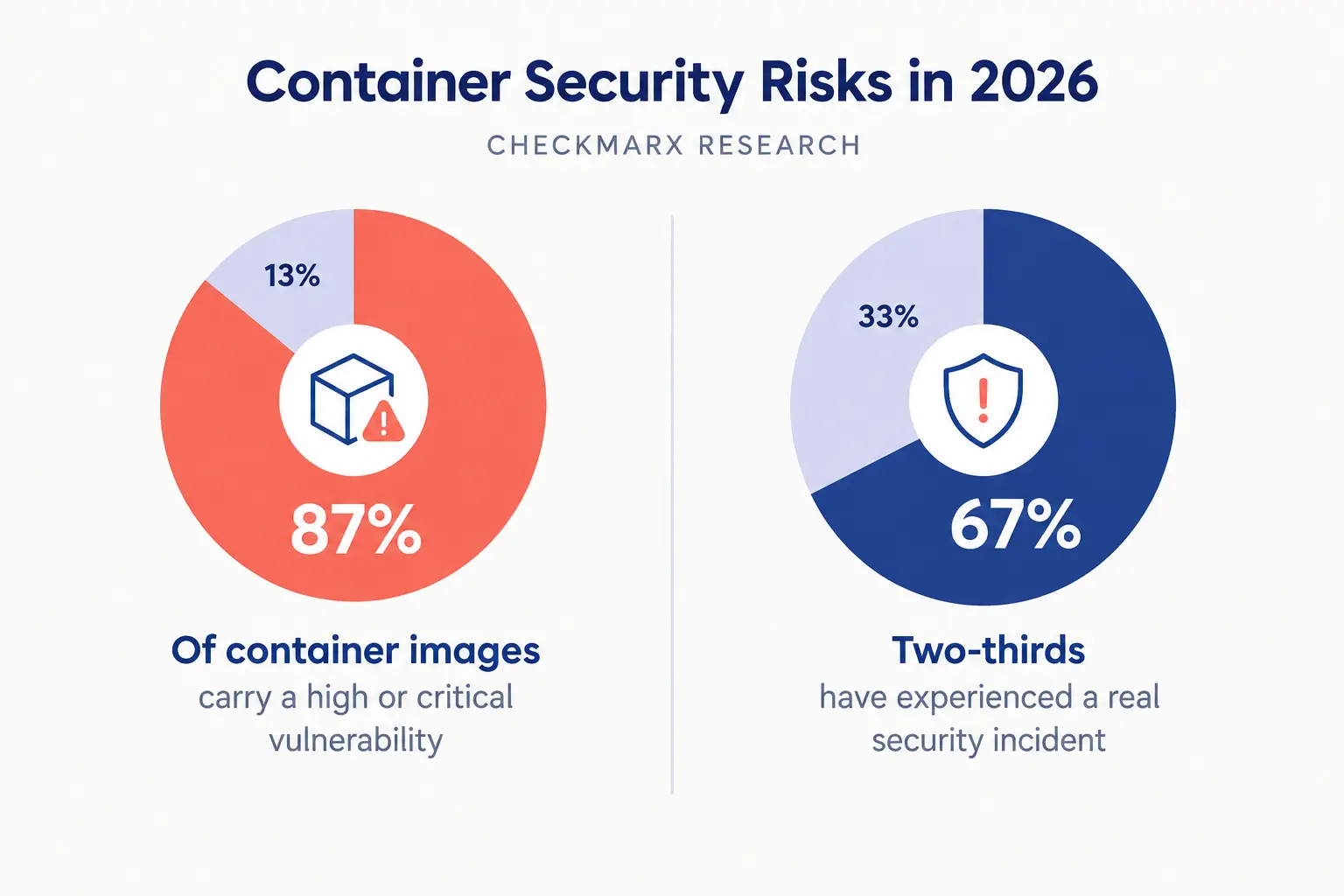
Checkmarx’s 2026 research on the container landscape found that roughly 87% of container images in active use carry at least one high or critical vulnerability, and about two-thirds of organizations report having already experienced a real security incident traced back to an insecure image—a finding laid out in Checkmarx’s 2026 research.
Gartner’s own projection, cited in the same research, expects more than 95% of organizations to be running containerized workloads by 2028. Adoption data backs this up from the other direction.
Sysdig’s most recent analysis found that 56% of organizations were already running containers in production in 2025, up sharply from 41% just two years earlier, with 82% of container users deploying Kubernetes as their orchestrator of choice, a pattern covered in Sysdig’s research on container adoption and risk.
The same research noted that roughly 70% of containers live for five minutes or less before being replaced. That churn is a genuine problem for anyone still relying on manual review, because a vulnerability can be introduced, exploited, and the evidence gone before a human ever looks at a dashboard.
Container Image Scanning: Catching Problems Before They Ship
If there’s one habit that separates a team with a real security program from one just hoping for the best, it’s container image scanning done early and often. The idea is simple: before an image is allowed anywhere near production, it gets checked against known vulnerability databases, misconfiguration rules, and—increasingly—a generated Software Bill of Materials listing every package and dependency baked into it.
Effective container image scanning happens at more than one point in the pipeline. It runs at local build, at registry push, and once more as an admission check before a cluster runs it. Skipping any of those checkpoints creates a blind spot, since a base image clean last month may carry a newly disclosed flaw today.
Teams that only scan once, at build time, routinely miss vulnerabilities disclosed after publication but before deployment, which is a meaningful share of real-world exposure. It’s also worth being honest about what scanning can and can’t tell you. Sysdig’s data found that only about 1% of critical vulnerabilities simultaneously have an available fix, an active exploit in the wild, and confirmed use in a running production environment.
That doesn’t make container image scanning pointless—it means raw vulnerability counts are a poor way to prioritize. A mature process correlates what’s found with what’s actually reachable and running, so a security team spends its limited time on the handful of flaws that genuinely matter instead of chasing every line on a report.
Runtime Security: What Happens After the Container Starts
Scanning an image tells you what could go wrong. Runtime security tells you what is going wrong, right now, inside a container that’s already running. Scanning alone can’t catch everything—a container can be built cleanly and still get compromised after deployment through a misused credential, a dependency that activates later, or an attacker who found a path through a misconfigured network policy.
A solid runtime security setup watches for anomalous behavior: a process spawning that was never part of the expected image, a container suddenly reaching out to an address it has no business talking to, or a process trying to escalate privileges and break out toward the host.
Open-source tools built for syscall-level auditing, paired with well-tuned behavioral baselines, are what let a team catch a container escape attempt in seconds rather than discovering it in a postmortem three weeks later.
Good runtime security also depends on basics that get underestimated. Running containers as non-root, dropping unnecessary Linux capabilities, and applying strict resource limits all shrink what an attacker can do even after getting a foothold.
None of that is exotic—it’s the equivalent of locking the windows before installing an alarm system, and it’s why programs that skip these fundamentals tend to generate noise without stopping much of anything.
Credential Management: The Secret Nobody Rotates
Every container needs to talk to something else—a database, an API, another service—and that means credentials live somewhere. This is where otherwise careful teams quietly undo their own work. A hardcoded API key baked into an image, a database password sitting in a plaintext environment variable, or a long-lived token nobody rotates because rotating it might break something: these everyday failures are what turn a contained breach into a full compromise.
Proper credential management means secrets never live inside the image itself. They’re injected at runtime from a dedicated secrets manager or vault, scoped to the narrowest permission set possible, and rotated on a real schedule rather than left alone out of fear of downtime.
Checkmarx’s research is blunt on this point, noting that organizations need explicit mechanisms to keep secrets from being hardcoded or exposed in images, environment variables, or logs, with rotation and access restrictions built in from the start rather than bolted on after an audit flags the gap.
Sound credential management also means auditing who and what can actually request a secret in the first place. A container that only needs read access to one queue shouldn’t hold standing credentials that could reach an entire database cluster.
Overly broad permissions are one of the quietest ways an attacker turns a single compromised container into a much larger incident, and narrowing that scope is one of the cheapest fixes any team can make.
Cloud Workload Security: Containers Don’t Live Alone
Containers rarely run in isolation. They sit inside a broader cloud workload security picture: the orchestration layer, the network fabric connecting services, the storage they read from, and the identity controls governing all of it.
Treating the container as separate from that surrounding environment is one of the more common strategic mistakes teams make, because an attacker doesn’t care which layer of the stack they compromise first.
Strong cloud workload security means the orchestration platform—usually Kubernetes—is locked down with role-based access control, network policies segmenting service-to-service traffic, and admission controllers that reject anything violating policy before it’s ever scheduled.
It also means the host nodes underneath are patched and hardened, since containers share the host’s kernel; a flaw at that level can undermine every protection built on top of it. Cloud workload security extends outward too, into the registries where images are stored and the pipelines that build and ship them.
A compromised registry or a poisoned build process can push a malicious image straight into production without ever touching a running container directly. That risk isn’t theoretical—attacks against open-source supply chains roughly doubled in 2024 alone, according to DeepStrike’s supply chain security research.
Any serious strategy treats the supply chain as part of that same perimeter, a point OX Security’s guide makes directly: solid container security best practices treat image provenance and registry access as core infrastructure, not an afterthought.
DevSecOps Automation: Making Security Part of the Pipeline, Not a Gate
None of the practices above scale if they depend on a person remembering to run them by hand. That’s where DevSecOps automation comes in—folding scanning, policy checks, and credential validation directly into the CI/CD pipeline so security becomes a property of how software ships, not an extra step tacked on at the end.
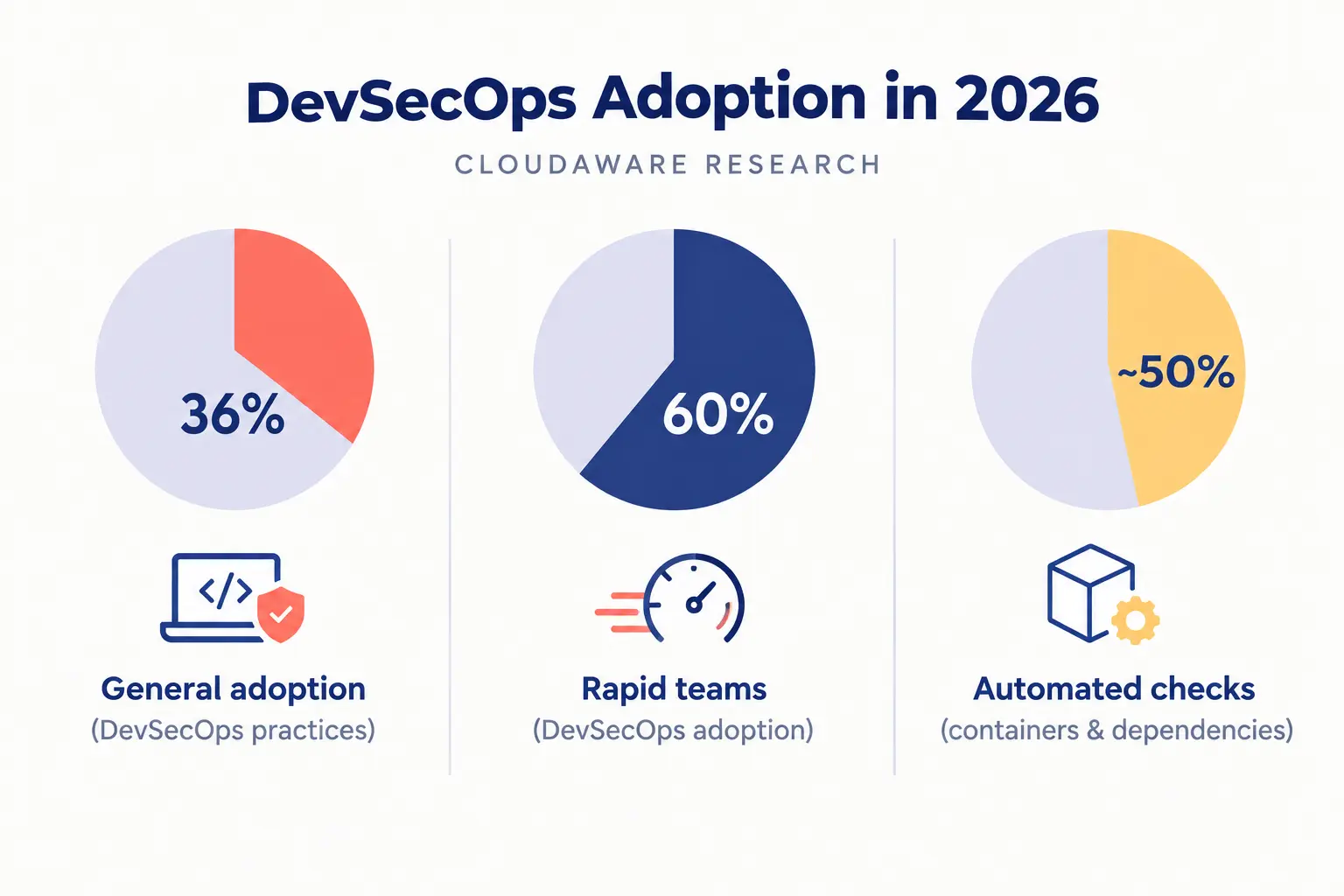
Adoption data suggests this shift is well underway but still uneven. Research from Cloudaware found that 36% of organizations now develop software using DevSecOps practices, a figure that climbs to roughly 60% among teams shipping rapidly, with close to half running some form of automated container and dependency checks as a standard part of their stack—detail covered in Cloudaware’s DevSecOps adoption research.
The same research flagged a useful caveat: coverage without consistency doesn’t help much. A pipeline that blocks a deployment over a finding while a sibling pipeline lets an identical issue through isn’t really enforcing a policy—it’s just creating the appearance of one.
Getting this kind of automation right means defining one baseline that applies everywhere rather than a patchwork of rules that differ by team, and giving developers fast, specific feedback—a result that says “line 42 in this Dockerfile pulls an unpinned base image” is useful; a report buried in a dashboard nobody opens is not.
The point of automating this work isn’t to slow developers down with more gates. It’s to make the secure path the easy path, so following it becomes the default instead of the exception.
A Practical Checklist for Applying These Practices
The table below distills core container security best practices into a quick reference for teams building or auditing their own program.
|
Practice Area |
What to Do | Why It Matters |
|
Container image scanning |
Scan at build, at registry push, and at deployment; generate an SBOM for every image |
Closes the window between a flaw’s disclosure and its deployment |
|
Runtime security |
Monitor syscalls and network behavior; run containers as non-root with minimal capabilities |
Catches threats that scanning alone can’t see |
|
Credential management |
Inject secrets at runtime from a vault; rotate on a schedule; scope permissions narrowly |
Stops one leaked credential from becoming a full compromise |
|
Cloud workload security |
Harden orchestration with RBAC and network policy; patch host nodes; secure the registry |
Protects the layers surrounding the container, not just the container itself |
| DevSecOps automation |
Embed one consistent baseline into every pipeline; give developers fast, specific feedback |
Makes the secure option the default instead of relying on manual diligence |
Where Teams Still Get It Wrong?
A few mistakes show up repeatedly, even among teams that otherwise follow solid container security best practices on paper. Some scan images once at build and never rescan what’s already sitting in a registry, missing flaws disclosed after publication.
Others invest heavily in monitoring tools but skip the basic hardening — non-root users, dropped capabilities — that would have stopped most incidents from escalating in the first place. Credential management often gets treated as a compliance checkbox rather than an operational habit, with rotation policies that exist on paper but never actually run.
And plenty of teams adopt DevSecOps automation in name only, wiring up a scanner without ever agreeing on what happens when it finds something serious, which turns automation into theater rather than protection.
The common thread is that these practices only work as a connected system, not a checklist completed once. Scanning without behavioral monitoring leaves a gap once something is already running. Monitoring without proper secrets handling still leaves the door open through leaked credentials.
And none of it holds together without securing the orchestration and supply chain around it, plus a pipeline that applies the rules on every deployment. Container security, in the end, is less about any one control and more about whether the pieces actually connect.
A Personal Note
The thing that changed how I think about this space wasn’t a breach report or a vendor pitch — it was watching two teams respond differently to the exact same scanner output. One team treated a flagged vulnerability as a fire drill: patch it, ship it, move on, repeat next week.
The other team asked a better question first — is this thing even reachable, is it actually running anywhere, and if we fix it, does our process guarantee it doesn’t come back next sprint. The second team shipped fewer patches overall but had far fewer real incidents.
If you’re starting out in this field, resist the urge to chase every red flag a tool throws at you. Build the habit of asking whether a finding is genuinely exploitable and whether your pipeline will catch the next one on its own — that instinct matters more than any tool you’ll ever use.