I’ve rebuilt this exact pipeline more times than I can count—for a client, for a bootcamp cohort, and for my own side projects when I wanted to see what broke under pressure. Every time, the question that trips people up isn’t “What is CI/CD?” It’s “Which AWS pieces actually talk to each other, and in what order, when something inevitably goes wrong?”
This CI/CD pipeline tutorial exists because most guides explain the theory and skip the wiring. We’re doing the wiring, start to finish, with nothing hand-waved.
By the end of this CI/CD pipeline tutorial, you’ll have a working AWS CI/CD pipeline that takes a code commit and turns it into a live AWS application deployment, with every stage automated and every failure caught before it reaches production. No prior pipeline-building experience assumed—just basic comfort with AWS and Git, and the patience to break something on purpose before you trust it.
If you want to build practical skills in AWS automation, CI/CD pipelines, and cloud deployment, enrolling in a DevOps training program can help you gain hands-on experience with real-world projects.
Why This CI/CD Pipeline Tutorial Matters for Engineers Working on AWS Right Now?
Pipelines stopped being optional a while ago, but 2027 made the shift measurable. According to the report, 83% of surveyed developers now run CI/CD pipelines as part of their regular workflow—the single most widely adopted DevOps practice tracked in the survey, up from 82% the year before.
GitHub Actions leads tool adoption at 47%, rising from 41% in 2025, while AWS CodePipeline and AWS CodeBuild sit around 7% of organizations surveyed. That gap matters: AWS-native tooling is a smaller slice of the market than GitHub Actions, which is exactly why this guide treats both as first-class options rather than picking a side.
CI/CD automation isn’t just about speed, either, though speed is the part everyone notices first. A pipeline that automatically tests every commit catches the kind of bug that would otherwise sit quietly until a customer finds it.
AWS DevOps teams that skip automated testing in favor of “fast shipping” tend to discover the tradeoff the hard way, usually during an incident review nobody enjoys attending. The slower, more expensive failure always shows up later—in production, in front of a customer, rather than in a build log where it’s cheap to fix.
AWS Services You Need Before Starting This CI/CD Pipeline Tutorial
Before touching a single configuration file, get familiar with the pieces this CI/CD pipeline tutorial assumes you have access to. Each one does a distinct job, and understanding that division of labor now will save you real debugging time later:
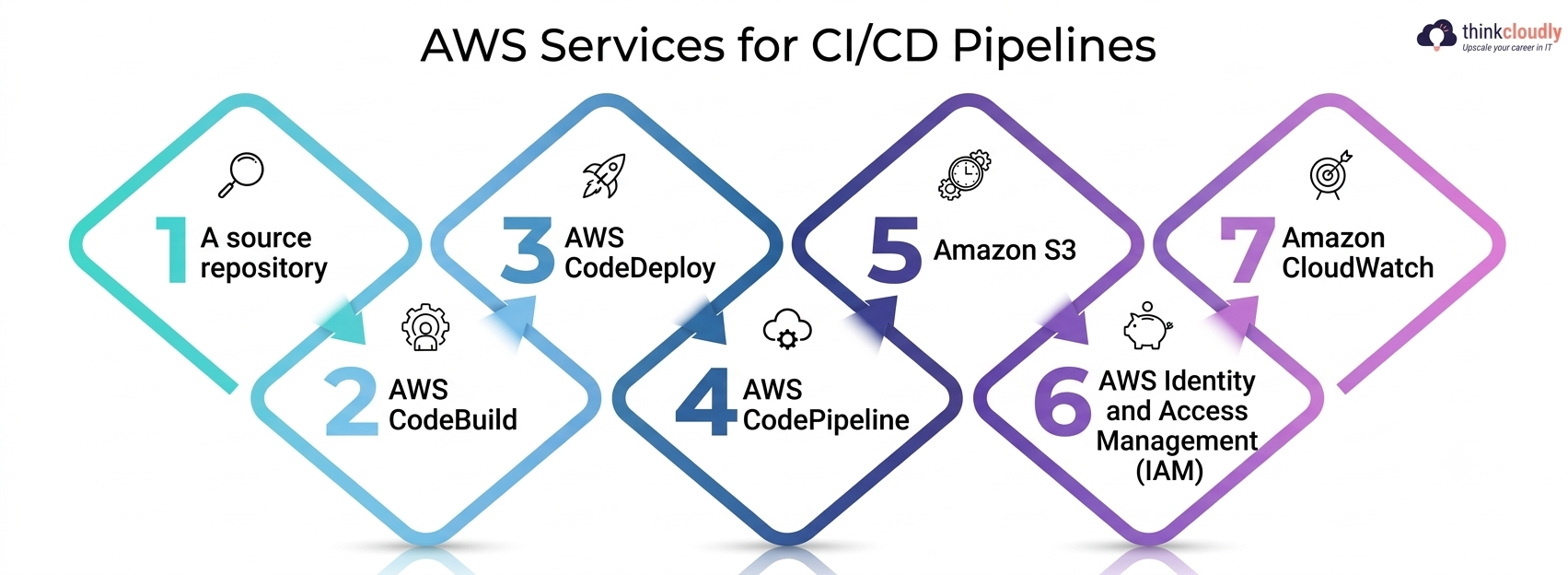
- A source repository — GitHub or AWS CodeCommit—holding the code that triggers everything downstream.
- AWS CodeBuild — compiles your code, runs your test suite, and produces a build artifact. Think of it as the “does this actually work” checkpoint.
- AWS CodeDeploy — takes a passing build artifact and releases it to EC2, ECS, Lambda, or on-premises servers, using whichever deployment strategy you configure.
- AWS CodePipeline — the orchestrator that strings source, build, and deploy stages together and triggers automatically on every push.
- Amazon S3 — stores build artifacts between pipeline stages so each step can hand off cleanly to the next without anyone manually copying files around.
- AWS Identity and Access Management (IAM) — scopes exactly what each pipeline stage is allowed to touch, which matters enormously once this pipeline reaches production.
- Amazon CloudWatch — watches pipeline execution and application health after deployment, so failures get noticed in minutes, not during the next support ticket.
If you’d rather skip AWS-native orchestration entirely and run everything through a GitHub Actions workflow instead, that’s a completely valid path covered later in this guide—plenty of AWS DevOps engineers prefer it for its simplicity and the fact that it lives right next to the code it deploys.
Step-by-Step CI/CD Pipeline Tutorial: Building Your AWS Pipeline
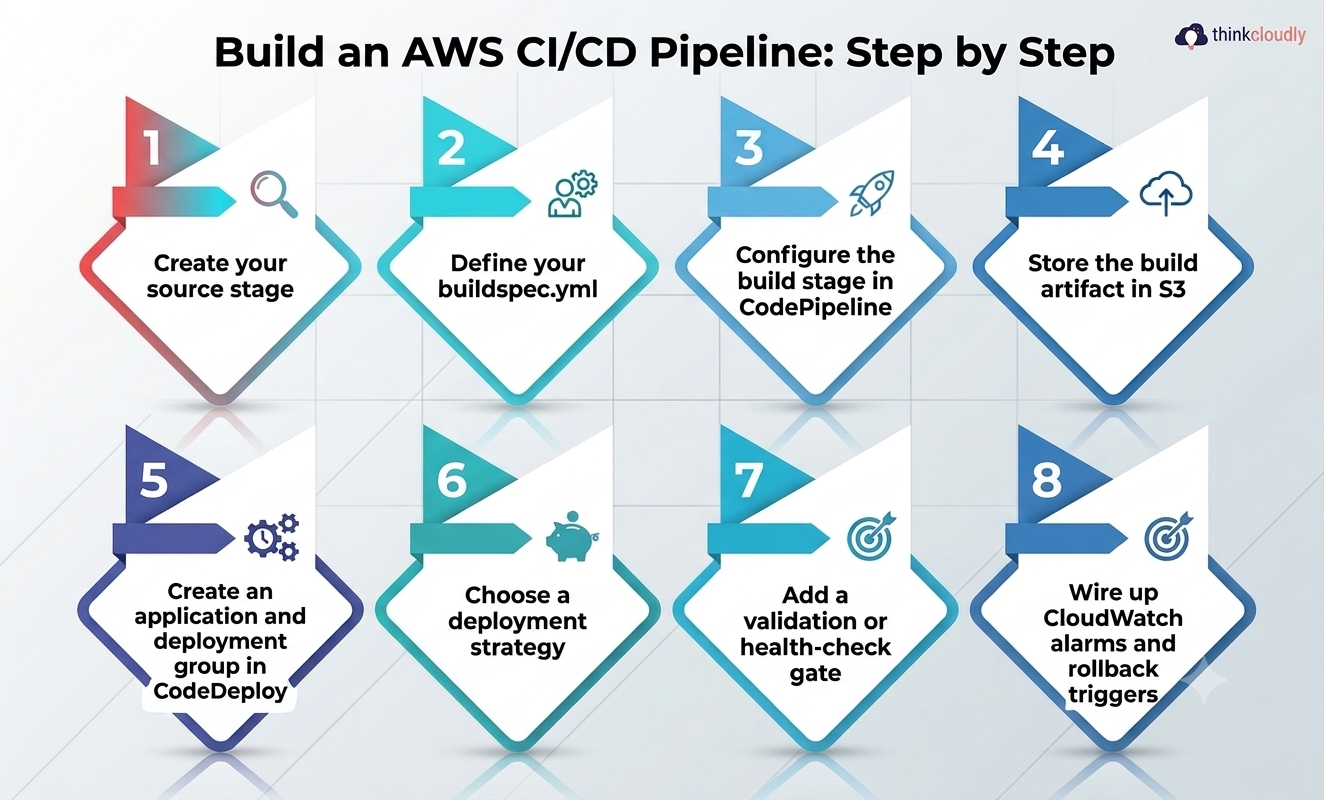
This is the part most tutorials rush. Here’s the full sequence, stage by stage, the way a real pipeline is actually assembled from source to production:
-
Create your source stage. Connect CodePipeline to your GitHub repository or CodeCommit repo. Every push to your designated branch becomes the trigger for the rest of the pipeline—no one has to remember to kick it off manually, and no deployment depends on someone being awake.
-
Define your buildspec.yml. This file tells AWS CodeBuild exactly what to run: install dependencies, execute your test suite, compile or package the application, and produce an artifact. A broken buildspec is the single most common reason a first attempt at this process fails silently, without ever showing an obvious error.
-
Configure the build stage in CodePipeline. Point it at your CodeBuild project. This is where your continuous integration workflow actually lives—every commit gets tested here before anything moves further down the pipeline.
-
Store the build artifact in S3. CodePipeline handles this automatically between stages, but understanding that it’s happening helps when you’re debugging a stage that can’t find its input.
-
Create an application and deployment group in CodeDeploy. Decide here whether you’re deploying to EC2 instances, an ECS service, or a Lambda function, since the deployment group configuration differs meaningfully for each target.
-
Choose a deployment strategy. Rolling, blue-green, or canary—each trades speed for safety differently, and the right choice depends on how much risk a bad release actually carries for your users. A production AWS application deployment should almost never use an all-at-once strategy without a serious reason.
-
Add a validation or health-check gate. Before CodePipeline marks a deployment complete, it should confirm the new version is actually healthy, not just that the deploy command ran without an error.
-
Wire up CloudWatch alarms and rollback triggers. A pipeline that can deploy automatically but can’t detect and reverse a bad deployment automatically has only solved half the problem, and it’s the half that matters most at 2 a.m.
Run that sequence end to end once, on purpose, and break something in it deliberately. You’ll learn more about how this continuous integration workflow actually behaves from one deliberate failure than from ten clean successful runs where nothing ever tested your assumptions.
Setting Up a GitHub Actions Workflow for AWS Application Deployment
Plenty of AWS DevOps engineers now build their entire pipeline around a GitHub Actions workflow instead of CodePipeline, and the gap between the two has narrowed quickly. AWS has been actively investing here: in February 2026, AWS announced that Elastic Beanstalk now supports GitHub Actions for automated deployment, letting a push to a repository trigger a full deployment package build, S3 upload, and environment update without touching CodePipeline at all.
The action authenticates through IAM using OpenID Connect, so there are no long-lived AWS access keys sitting in your repository secrets—a meaningful security improvement over older approaches that relied on static credentials.
A basic GitHub Actions workflow for this kind of CI/CD automation looks roughly like this: a .github/workflows/deploy. The YAML file defines triggers (usually a push to main), a job that checks out the code, authenticates to AWS via OIDC, runs your test suite, and then calls the relevant AWS deploy action. For full workflow syntax and trigger options, GitHub’s own Actions documentation is the most reliable reference—it changes often enough that a cached blog post is the wrong place to learn it from.
The appeal of this approach is simple: your continuous integration workflow and your deployment workflow live in the same file, next to your code, reviewed through the same pull-request process as everything else. No separate AWS console to manage, no drift between what’s documented and what’s actually configured, and no second system for a new hire to learn before they can ship their first change.
AWS CodePipeline vs. GitHub Actions: Choosing the Right Approach
|
Factor |
AWS CodePipeline |
GitHub Actions |
|
Where configuration lives |
AWS console or CloudFormation/Terraform |
YAML file inside your repository |
|
Best fit |
Teams already deep in AWS-native tooling |
Teams whose code already lives on GitHub |
|
2027F adoption (JetBrains survey) |
~7% of organizations |
47% of organizations |
|
AWS deployment targets |
EC2, ECS, Lambda, on-premises |
EC2, Lambda, Elastic Beanstalk, ECS via actions |
|
Native AWS service integration |
Deepest—built by AWS, for AWS |
Strong, growing fast through official AWS actions |
|
Learning curve |
Steeper if new to AWS consoles |
Lower if you already know GitHub |
Neither option is objectively correct. CodePipeline wins for teams that need deep IAM-level control and already manage everything else in AWS. A GitHub Actions workflow wins for teams that want their AWS application deployment logic reviewed, versioned, and merged exactly like application code—which, for a lot of smaller AWS DevOps teams, is the more honest description of how they actually want to work.
Team size tends to decide this more than technical merit: a five-person startup rarely benefits from the extra AWS console surface area that a fifty-person platform team eventually needs.
Common Mistakes That Break a CI/CD Automation Setup
A few mistakes show up in nearly every first attempt at this kind of pipeline, regardless of which tools get used:
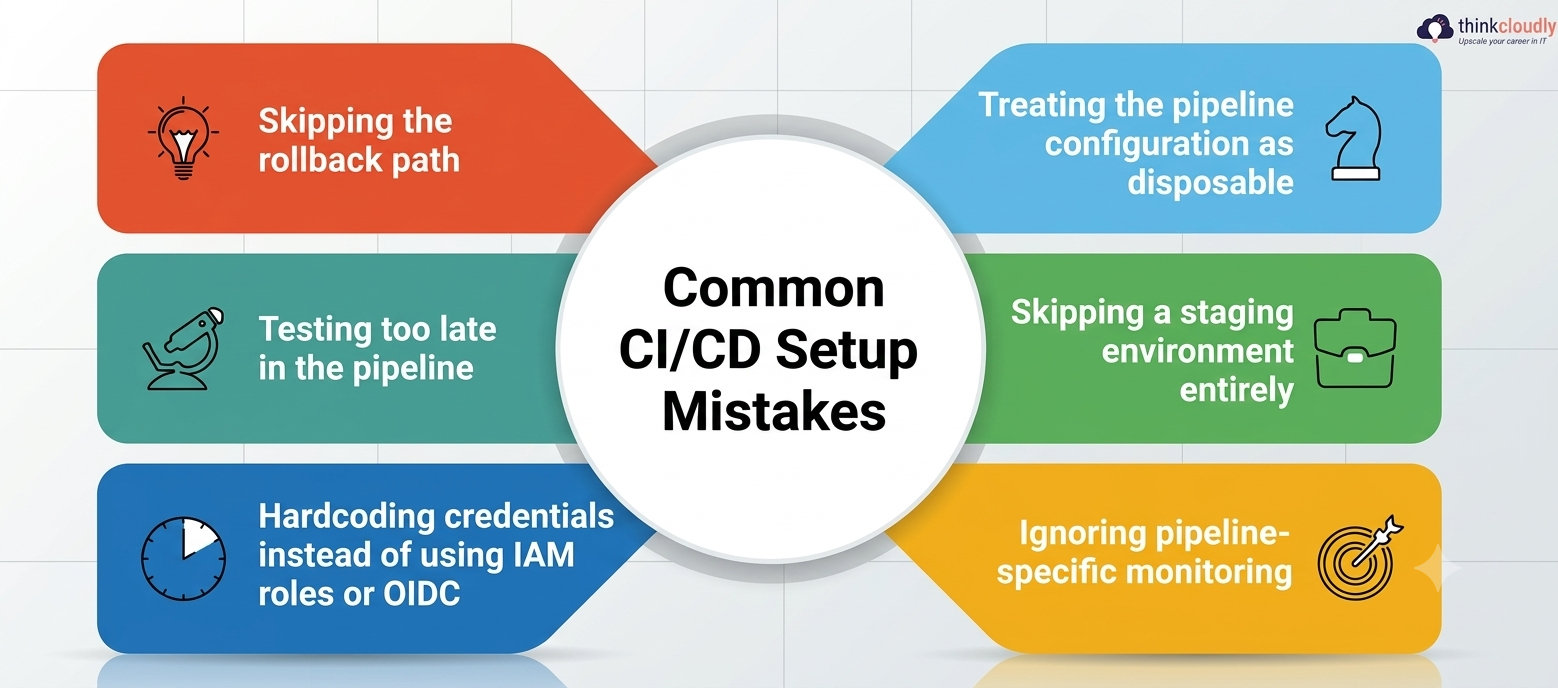
- Skipping the rollback path. Teams build the forward deployment carefully and leave rollback as an afterthought, then discover it’s broken during an actual incident, when there’s no time left to debug it calmly.
- Testing too late in the pipeline. Running the full test suite only at the very end means a trivial typo isn’t caught until the slowest, most expensive stage.
- Hardcoding credentials instead of using IAM roles or OIDC. Long-lived access keys sitting in a repository or build environment are a recurring cause of avoidable security incidents.
- Treating the pipeline configuration as disposable. A buildspec or workflow file that isn’t reviewed and version-controlled like real code tends to rot quietly until it breaks a release.
- Skipping a staging environment entirely. Testing locally and deploying straight to production skips the one environment that would have caught a configuration difference before customers did.
- Ignoring pipeline-specific monitoring. Watching application uptime isn’t the same as watching deployment frequency, failure rate, and rollback frequency — AWS CodePipeline’s native EC2 deployment support, added in early 2025, and its Lambda traffic-shifting capability, added a few months later, both exist specifically so teams can watch a rollout’s health in real time instead of guessing.
Keeping Your Continuous Integration Workflow Healthy Long-Term
A pipeline that works on day one and silently degrades over six months isn’t actually solved — it’s postponed. A healthy continuous integration workflow gets the same ongoing attention as the application it deploys:
- Review build times monthly. A test suite that quietly grew from four minutes to forty is a CI/CD automation problem waiting to surface as developer frustration.
- Audit IAM permissions attached to pipeline roles on a schedule, not only when something breaks or a security review forces the question.
- Re-test your rollback path periodically, not just once when the pipeline was built, since the application behind it keeps changing.
- Track how often deployments require manual intervention — that number trending upward is an early warning sign, not a coincidence.
- Revisit your deployment strategy as traffic grows. A rolling deployment that worked fine at low volume can start causing real customer-facing issues once scale changes the math.
A Personal Note
I’ll be honest about something most tutorials gloss over: the first pipeline you build will probably be a little ugly, and that’s fine. Mine was. I hardcoded a region name I shouldn’t have, forgot a rollback trigger for three weeks, and only noticed when a teammate asked what would happen if a deployment failed at 2 a.m. — and I didn’t have a confident answer. That gap is normal.
What matters is building the thing end to end once, breaking it on purpose, and fixing what you find, rather than reading about pipeline design indefinitely without ever shipping a single commit through a real one.
Open an AWS account today if you don’t already have a sandbox one, wire up the smallest possible version of this CI/CD pipeline tutorial, and let it fail at least once before you call it done. Failure teaches you more than a clean run ever will.