Imagine receiving a message from a recruiter on LinkedIn. The profile appears genuine. There is a detailed employment history, a professional photograph, several mutual connections, and a job description that fits your experience unusually well.
After a short conversation, the recruiter asks you to complete an application on an external website. The site looks professional. The company’s name appears in the web address, the branding looks familiar, and there is nothing obviously suspicious about the page.
You enter your email address and create a password. At that point, you may have given an attacker exactly what they wanted. You might not realize it until much later.
This is one of the problems with modern phishing. It does not always look like a poorly written email from a stranger promising an unbelievable prize. Sometimes it looks like an ordinary interaction that you had a good reason to expect.
Why Does the Old Mental Model No Longer Work?
For years, phishing awareness training has focused on a familiar set of warning signs: spelling mistakes, urgent requests, generic greetings, strange attachments, and suspicious-looking links. Those signs are still useful. They just aren’t enough anymore.
Attackers have access to large amounts of publicly available information, stolen personal data, and increasingly capable generative tools. As a result, they can produce messages that are grammatically correct, tailored to a particular person, and connected to events that are actually happening.
The underlying idea behind phishing, however, has remained remarkably simple. The attacker wants the victim to perform an action. That action might be clicking a link, entering a password, approving a payment, opening a document, or sharing information. The technology used to deliver the request may change, but the attack still depends on trust.
The difficulty today is that an attacker does not necessarily have to create trust from nothing. They can build on information that already exists. A person’s job title, employer, colleagues, interests, recent posts, and professional activities may all be publicly visible. Put together, those details can make a fraudulent message feel surprisingly familiar.
The Anatomy of a Modern Attack
Consider a common workplace scenario involving Microsoft 365.
An employee regularly receives genuine Microsoft notifications about their account. An attacker identifies the organization through LinkedIn or the company’s website and works out the employee’s email format from publicly available information.
The attacker then sends a message claiming that the employee’s Microsoft 365 password is about to expire.
The sender address may use a domain such as “microsoftonline-alerts.com“. It is not Microsoft’s legitimate domain, but it contains enough familiar words that someone reading quickly might overlook the difference.
The email includes a button leading to a fake login page. The page copies the appearance of the real Microsoft sign-in process and may even include the victim’s organization’s branding. The employee enters a username and password. The attacker now has the credentials.
What happens next depends on the attacker’s objective and the security controls protecting the account. They may attempt to access the mailbox, change account settings, create forwarding rules, or search the inbox for useful information.
An attacker who gains access to a business account can also learn a great deal about the organization. Email conversations reveal names, job responsibilities, ongoing projects, suppliers, customers, and sometimes financial activity. That information can be used to make the next stage of the attack much more convincing.
This is one reason business email compromise can become much more damaging than the original phishing message suggests. The stolen account can become a tool for attacking other people inside the same organization.
Multiple Channels, One Objective
Phishing is no longer limited to email. The same basic technique can be adapted to almost any communication channel that people trust.
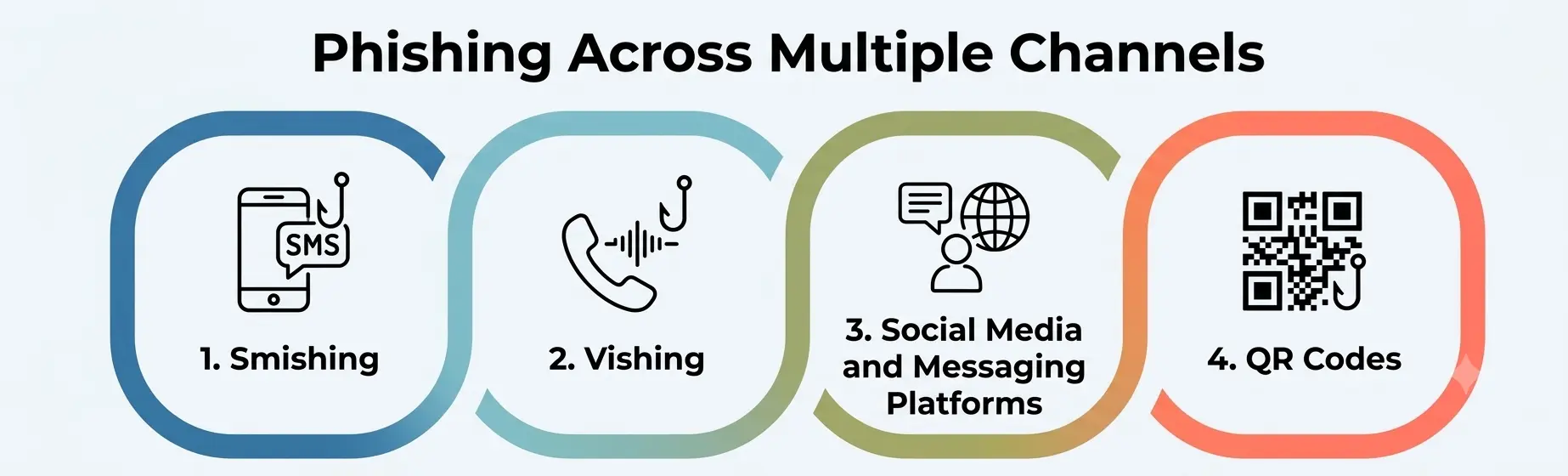
1. Smishing
Smishing is phishing delivered through SMS messages.
A common example is a message claiming that a parcel could not be delivered and that the recipient needs to pay a small customs or delivery charge. The link takes the victim to a page designed to resemble the website of a genuine delivery company.
The attacker may not be interested in the victim’s password at all. The objective could instead be payment-card information or other personal details.
The small amount requested can actually make the message more believable. A person who would immediately question a demand for thousands of rupees may not think twice about a small delivery fee.
2. Vishing
Voice phishing, or vishing, uses a phone call instead.
An attacker may claim to be calling from a bank, IT department, government agency, or another organization the victim recognizes. The caller reports suspicious activity and asks the victim to confirm their identity or perform some action.
A phone call introduces something an email does not: a human voice. That can create a stronger sense of urgency and legitimacy. The caller may also keep the victim engaged while guiding them through the requested steps.
One simple defense is to end the call and contact the organization through a number obtained independently, such as the number printed on a bank card or listed on the organization’s official website.
3. Social Media and Messaging Platforms
Social platforms create another opportunity because people are accustomed to receiving messages from both friends and strangers.
For example, someone may receive a WhatsApp message saying that a friend has changed their phone number. Nothing about that first message necessarily asks for money or credentials.
A few days later, the person might receive a request for a favor or an urgent payment. The attacker could have compromised the original account, or they may simply have collected enough information from public posts to imitate someone the victim knows.
The important point is that the attack may unfold gradually. There may be no obvious malicious link in the first interaction.
4. QR Codes
QR codes introduce another layer of uncertainty. With a conventional web link, a user can sometimes inspect the address before clicking. A QR code hides the destination until the camera scans it and the device resolves the encoded information.
A malicious QR code can appear on a poster, in a printed notice, or inside an email. It might claim to lead to an employee benefits portal, a payment page, or an account-verification service.
The presence of a QR code does not make an attack more sophisticated by itself. What changes is the amount of information available to the user before the destination is opened.
What Happens After the Click
Security awareness training often focuses heavily on the moment when someone clicks a phishing link. That is only part of the story. The more important question is what the victim does after reaching the destination.
If a phishing page collects a username and password, the attacker may immediately attempt to use those credentials against the legitimate service. If the compromised account belongs to an employee, the attacker can then use that account to gather information and target additional people.
For example, a compromised business mailbox might be used to send a convincing message to the finance department requesting that a supplier’s bank details be changed. The recipient sees a message from a familiar internal account. The request appears to fit an existing business conversation.
The original phishing attack may therefore end up causing a financial loss much larger than the value of the credentials that were initially stolen.
Why MFA Helps, But Doesn’t Solve Everything?
Multi-factor authentication makes this type of attack harder because a stolen password alone is no longer enough to access the account. But MFA fatigue is not equally resistant to every type of phishing.
In an adversary-in-the-middle attack, the attacker operates a system between the victim and the legitimate service. The victim may see what appears to be the real login process while the attacker’s infrastructure passes requests between the victim and the actual service.
If the victim successfully completes an MFA challenge, the attacker may attempt to capture the resulting authenticated session. This is one reason organizations should not assume that enabling MFA automatically makes phishing impossible. The type of MFA matters.
Hardware security keys and passkeys provide stronger protection against phishing because their cryptographic authentication is tied to the legitimate website’s origin. A fake website cannot simply take the authentication response and use it on another domain.
Password managers can also help. A password manager associates stored credentials with the website for which they were created. When a user visits a lookalike domain, the password manager generally will not automatically provide credentials for the legitimate site.
Neither approach eliminates every possible attack. A compromised device, malicious software, or other forms of account takeover can introduce different risks. Nevertheless, phishing-resistant authentication significantly reduces the usefulness of stolen passwords and conventional credential-harvesting pages.
A Better Defense Than Looking for Bad Grammar
Modern phishing requires a different approach to security awareness.
Consider a finance employee who receives an email apparently sent by the CEO. The message asks for an urgent payment to a new supplier and explains that the usual approval process needs to be bypassed because of a deadline.
-
The sender’s address is correct.
-
The writing style looks normal.
-
The request is plausible.
-
There may be nothing obviously suspicious about the email itself.
The stronger defense is a business process. If company policy requires payment changes or unusual transfers to be verified by phone, the employee should independently contact the CEO or another authorized person using an established contact method. The verification process matters more than the appearance of the email.
Now consider a developer working on an open-source project. They receive a technical question from another contributor. The conversation continues for several messages, and the person demonstrates genuine knowledge of the project.
Eventually, the contributor suggests sending a compressed file containing a proof of concept. At this point, the attacker is not relying on a fake login page. They have spent time establishing credibility.
The appropriate defence is therefore different. Files and code from external contributors should be handled according to a defined process, particularly when they are going to be executed or opened in a development environment.
A third example involves an employee receiving an SMS claiming that their IT account will be locked in thirty minutes unless they complete verification. The deadline is the important part of the attack.
Instead of following the link, the employee can contact the IT helpdesk using the normal internal contact method and ask whether any account action is actually required. That may take a few minutes. It is considerably cheaper than recovering a compromised account.
Changing the Way We Think About Phishing
The biggest problem with modern phishing is not that attackers have discovered a completely new technique.
-
It is that the old warning signs are becoming less dependable.
-
A message can be grammatically correct and still be malicious.
-
A website can have professional branding and still be fraudulent.
-
A sender can know your name, job title, and colleagues and still be an attacker.
Even a request that fits your current circumstances can be manufactured from information that is already publicly available. This means phishing awareness cannot depend entirely on recognising suspicious-looking messages.
A better approach is to examine the action being requested.
-
Does the request involve credentials, money, sensitive information or access to a system?
-
Is the requested action normal for this situation?
-
Does it follow the organisation’s established process?
-
Can the request be independently verified through another trusted channel?
These questions remain useful even when the phishing message is technically convincing.
Technology also has an important role. MFA, phishing-resistant authentication, email security controls, endpoint protection, and properly configured identity systems can reduce the consequences of a successful phishing attempt. But technology works best when combined with sensible processes.
Modern phishing succeeds because it is designed to fit into normal behaviour. The attacker wants the victim to think, “This makes sense,” and continue without stopping to verify the request.
The most effective response is therefore not to become suspicious of every message. It is to know which actions deserve verification and to make that verification part of the normal process. When trust is involved, slowing down for a few seconds can be a much stronger defence than trying to decide whether an email simply looks suspicious.
Conclusion
Modern phishing attacks are harder to identify as the attackers are able to develop believable messages, websites and social interactions that seem to be legitimate. MFA can help reduce the impact of stolen passwords, but it will not eliminate all phishing risk, especially when attackers use techniques that can bypass traditional authentication.
So organisations must take a layered approach combining phishing-resistant authentication, security controls, employee awareness and clear verification procedures. Employees should be spending less time worrying about how suspicious a message looks and more about what the message is asking.
Verifying requests involving credentials, payments, sensitive information, or system access can prevent a convincing phishing attempt from becoming a serious security incident.