Most engineers pick a load balancer the way they pick a parking spot—whichever one is closest, not whichever one actually fits. That habit is forgivable the first time you spin up a web app, but it gets expensive fast once traffic grows, security requirements tighten, or a protocol you didn’t plan for shows up in production.
Knowing the AWS load balancer types in detail, not just by name, is what separates an architecture that scales calmly from one that falls over the first time a marketing campaign does better than expected.
This guide walks through every one of the AWS load balancer types available today, what each one is actually built for, and how to decide between them without guessing. It’s written for students, early-career cloud engineers, and anyone studying for an AWS certification who wants the reasoning behind the choice, not a list of features to memorize.
Once you finish, you can also practice with these AWS load balancing interview questions to check how well the concepts stuck.
What Is AWS Load Balancing, and Why Do the Types Differ? So Much?
AWS load balancing is the practice of automatically distributing incoming traffic across multiple targets—EC2 instances, containers, IP addresses, or Lambda functions—spread across one or more Availability Zones, so no single resource gets overwhelmed and no single failure takes an application down. The service behind this is Elastic Load Balancing (ELB)—a family of four distinct options, each built for a genuinely different job.
The four options in active use today are the Application Load Balancer (ALB), the Network Load Balancer (NLB), the Gateway Load Balancer (GLB), and the older Classic Load Balancer (CLB), which AWS now steers almost everyone away from in favor of the newer three.
Each one operates at a different layer of the OSI model—the single most important thing to understand before choosing one, since that layer decides what it can see and, in turn, what it can do for you.
Picking the wrong option rarely causes an immediate outage. It shows up later, as a workload that can’t scale the way it should, a protocol that silently isn’t supported, or a security appliance with nowhere sensible to plug in.
According to AWS’s own load balancing services, the right choice comes down almost entirely to which layer your traffic needs to be inspected and routed at—everything else follows from that one decision.
Application Load Balancer (ALB): Built for Application Performance
The Application Load Balancer is the option most teams reach for first, and for good reason—it operates at Layer 7, the application layer, which means it can read the actual content of an HTTP or HTTPS request rather than just forwarding packets blindly.
That single capability is what makes application performance so much easier to tune, because routing decisions can be based on what a request is actually asking for, not just where it came from.
An ALB can route traffic based on the URL path, sending /api/* requests to one microservice and /images/* requests to another. It can also route based on hostname, so api.example.com and admin.example.com share a single load balancer while landing on completely separate backends.
Per AWS’s documentation on Application Load Balancers, it supports routing on HTTP headers, query parameters, and source IP, and it can send requests directly to a Lambda function as a target—something the other AWS load balancer types can’t do.
This is why an ALB is the default pick for microservices architectures, container-based deployments on ECS or EKS, and any multi-tenant setup serving several domains from one endpoint.
The cost of all that intelligence is a small amount of added latency compared to a transport-layer option, but for most web applications, the gain in application performance and routing flexibility is well worth that trade-off. If your workload is HTTP-based and your architecture is already broken into services, an ALB is almost always the right starting point.
Network Load Balancer (NLB): Built for Raw Speed and Network Performance
Where the ALB trades a little speed for intelligence, the Network Load Balancer goes the opposite direction entirely. It’s built for Layer 4 load balancing—meaning it works at the transport layer, routing TCP, UDP, TLS, and QUIC connections based on IP address and port rather than reading any application content at all. Because it never has to parse a request, it can move traffic at a scale the content-aware option simply wasn’t designed for.
AWS’s documentation on the Network Load Balancer states it plainly: this is the option built to handle volatile, high-throughput workloads, capable of processing millions of requests per second while sustaining extremely low latency. That’s why Layer 4 load balancing is the right choice for gaming backends, financial trading systems, IoT ingestion pipelines, and any workload where a few milliseconds of added delay is unacceptable.
Network performance is where the NLB earns its reputation. Because it preserves the client’s source IP address all the way to the target and supports a static IP address per Availability Zone, it’s also the right pick when a downstream firewall rule needs a predictable, stable address to allow through.
Teams running protocol-sensitive workloads—anything riding on raw TCP or UDP rather than HTTP—generally find that Layer 4 load balancing is the only approach that fits cleanly, since a content-aware option simply can’t route traffic it was never built to inspect.
Gateway Load Balancer (GLB): Built for Security Appliances
The newest of the AWS load balancer types solves a problem the other two were never meant to touch: how do you insert a fleet of third-party virtual appliances—firewalls, intrusion detection and prevention systems, and deep packet inspection tools—into a traffic path without rebuilding your network around a single vendor’s hardware?
The Gateway Load Balancer operates at Layer 3, listening for all IP packets across every port, and it uses the GENEVE protocol on port 6081 to exchange traffic between itself and the registered virtual appliances.
Per AWS’s documentation on the Gateway Load Balancer, it combines a transparent network gateway with the same traffic-distribution and health-monitoring design found across the rest of the family, and it keeps flow stickiness so a given connection consistently reaches the same appliance instance.
What makes the GLB distinct is that it isn’t routing traffic to your application at all—it’s routing traffic through a security layer before that traffic ever reaches your application, then handing it back.
That architecture lets a security team scale firewall appliances independently of the application teams building on top of them—exactly the separation of concerns that large, security-conscious organizations need as they grow.
Classic Load Balancer (CLB): The One AWS Wants You to Retire
The Classic Load Balancer predates the other three and operates loosely at both Layer 4 and Layer 7, but without the refined feature set either modern option offers. It has no path-based or host-based routing, no native support for containers registering dynamic ports, and no Lambda targets. AWS still supports it for existing workloads, but it’s no longer the recommended starting point for anything new.
If you’re maintaining an older environment, you’ll still encounter a CLB occasionally, and it’s worth recognizing for that reason alone. But among the current options, there’s rarely a good argument for choosing one over an ALB or NLB on a fresh build—the newer options simply do more for a comparable or lower cost, with far fewer limitations to work around later.
Fault Tolerance Across the AWS Load Balancer Types
Every option in the family shares a design goal that matters more than any single feature comparison: fault tolerance. Each one distributes traffic across multiple Availability Zones, continuously runs health checks against registered targets, and automatically stops sending traffic to anything that fails those checks, all without manual intervention.
That shared fault tolerance is what lets an architecture survive the loss of an entire Availability Zone without a human needing to notice and react in real time. If every healthy target in one AZ disappears, traffic shifts to the healthy targets in the others, and the application keeps serving requests. Cross-zone load balancing, available across the newer options, spreads that traffic evenly rather than leaving one zone overloaded while another sits idle.
That resilience isn’t something bolted on after the fact—it’s built into how these services were designed from the start, which is exactly why hand-rolling your own load-balancing logic on a single EC2 instance is almost never worth the effort it takes to match what AWS already provides by default.
Comparing the AWS Load Balancer Types at a Glance
|
Load Balancer |
OSI Layer | Best For |
Key Strength |
|
Application Load Balancer (ALB) |
Layer 7 | Microservices, containers, multi-domain web apps |
Content-based routing and strong application performance |
|
Network Load Balancer (NLB) |
Layer 4 | High-throughput, latency-sensitive, non-HTTP workloads |
Millions of requests per second with low latency |
|
Gateway Load Balancer (GLB) |
Layer 3 | Firewalls, IDS/IPS, deep packet inspection |
Transparent insertion of third-party security appliances |
|
Classic Load Balancer (CLB) |
Layers 4 & 7 (limited) | Legacy workloads only |
Backward compatibility, nothing more. |
Read across that table, and the pattern is clear: these aren’t competing options ranked best to worst. They’re specialized tools, each solving a different piece of the same underlying problem of getting traffic to the right place without a single point of failure.
How to Choose Between the AWS Load Balancer Types?
Start with the protocol and the content. If your traffic is HTTP or HTTPS and you want routing decisions based on what’s inside the request, an ALB and the application performance it delivers will almost always be the right fit. If your traffic is raw TCP, UDP, or another protocol where network performance matters more than content-based routing, Layer 4 load balancing is the better match.
If the real requirement is inserting a security appliance into the traffic path without rewriting your network around it, the GLB is purpose-built for exactly that. And if you’re inheriting an old environment running a CLB, plan a migration rather than build anything new on top of it.
One more factor worth weighing honestly: cost and operational simplicity. Running two load balancers together — an NLB in front of an ALB, for instance — is a legitimate pattern when you need both the network performance of Layer 4 load balancing and the content-based routing of Layer 7, such as exposing a static IP address to a partner while still routing by URL path behind it. It adds a small amount of complexity, but it’s far simpler than forcing a single option to do a job it wasn’t designed for.
Common Mistakes Teams Make With AWS Load Balancing
A handful of patterns show up again and again among teams newer to AWS load balancing.
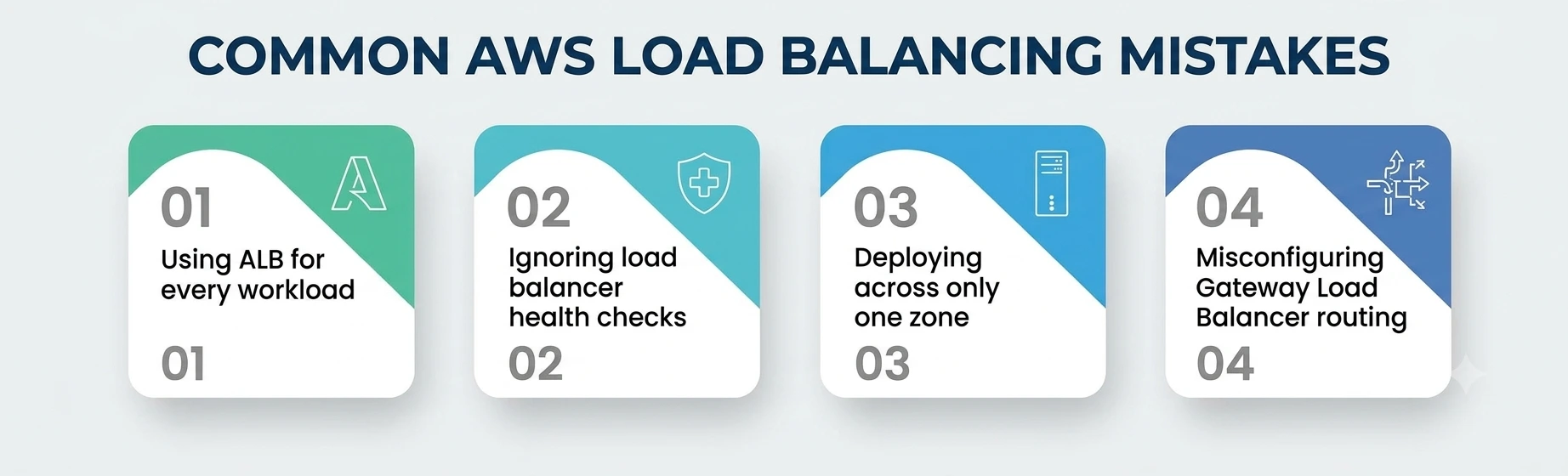
- The most common is defaulting to an ALB for everything, including latency-sensitive, non-HTTP workloads where a Layer 4 approach would have delivered meaningfully better throughput with less overhead.
- The second is skipping health check tuning entirely, leaving default thresholds in place that take too long to detect a failing target — a gap that quietly undermines the fault tolerance the service is supposed to provide.
- The third is enabling only a single Availability Zone during initial setup, which defeats the purpose of redundancy before a single request has even been served, since there’s no second zone to fail over to.
- And the fourth is forgetting that a Gateway Load Balancer needs its own subnet and routing setup in both the provider and consumer VPCs — skip that, and the GLB ends up deployed but functionally unreachable. If VPC subnets and routing still feel confusing, these AWS networking interview questions break down the basics in a simple way.
None of these mistakes are exotic — each gets fixed in minutes once someone notices, which is exactly why good AWS load balancing deserves a deliberate checklist rather than an assumption that the defaults handled everything.
A Personal Note
The first time I had to choose between the AWS load balancer types for a real workload, I picked an ALB purely because it was the one I’d used in every tutorial I’d followed. The workload was a UDP-based telemetry pipeline, and within a week it was obvious the choice was wrong — the ALB couldn’t even see the traffic properly, let alone route it well.
Switching to an NLB fixed it in an afternoon, and the lesson stuck with me longer than any diagram could have: the question is never “which load balancer do I already know,” it’s “what layer does my traffic actually live at.”
If you’re a student working through this material, resist the urge to memorize feature lists. Build something small using each option, send traffic that doesn’t fit the one you tried first, and watch it fail. That’s a faster teacher than any guide, including this one.