Most lists of Kubernetes interview questions online are still written for someone fresh off a weekend course — define a pod, define a node, move on. That’s not what a panel asks an engineer with three or four years of production experience.
By 2027, platform teams have mostly stopped asking candidates to recite YAML and started asking them to reason through a cluster that’s already on fire. The CNCF Annual Cloud Native Surve found Kubernetes production adoption had climbed to 82 percent — exactly why panels now test judgment, not vocabulary.
This guide walks through 25 Kubernetes interview questions built for that bar, grouped by what senior panels actually probe: architecture, scaling, networking, monitoring, and automation. Every answer is a short reasoning walkthrough, not a one-line definition, because an experienced candidate is expected to explain the “why,” not just the term.
The questions below assume a microservices architecture as the default deployment model, since that’s the context nearly every one of these Kubernetes interview questions gets asked in.
Why Have Kubernetes Interview Questions Shifted Toward Scenarios?
A few years ago, Kubernetes interview questions mostly tested whether a candidate had memorized the object model. Teams running dozens of independently deployed services now need engineers who can reason under real production constraints, describe an actual incident they’ve handled, and talk through automation pipelines they’ve built, not just read about.
The Stack Overflow Developer Survey has shown containers and orchestration among the most widely used professional tooling for years, so panels assume baseline fluency exists and spend the interview probing depth instead.
Core Kubernetes Architecture Components
A quick map worth having solid before the Kubernetes interview questions below shift into scenarios:
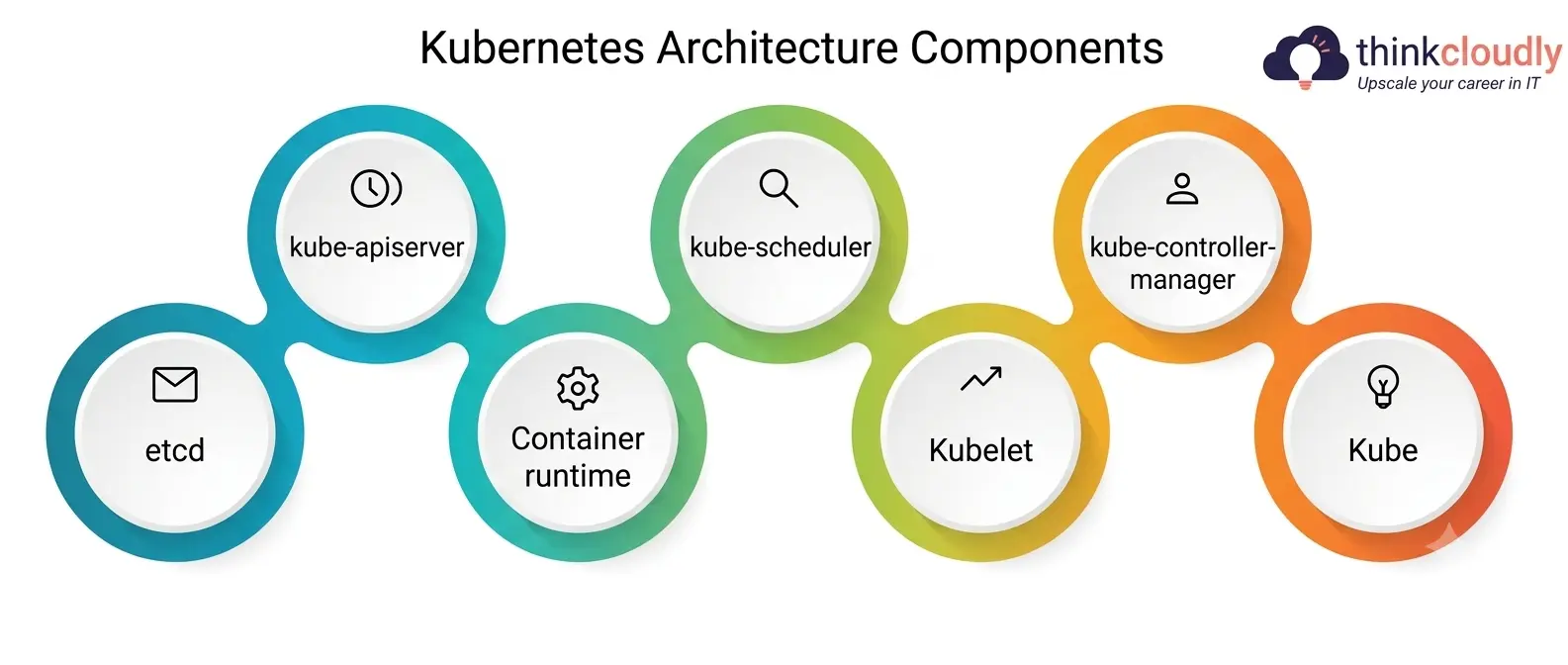
- kube-apiserver – the front door; every component talks to the cluster only through this API.
- etcd – the key-value store holding all cluster states.
- kube-scheduler – assigns new pods to nodes based on resources and affinity rules.
- kube-controller-manager – runs the loops that keep actual state matching desired state.
- kubelet – the node agent that starts and stops containers and reports their status.
- Kube – proxy handles the routing rules per-node, to make sure traffic is delivered to the correct pods.
- Container runtime – often container; downloads images, runs containers.
25 Kubernetes Interview Questions and Answers
These 25 Kubernetes interview questions cover everything from core concepts to real-world scenarios that hiring managers love to ask. Each answer is kept short and practical, so you can revise quickly and explain it with confidence in your next interview.
Q1. What happens, step by step, when you run kubectl apply on a deployment manifest?
Answer. The apiserver authenticates and validates the request, then persists the desired state into etcd. The deployment controller notices the change and creates a ReplicaSet, which creates pod objects; the scheduler assigns each pod to a node, and the kubelet there pulls the image and starts the container.
Q2. Why does Kubernetes fit a microservices architecture so naturally, and where does that fit break down?
Answer. Kubernetes gives each service in a microservices architecture its own deployable unit, independent scaling, and isolated failure domain. The fit breaks down around cross-service communication — fifty interdependent services introduce latency chains and partial failures a monolith never had, and Kubernetes doesn’t solve that on its own.
Q3. How is a Deployment different from a StatefulSet and a DaemonSet?
Answer. A Deployment manages interchangeable, stateless pods. A StatefulSet gives stable identity and storage per pod, which is important for databases and queues. A DaemonSet is used for agents like log collectors and ensures exactly one pod per node. One common mistake is to run a database as a plain Deployment and lose the storage binding a StatefulSet provides.
Q4. What happens to the cluster when etcd goes down?
Answer. How do you protect it? If you lose etcd, and have no backup you lose all of the memory of the cluster. Nothing new can be scheduled or recovered. The right protection is a tested backup-and-restore process, with etcd running as an odd number multi-node cluster so losing one member doesn’t break quorum.
Q5. What’s the difference between a taint and a node affinity rule?
Answer. A taint sits on a node and repels pods unless they tolerate it, useful for reserving specialized nodes. Node affinity sits on a pod and expresses a preference for which nodes to land on. The two are usually paired: taints keep unwanted pods off a node pool, and affinity steers the right pods toward it.
Q6. Explain how you would do a zero-downtime rolling update of a critical service?
Answer. Workload management for a safe rollout starts with tuning maxUnavailable and maxSurge so that old pods are only removed once new ones have been confirmed healthy by readiness probes. And a pod disruption budget makes sure a routine node drain can’t take down more replicas than the service can tolerate.
Q7. What’s the difference between resource requests and limits, and what happens when they’re wrong?
Answer. A request is what the scheduler uses to place a pod; a limit is the hard ceiling the kubelet enforces at runtime. Setting requests too low is a classic workload management mistake — it lets the scheduler overpack a node beyond what it can sustain. Memory limits set too low cause OOMKilled terminations; CPU limits set too tight cause throttling instead of a crash.
Q8. How does the Horizontal Pod Autoscaler decide when to scale, and what fails most often?
Answer. It watches a target metric, usually CPU or memory, and adjusts replica count to keep it near a set target. A frequent failure is scaling on a metric that doesn’t track real load — CPU can stay flat while queue depth spikes — which is why custom, request-based metrics are increasingly preferred for mature workload management.
Q9. What’s the difference between a liveness probe and a readiness probe?
Answer. A liveness probe signals whether a container should be restarted; a readiness probe signals whether it should receive traffic. Configuring both identically is a costly mistake — a briefly overloaded pod gets killed instead of pulled from rotation, turning a slowdown into an outage.
Q10. How should a genuinely risky canary deployment be structured?
Answer. A canary routes a small slice of real traffic to the new version while most traffic stays on the stable one. Strong canary design pairs this with success metrics decided in advance — error rate, latency percentile, a rollback threshold — and a rollback path that works in under a couple of minutes, not just on paper.
Q11. What are the different types of Kubernetes Services, and when is each used?
Answer.
|
Service Type |
How It’s Exposed |
Typical Use Case |
|
ClusterIP |
Internal cluster IP only |
Default; service-to-service traffic inside the cluster |
|
NodePort |
A static port opened on every node |
Quick external access, usually for testing |
|
LoadBalancer |
Provisions a cloud load balancer |
Production-facing services needing a stable public endpoint |
|
ExternalName |
Maps a name to an external DNS record |
Referencing an external database or API internally |
Picking the wrong Kubernetes Services type causes real incidents — exposing a NodePort straight to the internet instead of fronting it with a LoadBalancer bypasses controls most teams assume are already there.
Q12. How does Kubernetes DNS resolve a service name to a pod IP?
Answer. CoreDNS automatically creates a DNS record for every Kubernetes Services object. A lookup resolves to the service’s stable ClusterIP, and kube-proxy’s rules then load-balance across the healthy pods behind it — pods never need to track real pod IPs, since routing to Kubernetes Services endpoints is handled transparently as pods scale.
Q13. What is the difference between Service resource and Ingress resource?
Answer. A Service routes at the network layer, but knows nothing about HTTP paths or hostnames. An Ingress sits in front of it and puts application layer routing on top — /api goes to one backend, and /app goes to another, often with TLS termination — and then passes traffic to the right Service underneath.
Q14. How would you debug a service that suddenly stops routing traffic correctly?
Answer. First — check the service selector against the actual pod labels. This is a frequent, easy to miss cause after a recent change. Check the endpoints object. If it’s an empty list, it’s usually failing readiness probes, not a network problem. If endpoints look good, check node rules for kube-proxy and any NetworkPolicy that could be blocking traffic for the first time.
Q15. What is a NetworkPolicy, and why do so many clusters still run without one?
Answer. A NetworkPolicy restricts which pods can talk to each other, acting as a firewall inside the cluster, not just at its edge. Without one, pod-to-pod traffic is wide open by default, so one compromised pod in a microservices architecture could reach every other service. Many teams skip it simply because retrofitting policies onto a running environment is harder than designing them from day one.
Q16. What’s the difference between metrics, logs, and traces, and why does an experienced engineer need all three?
Answer. Metrics are numeric time series — CPU, request rate, error count — good for dashboards and trend alerting. Logs are discrete events that explain what happened inside one request. Traces follow a single request across services in a microservices architecture, often the only way to pinpoint which hop caused the latency.
Q17. How do you configure the CPU and memory monitoring with Prometheus, what is a common mistake?
Answer. Prometheus scrapes metrics from cAdvisor and the kubelet, usually in combination with Grafana for visualisation and Alertmanager for alerts. A common pitfall in container monitoring setups is to alert on raw usage spikes without requiring a sustained duration – a deploy spike shouldn’t page anyone. It’s worth quoting the Prometheus docs directly, because they really get the scrape-and-alert model.
Q18. Pod is in CrashLoopBackOff, how will you troubleshoot it?
Answer. Start with kubectl describe pod to check recent events and exit code — an OOMKilled code will look very different from an application crash. Then usually the actual error would show up with kubectl logs –previous. If you see no logs, check resource limits and recent config changes, a bad environment variable or an over-eager probe is often the culprit.
Q19. What’s the difference between monitoring and observability?
Answer. Monitoring answers questions a team already knew to ask, through predefined dashboards. Observability provides enough raw, structured data to answer questions nobody thought to ask in advance — which matters when debugging a novel failure across many services that no fixed container monitoring dashboard was built to catch.
Q20. How should alert thresholds be chosen to avoid both missed incidents and alert fatigue?
Answer. Too tight, and alerts generate noise teams learn to ignore, defeating the purpose of container monitoring. Too loose, and real degradation goes unnoticed until users feel it. The fix is tying alerts to user-facing symptoms — error rate, latency percentile — rather than arbitrary infrastructure numbers.
Q21. How does a GitOps-based DevOps automation pipeline differ from a traditional push-based CI/CD pipeline?
Answer. A push-based pipeline has the CI system apply changes directly with cluster credentials, meaning every run needs broad production access. A GitOps-based DevOps automation setup instead has an in-cluster agent, commonly ArgoCD or Flux, continuously reconcile the cluster to match what’s declared in Git, so the pipeline never holds cluster credentials at all — and rollback becomes as simple as reverting a commit.
Note: You can also do Devops Certification course to underdtand about it.
Q22. What’s the role of RBAC, and what mistakes do even experienced teams still make?
Answer. RBAC defines what a user or service account can do against the apiserver. A common mistake is granting cluster-admin to unblock a DevOps automation pipeline, then never revisiting that grant. The safer pattern scopes access to exactly what each step needs.
Q23. How would you design cluster autoscaling to handle a sudden traffic spike?
Answer. Autoscaling works at two layers — the Horizontal Pod Autoscaler adjusting replica counts, and the cluster autoscaler adjusting node count. A small buffer of spare capacity avoids the delay of booting new nodes mid-spike, and pod priority classes get critical services scheduled first.
Q24. What security practices should be non-negotiable before a cluster goes to production?
Answer. A defensible baseline enforces Pod Security admission to block privileged containers, applies NetworkPolicies instead of leaving pod traffic open, scans images for known vulnerabilities, and rotates secrets instead of hardcoding credentials. None of this is exotic; the signal is whether a candidate can explain why.
Q25. How would you justify further DevOps automation investment to a team whose manual process “works fine”?
Answer. The honest framing is a risk, not just speed. A manual process that works today depends entirely on one or two people who remember every undocumented step — a real liability the moment they’re unavailable during an incident. Framing the pitch around removing that single point of failure lands better than “doing things faster.”
Kubernetes Troubleshooting Checklist for Production Clusters
A fast-scan reference worth keeping visible rather than buried in a paragraph:
- Check pod status first – scan for CrashLoopBackOff, Pending, or ImagePullBackOff states.
- Confirm resource pressure – a node quietly out of capacity explains many scheduling failures.
- Verify service selectors match pod labels – a mismatch after a change is a common, easy-to-miss cause.
- Review recent deployment history – check whether a change correlates with when the problem started.
- Inspect probe configuration – an overly aggressive liveness probe can look like an application bug.
- Check for NetworkPolicy changes – a new policy can silently block traffic that used to work.
A Personal Note
I’ve sat in on enough technical rounds to say this plainly: the engineers who do well aren’t the ones who memorized the most Kubernetes interview questions the night before. They’re the ones who’ve broken something in a cluster, fixed it under pressure, and can walk through it calmly instead of reciting a definition. Pick three or four moments from your own work and practice explaining what went wrong and why your fix worked — that grounded story beats a textbook answer every time.