




Most beginners don’t fail at DevOps because they’re slow learners. They fail because they open a job listing, see fifteen tool names stacked in the requirements section, and try to study all fifteen at once instead of picking the five that actually matter in year one.
I’ve sat across from enough confused students to know the pattern by heart: someone spends a month bouncing between tutorials for tools they’ll never touch in an entry-level role, while the one skill every hiring manager actually tests for — a clean commit history — sits untouched.
This guide skips the sprawling directory-style list. It walks through five DevOps tools in the order a working engineer actually picks them up, explains what each one solves in plain language, and backs every claim with something you can check yourself rather than a recycled “top tools” roundup. If you’re choosing your first toolkit this year, start here and stop there until each one clicks. You can also join the ThinkCloudly DevOps training program.
Why Fewer DevOps Tools, Learned Properly, Beat a Long List?
Stonebranch’s fifth annual Global State of IT Automation Report, drawn from a survey of more than 400 IT Ops, DevOps, and platform engineering professionals, found that DevOps-specific automation now sits at 49% adoption, while 89% of organizations admit they’re already juggling multiple automation platforms at once. Read that carefully: even experienced teams are managing tool sprawl, not escaping it. A beginner adding a sixth or seventh tool before mastering the first few isn’t getting ahead of the industry—they’re recreating its biggest complaint.
That’s the real case for a short list. Learn five DevOps tools properly—one that tracks code, one that automates testing, one that packages applications, one that provisions servers, and one that configures them—and you already cover more real daily work than most job descriptions ask for. Depth beats breadth here, every time.
Git Version Control: The First Habit, Not the First Tool
Everything downstream of this depends on it, so start with Git version control before anything else on this page. Git version control gives you a complete, reversible history of every change made to a project, plus the ability to branch off and experiment without any risk to the working codebase.
GitHub’s Octoverse 2026 report, published October 28, 2026, puts the scale of this habit in perspective: developers pushed 17.9 billion pushes and made 34.3 billion commits across public and private repositories in the twelve months ending September 30, 2026—both figures more than the two previous years combined. GitHub Actions alone ran 45.4 billion jobs in that same window, which tells you how tightly version control and automation are now stitched together.
Practicing Git version control doesn’t require a real job. Create a repository, make small commits with honest messages, open a branch, break something on purpose, and merge it back through a pull request. That loop—branch, commit, review, merge—is the single most repeated motion in this field, and it’s the one habit that makes every other tool on this list easier to understand once you reach it.
Jenkins Automation and the CI/CD Layer Around It
Once code lives somewhere safe, the next problem is getting it tested and released without a human babysitting every step. That’s where Jenkins automation and its competitors come in, and the landscape is more balanced than most beginner guides suggest.
A dedicated CI/CD survey run by JetBrains and TeamCity in early 2026 found that, among organizations with a CI/CD tool in place, GitHub Actions leads at 33% adoption, Jenkins automation sits close behind at 28%, and GitLab CI trails at 19%. Eighteen percent of respondents still run no CI/CD tool at all—a reminder that even this “basic” skill isn’t universal yet. The JetBrains CI/CD tools report breaks the numbers down by organizational and personal-project use if you want the full picture.
For a beginner, that spread is actually good news: there’s no single correct starting point, only a correct order of operations. If your code lives on GitHub, start there. If you’re joining a team that already relies on Jenkins automation for its older, more configurable pipeline setup, learn that instead—the underlying concepts of stages, triggers, and build artifacts transfer cleanly between either one. What matters is reaching one working milestone: push a commit, watch an automated test run, and see a pass or fail result without touching anything by hand.
Docker Containerization: Making “It Works on My Machine” Obsolete
Docker containerization solved a problem that used to eat entire afternoons: code that ran fine on a developer’s laptop and then broke the moment it reached a server with a slightly different setup. A container bundles an application with every library and dependency it needs, so it behaves the same way regardless of where it’s deployed.
The Cloud Native Computing Foundation’s most recent annual survey found that 56% of organizations now run containers in most or all of their production applications, up from just 41% in 2023, while container pilot programs—the “still testing it out” stage—dropped to only 6%. In other words, Docker containerization has quietly moved from experimental to default in just a few years. The CNCF’s cloud-native adoption findings cover the fuller context, including how container growth is fed into orchestration tools like Kubernetes.
Learn Docker containerization in this order, and resist the urge to skip ahead: Write a basic Dockerfile for an application you already understand, build the image and run it locally, then push that image to a registry so someone else could pull and run it unchanged. Only once that feels boring should you look at Kubernetes—orchestration without a solid grip on what a container actually is just becomes copy-pasted YAML you don’t fully trust.
Terraform Infrastructure as Code: Stop Clicking Through Cloud Consoles
Everything covered so far automates code. Terraform infrastructure as code automates the servers and cloud resources that code runs on, which is the part of the job that turns “DevOps” from a job title into an actual discipline. Instead of manually clicking through a cloud console to spin up a server, you write a configuration file describing exactly what you want, and the tool builds precisely that, every time, identically.
Firefly’s State of IaC 2026 research, published October 25, 2026, offers a useful reality check on where most teams actually sit with this skill: only 12% describe their infrastructure automation as fully “automated,” and just 5% have reached “self-healing” maturity, while a combined 49% are still at the “manual” or purely “scripted” stage. Sixty-eight percent deploy their infrastructure as code through general-purpose CI/CD tools rather than dedicated IaC platforms, and 90% admit their orchestration still needs real improvement.
That gap is actually an opportunity for a beginner: most of the field hasn’t mastered Terraform infrastructure as code either, so a genuine understanding of it—not just a syntax overview—puts you ahead of a large share of people already working in the role. Start by provisioning something small and disposable, like a single storage bucket or a tiny test server, through a configuration file instead of a console click. Destroy it, rebuild it from the same file, and confirm it comes back identical. That’s Terraform infrastructure as code in a nutshell, and the rest is mostly syntax and patience.
Ansible Configuration Management: Automating the Setup Nobody Wants to Repeat
Provisioning a server is only half the job. Once it exists, someone has to install packages, set permissions, configure users, and apply the same settings across every machine in a fleet—by hand, if nobody automates it. Ansible configuration management exists specifically to kill that repetitive, error-prone work.
What makes Ansible configuration management a reasonable second automation tool to learn, right after Terraform, is its agentless design: there’s no separate piece of software to install and maintain on every server you manage, just a connection over SSH and a set of plain-text instructions called playbooks. That lower setup cost is part of why configuration automation keeps climbing even as the tooling around it fragments—Stonebranch’s survey found that 78% of automation teams plan to either add or outright replace a platform within the year, a sign that the appetite for automating repetitive server work, the exact job this kind of configuration automation handles, hasn’t slowed down.
A sensible first project: write a playbook that installs one package, creates one user, and applies one configuration file across two test machines instead of one. The moment you see the same playbook behave identically on both machines, Ansible configuration management stops being an abstract concept and starts being a tool you actually trust.
5 DevOps Tools Beginners Should Learn First in Order
If you’d rather see the whole sequence at a glance before committing to it, here it is, stripped down to five steps:
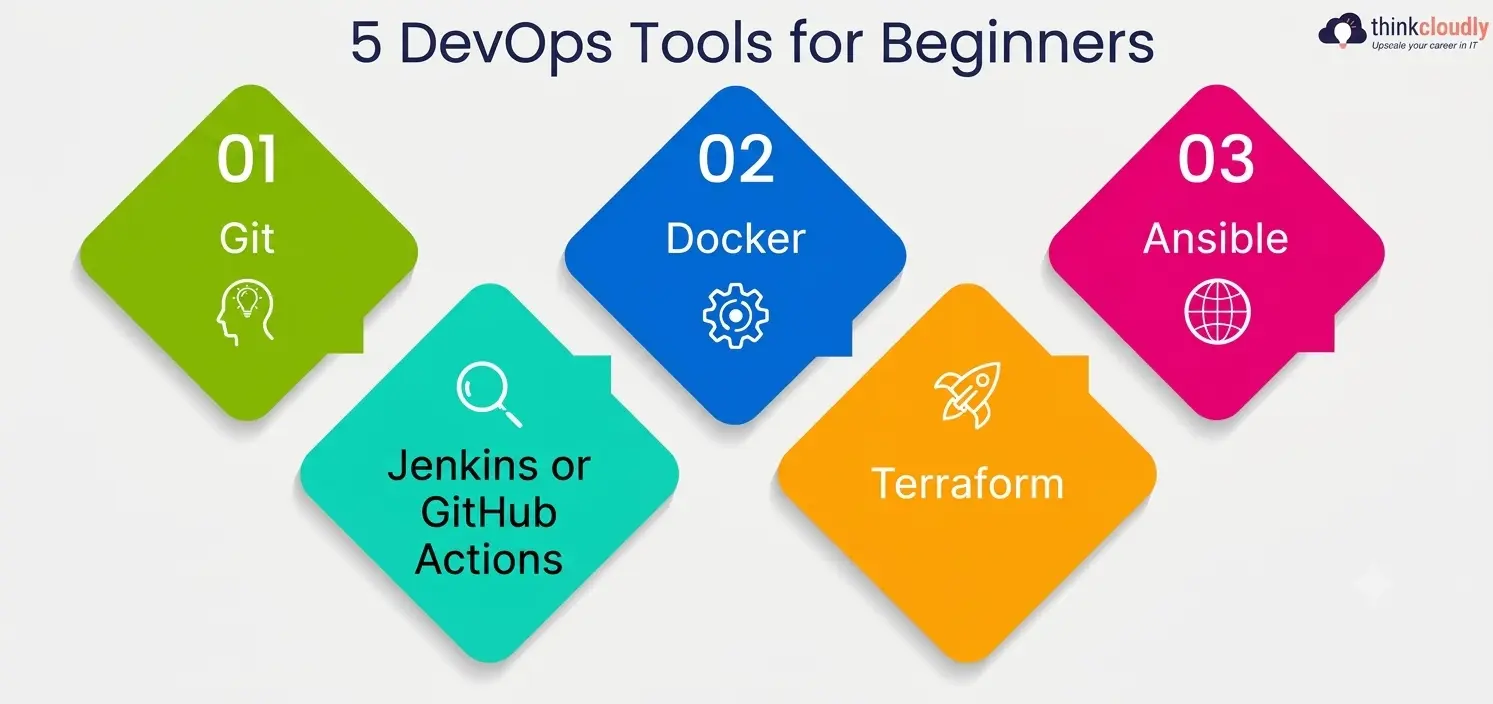
- Git—build the branch-commit-merge habit on a small personal project before touching anything else.
- Jenkins or GitHub Actions—automate one test run so code gets checked before it ships, not after.
- Docker—package one application into a container and run it identically in two different places.
- Terraform—provision one small, disposable piece of cloud infrastructure from a configuration file instead of a console.
- Ansible—configure that same infrastructure consistently, without repeating manual setup steps by hand.
Work through that order over roughly eight to ten weeks, one tool every two weeks, and you’ll have hands-on proof behind every line on your resume instead of a list of names you can only define, not demonstrate.
How These Five DevOps Tools Fit Together
|
Tool |
Core Job | Skill You Practice First |
Realistic Time to a Working Example |
|
Git |
Version control and collaboration | Branch, commit, merge, resolve a conflict |
A weekend |
|
Jenkins / GitHub Actions |
CI/CD automation | Trigger a test run on every push |
3–5 days |
|
Docker |
Containerization | Build and run one image consistently |
A weekend |
|
Terraform |
Infrastructure as code | Provision and destroy one resource from a file |
1–2 weeks |
|
Ansible |
Configuration management | Apply one playbook across two machines |
1 week |
Keep this table nearby while you’re planning study time. None of these five DevOps tools demands months of theory before you can see it work — each one has a small, honest first project that fits inside a weekend or two.
6 Mistakes That Slow Beginners Down With These Tools
- Learning every tool shallowly instead of five tools deeply. A resume full of names you can’t demonstrate in an interview is worse than a short list you can actually walk someone through.
- Skipping Git version control to jump straight to containers or orchestration. Every other skill on this page assumes a working version control habit already exists underneath it.
- Treating a CI/CD pipeline as something you read about rather than build. Reading how Jenkins automation works and watching your own pipeline fail for the first time teach completely different lessons.
- Going straight to Kubernetes before understanding what a single container actually does. Docker is the foundation; orchestration is the layer on top, not a replacement for it.
- Writing Terraform infrastructure as code once and never destroying what you built. Rebuilding the same resource from scratch is what proves the configuration file actually works, not just that it ran once.
- Ignoring configuration management entirely because it sounds less exciting than automation pipelines. Ansible is often the tool that quietly prevents the 2 a.m. incident caused by one server configured slightly differently than the rest.
A Personal Note
The first server I ever configured by hand took me most of a Saturday, and I was proud of it for about a week — right up until I had to set up a second one and realized I’d already forgotten two of the steps I’d done from memory the first time.
That’s the moment Ansible actually made sense to me, not because someone explained the theory well, but because I’d already felt the specific pain it exists to remove. I’d tell anyone starting this list the same thing: don’t wait until a tool’s value is obvious in the abstract.
Pick the smallest real project you can finish this weekend, let it break at least once, and fix it yourself before moving to the next tool on this page. That’s a far better teacher than any single article, including this one.