Most people treat their home or campus WiFi the same way they treat a light switch—flip it on, forget it exists, and assume it just works. That assumption is exactly what attackers count on. A wireless signal doesn’t stop at your wall the way a cable does; it spills into the hallway, the parking lot, and sometimes the street outside.
Anyone within range can try to listen in, and that is the entire reason wireless network security exists as its own discipline rather than an afterthought bolted onto regular IT security.
If you’re a student managing a laptop, a phone, and a handful of IoT gadgets on a shared network, or an early-career IT professional trying to understand how these pieces fit together, this guide breaks down what actually protects a wireless network in 2026—not the generic “use a strong password” advice, but the specific mechanisms that make a network hard to break into.
By the end, you should understand how identity verification decides who gets onto your network, why address-based filtering is useful but not bulletproof, what real wireless encryption looks like at the protocol level, and how ongoing traffic analysis and endpoint monitoring catch the threats that slip past the front door. We’ll also look at recent data on how badly this is being handled across the industry, because the numbers are more alarming than most people expect.
Why Wireless Network Security Matters More Than Ever in 2026?
Wireless networks have quietly become the largest unguarded entry point into most homes, schools, and offices. The scale of the problem is no longer theoretical. Researchers tracking wireless-related vulnerability disclosures found that flaws are now being reported at roughly 2.5 per day, a number that has grown far faster than vulnerability disclosures in any other technology category, according to Help Net Security’s 2026 reporting on wireless vulnerability growth.
Wi-Fi accounts for the majority of these disclosed flaws, with Bluetooth and cellular devices close behind—meaning nearly every wireless-capable gadget in a typical household or classroom carries some level of exposure.
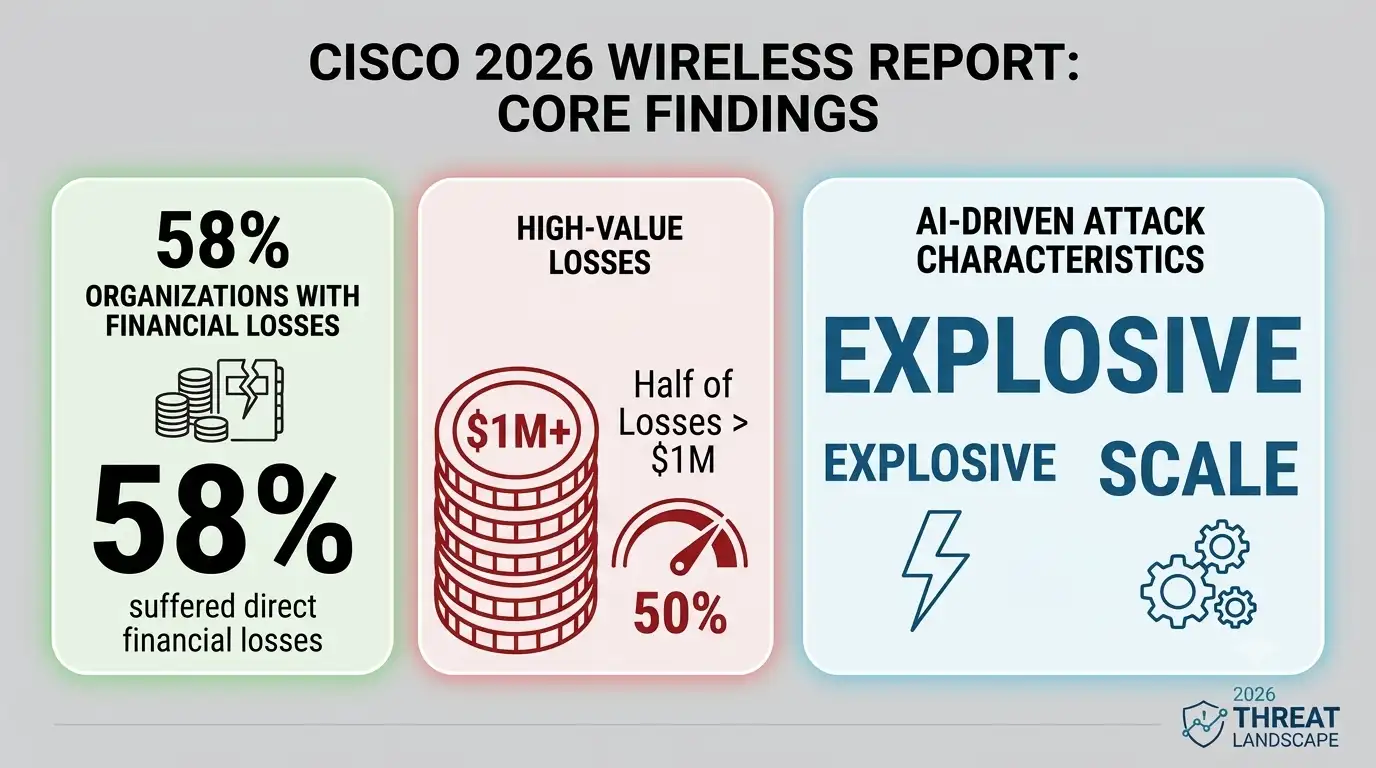
It isn’t just a numbers game either. Cisco’s 2026 State of Wireless Report found that 58% of organizations suffered direct financial losses from wireless security incidents in the past year, and half of those losses topped $1 million, largely because AI-driven attacks can now mimic normal network behavior and exploit weak configurations at a scale humans can’t match, as covered by eSecurity Planet’s summary of the Cisco findings.
For students and everyday users, this might sound like a corporate problem, but the same weak configurations — default router passwords, outdated firmware, open guest networks—exist on home routers too, and they’re just as exploitable.
Public and campus hotspots add another layer of risk: research on public WiFi usage found that roughly 40% of frequent travelers have already had their security compromised on an open network, with libraries, cafes, and shared study spaces among the riskiest places to log in, according to BroadbandSearch’s public WiFi data. Strong wireless network security isn’t a nice-to-have anymore; it’s the baseline expectation for anyone connecting more than one device to the internet.
Network Authentication: The First Real Checkpoint
Every meaningful layer of wireless network security starts with a simple question: how does the network decide who’s allowed to join? That question is answered by network authentication, the process of verifying a device or user’s identity before granting access to network resources.
On a typical home router, this is a single shared password (WPA2 or WPA3 Personal). On a school or corporate network, it’s usually far more granular—each user logs in with their own credentials through a system like WPA3-Enterprise or 802.1X, which checks identity against a central server rather than a password everyone shares.
The difference matters more than most people realize. A shared password used for network authentication means that if one person’s device is compromised, or the password leaks to someone who left the organization months ago, the entire network is exposed until every device gets reconfigured. Assigning each person their own login credentials avoids that problem entirely—access can be revoked for one person without disrupting anyone else.
For students setting up a home lab or a shared apartment network, even switching from a single shared WiFi password to a guest network with a separate password for visitors is a meaningful step toward better access-control hygiene. It won’t match enterprise-grade identity verification, but it limits how far a single compromised password can spread.
MAC Address Filtering: Useful Layer, Not a Silver Bullet
MAC address filtering is one of the oldest tricks in the wireless security toolbox, and it’s still worth understanding even though it isn’t a complete defense on its own. Every network device has a unique Media Access Control (MAC) address baked into its hardware, and this filtering lets a router administrator create an allow list—only devices with pre-approved MAC addresses can connect, regardless of whether someone else has the WiFi password.
The catch is that this kind of filtering can be bypassed by anyone with basic networking knowledge. MAC addresses are broadcast in plain text even on encrypted networks, and most operating systems let a user manually change, or “spoof,” their device’s MAC address to impersonate an approved one.
That means MAC address filtering should be treated as a speed bump, not a wall—useful for keeping casual or accidental connections off a small home or classroom network, but not something to rely on against a motivated attacker.
Where this approach genuinely earns its place is in smaller, controlled environments—a home lab, a handful of IoT devices, a small office—where the administrator knows exactly which devices should ever appear on the network and can quickly notice when an unfamiliar one shows up.
WiFi Security Protocols: What’s Actually Protecting Your Traffic
When people say “WiFi security,” they’re usually talking about the encryption protocol running underneath the connection—the thing that scrambles your data so it can’t be read by anyone eavesdropping nearby.
WPA2 has been the standard for over a decade, but WPA3 is now the recommended baseline for solid wireless protection, offering stronger encryption, protection against offline password-guessing attacks, and individualized encryption for open networks like the ones found in cafes and libraries.
Despite WPA3 being available on most routers sold since the early 2020s, adoption has been slower than expected, largely because older devices don’t support it and administrators are reluctant to break compatibility.
That gap matters: a report analyzing hundreds of wireless environments found that 94% of WiFi networks lack management frame protection, a feature that stops attackers from forging disconnect commands and forcibly kicking devices off the network, according to IT Pro’s coverage of the Nozomi Networks research.
That single missing setting is often the first move in a larger attack, since a forced disconnect can trick a device into reconnecting to a fake access point instead of the real one. If your router supports WPA3 and management frame protection, turning both on is one of the highest-value changes you can make to your network’s protection in an afternoon.
Network Traffic Monitoring: Catching What Slips Through
Even a well-configured network with solid authentication and modern encryption can still be breached—nothing is airtight forever. That’s where network traffic monitoring comes in: continuously observing the data flowing across a network to spot patterns that don’t belong, like a device suddenly sending large amounts of data at 3 a.m., or repeated connection attempts from an unfamiliar address.
For a home user, basic traffic monitoring might mean checking your router’s connected-devices list every so often and looking up any device you don’t recognize. For a school IT department or a small business, that kind of monitoring usually means dedicated software that flags unusual bandwidth spikes, unexpected outbound connections, or traffic patterns associated with known attack tools.
The value of this approach is that it doesn’t depend on stopping every attack at the front door—it assumes some attacks will get through and focuses on catching the unusual behavior that follows.
Given that AI-generated attacks are now specifically designed to mimic normal traffic patterns, per Cisco’s 2026 findings, consistent traffic analysis has become one of the few reliable ways to catch an intrusion that authentication and encryption alone didn’t stop.
Endpoint Monitoring: Securing the Devices, Not Just the Signal
Solid wireless protection isn’t only about the router and the airwaves—it’s also about every device connected to that network. Endpoint monitoring is the practice of watching the health and behavior of individual devices (laptops, phones, smart TVs, IoT sensors) for signs of compromise, rather than just watching the network as a whole.
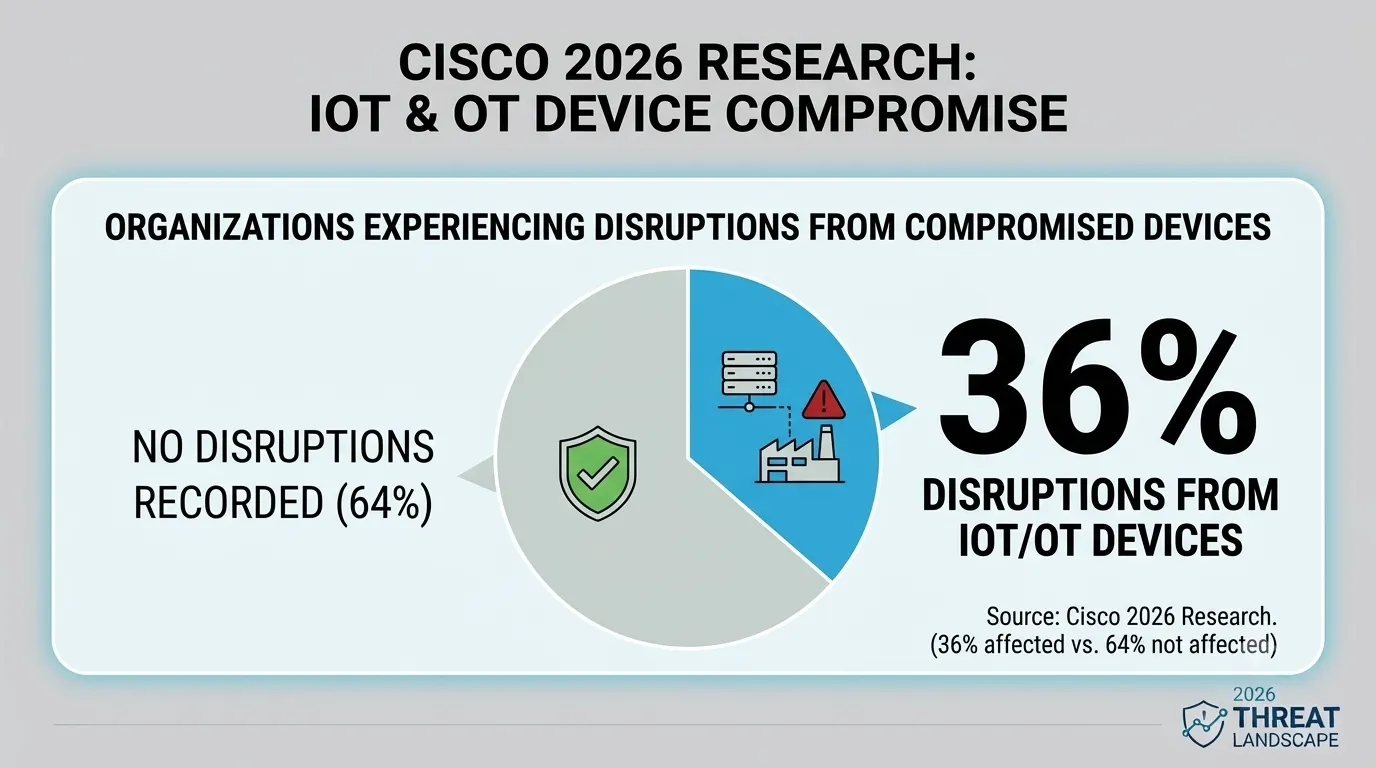
This matters because a huge share of real-world breaches start on a single compromised endpoint that then moves laterally across the rest of the network. Cisco’s 2026 research found that 36% of organizations experienced disruptions traced back to compromised IoT or OT devices—smart cameras, sensors, and other connected gadgets that rarely get the same security attention as a laptop.
This kind of monitoring closes that gap by tracking things like unexpected software installations, unusual outbound connections from a single device, or a device suddenly behaving differently than its normal baseline.
For students and home users, this kind of device-level monitoring can be as simple as keeping antivirus software active and updated on every device, checking for unauthorized apps, and making sure smart-home gadgets get firmware updates instead of being forgotten in a drawer of settings nobody opens.
For larger networks, dedicated device-monitoring tools give administrators visibility into every device individually, which pairs naturally with watching traffic patterns at the network level.
A Layered Approach: How the Pieces Fit Together
None of these controls work well in isolation. Wireless network security is strongest when authentication, filtering, encryption, and monitoring are layered together so that a failure in one area doesn’t leave the whole network exposed.
|
Security Layer |
What It Does | Best Suited For |
Key Limitation |
|
Network authentication |
Verifies identity before granting network access | All networks, especially shared or multi-user ones |
Shared passwords weaken it quickly |
|
MAC address filtering |
Restricts access to pre-approved hardware addresses | Small, controlled environments |
Easily bypassed by MAC spoofing |
|
WiFi security protocols (WPA3) |
Encrypts traffic and protects against password-guessing | Any modern wireless network |
Requires compatible hardware |
|
Network traffic monitoring |
Flags unusual data flow and connection patterns | Networks with multiple regular users |
Needs consistent review to be useful |
|
Endpoint monitoring |
Tracks individual device health and behavior | Networks with many connected devices | Can miss network-level attacks alone |
Read across a row, and you’ll notice a pattern: every layer has a limitation, and every limitation is covered by a different layer in the table. That’s the entire logic behind treating this kind of protection as a system rather than a single setting to toggle once and forget.
Common Wireless Network Security Mistakes Worth Fixing Today
A few habits show up again and again, whether it’s a home network or a small office. Leaving a router’s default admin password unchanged is still shockingly common, and it hands an attacker instant control over login settings, wireless protocols, and everything else on the device.
Ignoring firmware updates leaves known vulnerabilities open indefinitely, even after the manufacturer has already published a fix. Running an open guest network with no separation from the main network means a single compromised guest device has a clear path to every other device in the house or office.
And skipping this kind of monitoring entirely means an intrusion could sit unnoticed for weeks, since nobody is watching for the behavior that would have flagged it early.
None of these fixes require an advanced degree in networking. They require someone to actually sit down, log into the router’s admin panel once, and check the settings that get ignored by default.
A Personal Note
I started paying real attention to wireless network security after watching a friend’s smart home essentially get taken over because a single cheap camera never received a firmware update and used the router’s default admin password to boot.
Nothing about that failure was exotic—it was two ordinary oversights stacked on top of each other. What stuck with me afterward was how little effort the fix actually took once we sat down and went through it properly: new admin credentials, WPA3 turned on, a separate guest network, and a habit of glancing at the connected-devices list every couple of weeks.
If you take one thing from this piece, let it be that this kind of security rewards small, consistent habits far more than it rewards buying an expensive router and assuming the defaults are safe. They rarely are.