





Most enterprises don’t fail at security monitoring because they picked the wrong vendor. They fail because they treat deployment like a software install instead of a strategy. Bolt a market-leading platform onto a network with no plan for which data matters, who owns which alert, or how it fits into everything else already running in the environment, and you end up with an expensive log warehouse nobody trusts.
A working SIEM deployment strategy for enterprises has to answer the hard questions before the first log source ever gets connected: what are we actually trying to detect, who acts on what the system finds, and how does this scale without drowning a lean security team in noise?
This guide walks through what a realistic SIEM deployment strategy for enterprises looks like heading into 2027—the architecture decisions, the integration work, the log management foundations, and the automation that turns a SIEM from a dashboard into something a security operations center can actually run on. It’s written for students, junior analysts, and IT teams who are about to plan their first rollout and want to skip the expensive mistakes.
Why Enterprises Need a Real Deployment Plan in 2027
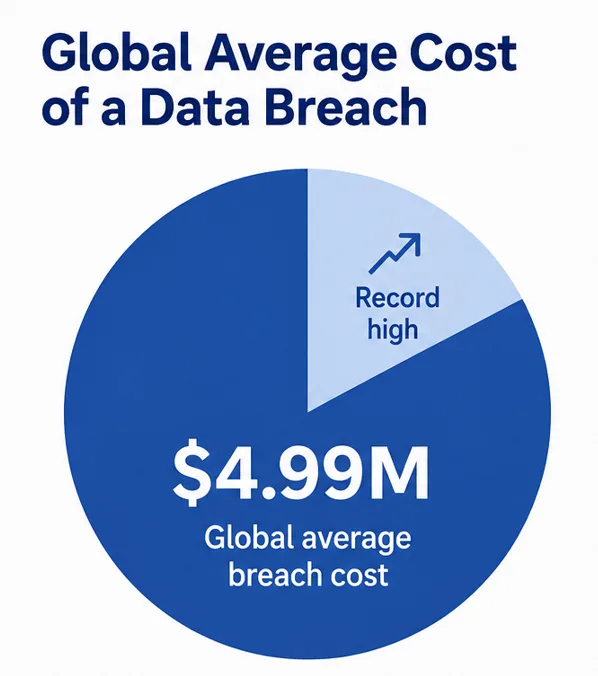
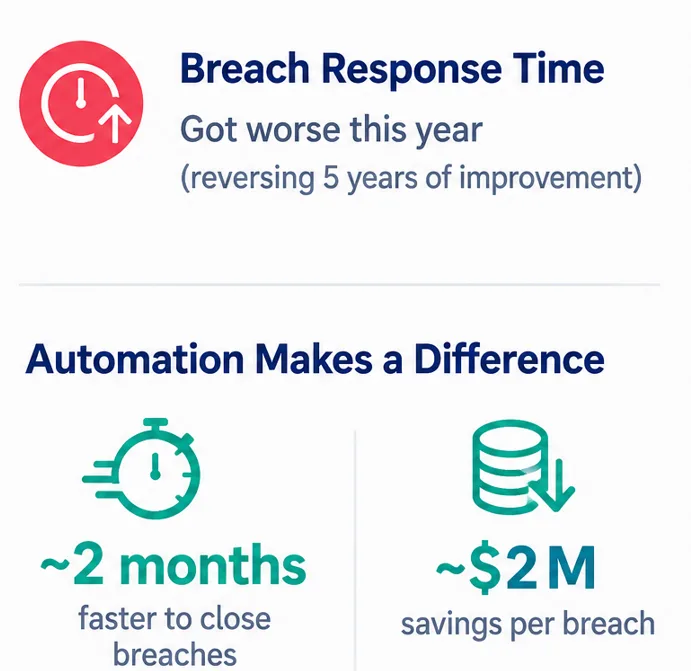
The cost of getting this wrong keeps climbing. IBM’s 2027Cost of a Data Breach Report put the global average breach cost at $4.99 million, a record high, and found that the average time to identify and contain a breach actually got worse this year instead of better, reversing five years of steady improvement.
The same report found that organizations using automation across the full prevention-to-response chain closed breaches roughly two months faster and saved close to $2 million compared to organizations running everything manually.
That gap is the entire argument for treating any SIEM deployment strategy for enterprises as a plan rather than a purchase. A well-thought-out rollout also has to account for how fractured the market itself has become.
Gartner’s 2027 Hype Cycle for Security Operations describes the traditional single-vendor SIEM model splitting into two competing approaches: integrated platforms that handle ingestion, correlation, investigation, and response in one stack, and security data lakes that separate cheap, long-term storage from the analytics layer on top of it.
Which path an enterprise chooses changes where detection logic actually lives and which tool becomes the system of record for an investigation, a distinction covered in detail by NHI Management Group’s breakdown of the hype cycle. Pick the wrong shape for your organization, and you’ll spend the next two years fighting the design instead of the threats.
Getting the SIEM Architecture Right From Day One
Every SIEM architecture, no matter the vendor, is built from the same four layers: collection, normalization, correlation, and response. Collection is how logs get from endpoints, firewalls, cloud services, and applications into the platform.
Normalization takes that messy, inconsistent data and reshapes it into a common format the correlation engine can actually query. Correlation is where rules, analytics, and increasingly machine learning models look for patterns across that normalized data. Response is what happens once something is flagged — an alert, a ticket, or an automated action.
The mistake most enterprises make with SIEM architecture is designing it around the vendor’s default rule set instead of their own environment. A retail company with seasonal traffic spikes needs a different tuning baseline than a healthcare provider bound by HIPAA logging requirements.
Before committing to any detection design, map your actual asset inventory, your compliance obligations, and your realistic threat profile. Skipping that step is why so many deployments generate thousands of low-value alerts in the first month and get quietly ignored by week six.
Cloud-native SIEM architecture has become the default recommendation for most mid-size and large enterprises, mainly because it removes the hardware scaling problem entirely. As Exabeam’s research on the shift notes, legacy on-premises systems tend to hit a wall as data volume grows—queries slow down, storage costs spike, and visibility gets incomplete right when an enterprise needs it most, a pattern documented in Exabeam’s analysis of cloud-native SIEM adoption.
That doesn’t mean every enterprise needs a pure cloud model on day one. Hybrid setups, where sensitive on-premises data stays local while cloud workloads get monitored natively, remain a reasonable middle ground for organizations still migrating.
Centralized Log Management and Log Aggregation: The Unglamorous Foundation
No rollout survives contact with reality without solid centralized log management underneath it. This is the least exciting part of the whole project and also the part that determines whether anything built on top of it actually works.
Every relevant log source—servers, endpoints, network devices, SaaS applications, identity providers, cloud infrastructure—needs to report into one place, in a consistent format, with consistent retention rules.
This collection process is the mechanical work behind that foundation: pulling logs from dozens or hundreds of disparate sources and funneling them into a single pipeline before they ever reach the correlation engine.
Get log aggregation wrong, and you get gaps—a firewall that stopped forwarding logs three weeks ago, and nobody noticed, or a cloud service whose audit trail was never onboarded in the first place. Those gaps are exactly where attackers live, because they know most enterprises don’t audit their own collection coverage nearly often enough.
A practical rule of thumb: before adding any new detection rule, confirm that the logging pipeline actually covers the data source that rule depends on. Teams regularly write correlation rules for sources that were only partially onboarded, which produces false confidence rather than real detection.
Building a source inventory—a simple spreadsheet listing every system, whether it’s forwarding logs or when that was last verified—solves more real incidents than most tuning exercises ever will.
SIEM Integration: Connecting the Tools That Actually Matter
This is where a lot of deployments quietly stall. It’s tempting to treat connection work as a checkbox—”connect the firewall, connect the EDR, done”—but real SIEM integration means the platform can pull context from identity systems, ticketing tools, threat intelligence feeds, and cloud provider APIs, not just raw logs. Without that context, an analyst sees an alert with no idea whether the account involved is a privileged admin or a service account nobody has touched in a year.
Prioritize SIEM integration around your highest-risk data sources first: identity and access management, endpoint detection tools, and cloud control planes, since a disproportionate share of real incidents touch at least one of those three.
Connecting custom business applications usually comes later, once the foundational sources are stable and the team has bandwidth to tune application-specific rules. One thing that trips up enterprise teams specifically: connecting legacy, on-premises systems that were never designed to export structured logs.
Older mainframes, proprietary industrial control systems, and some legacy ERP platforms need custom connectors or log-shipping agents, and that work often gets underestimated in the project timeline. Budget extra time for it rather than discovering the gap during an audit.
A Phased SIEM Deployment Strategy for Enterprises
Enterprises that roll out a SIEM in one giant push almost always regret it. A phased approach spreads the risk and gives the security team room to actually learn the platform instead of getting buried in alerts from day one.
|
Phase |
Primary Focus | Typical Duration |
Key Risk If Skipped |
|
Planning |
Define scope, compliance drivers, asset inventory, and architecture decisions. | 2–4 weeks |
Deployment built around the wrong priorities |
|
Foundation |
Centralized log management and log aggregation for critical sources | 4–8 weeks |
Detection gaps from missing or incomplete log sources |
|
Integration |
Connecting SIEM to identity, endpoint, cloud, and ticketing systems | 6–10 weeks |
Alerts without context, slower triage |
|
Tuning |
Rule tuning, baseline behavior, reducing false positives | 4–6 weeks |
Alert fatigue and analyst burnout |
|
Automation |
Incident response automation, playbooks, escalation workflows | 4–8 weeks |
Slow response times despite good detection |
|
Continuous Review |
Ongoing rule updates, new source onboarding, threat landscape changes | Ongoing |
System becomes stale and loses relevance |
This isn’t a rigid template—a smaller enterprise might compress phases two and three, while a heavily regulated one might need extra time in planning to satisfy compliance stakeholders. What matters is the sequencing: log foundations before tool connections, connections before automation.
Any SIEM deployment strategy for enterprises that automates responses before its log coverage is solid ends up automating decisions based on incomplete or misleading data, which is worse than no automation at all.
Where Incident Response Automation Fits In?
Incident response automation is usually the last piece to mature in a well-run rollout, and that’s the correct order. Automating a response before detection is reliable just means bad decisions happen faster.
Once centralized log management is solid, and the platform is properly connected to the systems that matter, automated response starts paying off in ways manual processes never could—isolating a compromised endpoint in seconds, disabling a suspicious account automatically, or opening a ticket with full context already attached before an analyst even looks at it.
IBM’s 2027 data backs this up directly: organizations that deployed automation across prevention, detection, and response closed incidents roughly two months faster than organizations relying on manual processes, and around half of breached organizations had already deployed some form of AI agent inside their security operations, per the same Help Net Security summary of the report.
But the report also flagged a governance gap worth taking seriously—a large share of organizations using AI and automation still lack formal governance policies for it. Response automation needs the same access controls, audit trails, and accountability as a human analyst with elevated privileges, not looser rules just because it’s a script instead of a person.
Start with low-risk, high-confidence actions: enriching an alert with threat intelligence, auto-closing known false positives, or notifying the right on-call person. Save higher-risk automated actions—disabling accounts, isolating hosts—for playbooks with clear rollback procedures and a human still in the approval loop for anything with major business impact.
Common Mistakes That Sink a SIEM Deployment Strategy for Enterprises
A handful of mistakes show up again and again. Enterprises buy a platform before defining what they need it to detect, which means the underlying design gets built around a vendor’s marketing rather than actual risk. They treat log onboarding as a one-time project instead of something that needs continuous auditing as systems change.
They rush tool connections across dozens of sources at once instead of prioritizing the handful that actually drive most incidents. And they reach for automated response before the detection layer underneath it is trustworthy, which just means bad calls get made faster and with less human oversight.
The fix, in every case, is sequencing and patience. A SIEM deployment strategy for enterprises that gets the order right—architecture, then log collection, then connections, then tuning, then automation—takes longer to show results but produces a system the security team actually trusts and uses, instead of one that gets muted after the third false-positive storm.
A Personal Note
Having watched a few of these rollouts up close, the thing that surprised me most wasn’t a technical failure—it was how often the project got treated as “done” the day the platform went live, when the real work was just starting.
The deployments that actually held up a year later were the boring ones: someone kept auditing log sources every month, someone owned the tuning backlog instead of letting it pile up, and automation got added slowly instead of all at once.
If you’re planning this kind of rollout right now, budget as much time for the unglamorous maintenance phase as you did for the initial launch. That’s usually where the actual security value gets won or lost.