
If you are a student, count the number of accounts you log into in a single week. Campus email, a learning portal, a library system, two or three streaming subscriptions, a part-time job’s payroll app, a bank, and at least four social platforms. Each one of those logins is a “credential”—a username paired with a secret that proves you are who you say you are.
Most people never think about what happens to that secret after they type it in and hit enter. That gap in understanding is exactly why this subject has become one of the most talked-about topics in everyday cybersecurity, not just inside corporate IT departments.
This guide breaks the subject down in plain language. No jargon walls, no assumption that you already know what a hash function is. By the end, you will understand what actually goes into protecting a login, why it covers far more than a single password, and how a handful of small habits can keep your digital life from becoming someone else’s payday.
What Is Credential Management?
At its simplest, credential management is the process of creating, storing, using, and eventually retiring the login details that give you access to a system. That includes your password, but it also includes recovery emails, security questions, API keys if you code, session cookies that keep you logged in, and increasingly, passkeys that replace passwords altogether. Think of it as the full lifecycle of your digital identity rather than just the string of characters you type on a login screen.
This is not a single action. It is a set of ongoing decisions: how long and unique your passwords are, whether you reuse the same one across five different apps, how a website stores that password on its servers, and how long your session stays active after you walk away from your laptop. Each of those decisions either narrows or widens the door an attacker can walk through.
Why Account Security Starts With Credential Management?
Every layer of account security you have ever heard of—two-factor codes, biometric unlocks, login alerts—exists because passwords alone were never enough. A stolen or guessed credential is still the fastest route into someone’s inbox, bank account, or student portal, which is why attackers automate the process at massive scale using stolen username-password pairs collected from previous breaches.
Strong account security depends on treating each credential as something with real value, because that is exactly how criminals treat it. A university email address linked to financial aid, a food-delivery account with a saved card, and a gaming account with years of purchases are all worth something on the black market.
When you understand that your login details have resale value, protecting them stops feeling like an IT chore and starts feeling like basic self-protection, the same instinct that makes you lock your dorm room door.
Password Policies in 2026: What Changed and Why It Matters
For years, “strong password” meant a forced mix of uppercase letters, numbers, and symbols, changed every ninety days whether it needed to be or not. That advice has quietly flipped.
The NIST SP 800-63B Digital Identity Guidelines—the U.S. government’s authoritative framework for authentication—now push organizations toward length over complexity, discourage forced periodic resets unless a breach is confirmed, and instead ask systems to screen new passwords against lists of already-compromised values.
Modern password policies favor a long, memorable passphrase—something like four unrelated words strung together—over a short string stuffed with symbols that you will inevitably forget and write on a sticky note. The logic is simple: a 16-character passphrase is mathematically harder to crack than “P@ssw0rd1!”, and it is far easier for a human brain to actually remember.
A well-designed policy means your school, bank, or employer should be allowing long passphrases, blocking known-breached passwords, and not punishing you with arbitrary complexity rules that only make you reuse a predictable pattern.
If you manage your own accounts as a student, apply the same logic personally. Set password policies for yourself: never reuse a password across two services, keep every password at least 14 characters long, and let a password manager generate and remember the random ones so you do not have to.
Password Hashing — What Actually Happens to Your Password
Here is something most students never learn until a data breach headline forces the question: a well-run website never stores your actual password. Instead, it runs your password through password hashing, a one-way mathematical function that converts “MyDogRex2026” into a long, seemingly random string. When you log in again, the site hashes what you typed and compares the two hashes rather than comparing plain text.
The OWASP Password Storage Cheat Sheet, maintained by the Open Web Application Security Project, recommends slow, memory-hard algorithms such as Argon2id, bcrypt, or scrypt for this job, paired with a unique random “salt” for every user so that two people with the identical password end up with completely different stored hashes. Fast general-purpose hashes like plain SHA-256 are explicitly discouraged for this purpose because attackers can guess billions of combinations per second against them.
Why should a student care about the mechanics of password hashing? Because it explains why reusing a password across accounts is so dangerous. If one site does password hashing correctly and another does not, a breach at the weaker site can expose your actual password, which criminals then test against every other account tied to your email—including the ones protected by properly hashed credentials.
Session Management—The Half of Credential Management Everyone Forgets
Logging in is only the first step. What happens after you are authenticated is governed by session management, the mechanism that keeps you logged in as you click around a site without re-entering your password on every page. A session is usually represented by a token or cookie stored in your browser, and it is temporarily just as powerful as your original credential.
This is where a large piece of overlooked credential management lives. Poor session management—sessions that never expire, tokens that are not regenerated after login, or cookies sent over an unencrypted connection—can let an attacker hijack an active session without ever knowing your password.
The OWASP Session Management Cheat Sheet recommends that sites rotate session identifiers after login, enforce both idle and absolute timeouts, and transmit session cookies only over encrypted connections with protective flags set.
As a student, you experience session management every time you tick “stay signed in” on a shared library computer or a friend’s laptop. Treat that checkbox with respect. A session left open on a public machine is functionally the same as leaving your password taped to the monitor, and closing the browser tab is not the same as logging out.
Authentication Protocols Every Student Should Understand
Behind every login screen sits one or more authentication protocols—the standardized rules that decide how a system verifies your identity and, in many cases, shares that verified identity with other services.
You have almost certainly used protocols like OAuth 2.0 when you clicked “Sign in with Google” on a new app, or SAML if your university uses single sign-on to connect your one login to dozens of internal tools.
Understanding authentication protocols at even a basic level helps you spot red flags. A legitimate “Sign in with Google” button should redirect you to an actual Google domain, not a look-alike page asking you to type your password into a third-party form.
The OWASP Authentication Cheat Sheet also pushes for multi-factor authentication wherever possible, since a stolen password alone becomes far less useful to an attacker once a second, independent proof of identity—a code, a hardware key, or a biometric check—stands in the way.
Newer authentication protocols are also pushing passwords toward extinction entirely. Passkeys, built on public-key cryptography, let you sign in with a fingerprint or device PIN instead of typing anything at all, removing the reusable secret that made credential stuffing profitable in the first place.
A Quick Comparison: Old Habits vs. Modern Credential Management
|
Practice Area |
Outdated Approach |
Recommended in 2026 |
|
Password length |
Short password with forced symbols |
Long passphrase (14+ characters), no arbitrary complexity |
|
Password changes |
Reset every 60–90 days regardless of risk. |
Change only after a confirmed breach or exposure. |
|
Storage on the server |
Plain text or fast hash (e.g., MD5) |
Slow, salted password hashing (Argon2id, bcrypt) |
|
Staying logged in |
Sessions that never expire |
Idle and absolute timeouts, session rotation after login |
|
Verifying identity |
Password only |
Password plus MFA, or passwordless passkeys |
|
Managing many accounts |
Reusing one password everywhere |
Unique password per account via a password manager |
Common Mistakes That Undermine Credential Management
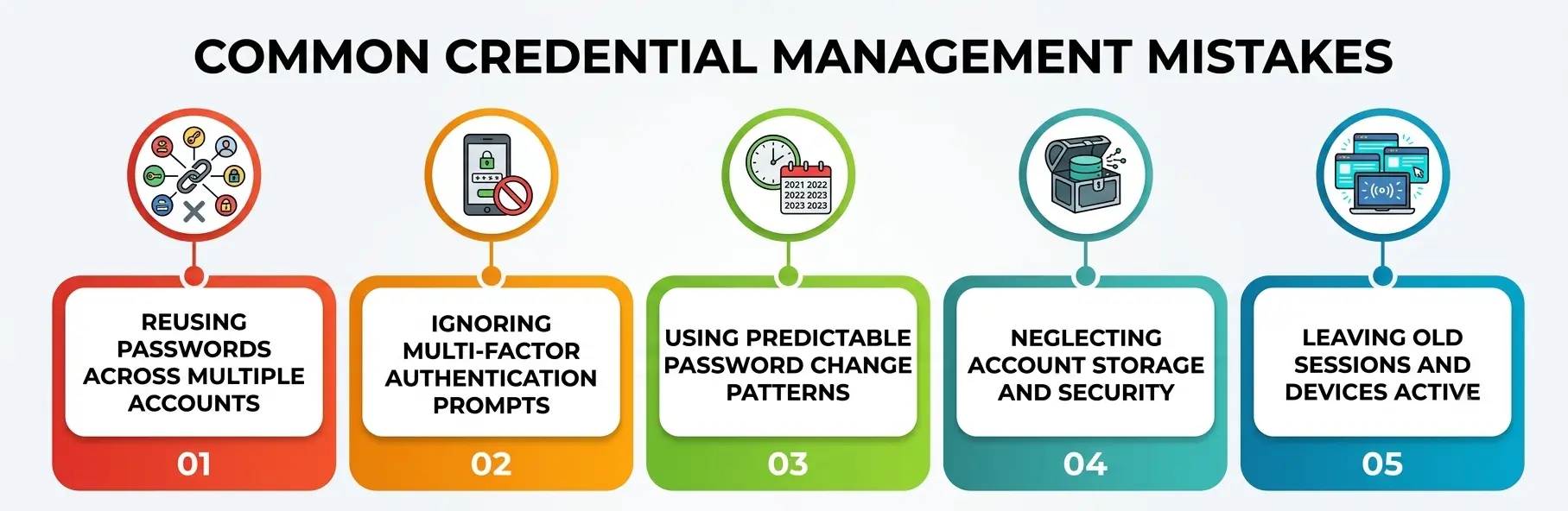
Even students who care about security fall into predictable traps. Reusing a favorite password across a streaming account, a class forum, and a bank app is the single biggest one—it turns one weak site’s breach into a full account takeover chain.
Ignoring account security prompts to enable multi-factor authentication because it feels like an extra step is another, especially since that “extra step” is often the only thing standing between a leaked password and a compromised account.
Lax password policies are not only an organizational problem; individuals set their own informal policies too, and “add a 1 at the end when a site forces a change” is a policy attackers have long since automated around.
Ignoring how your passwords are actually stored on the server, by using the same weak password everywhere, assumes every service you trust protects it equally well, which is rarely true.
Skipping the basics of staying logged in safely, like forgetting to log out of shared devices or never checking which devices are still active on your account, leaves old sessions open long after you stop thinking about them. And dismissing how sign-in systems actually verify you as “too technical to worry about” means missing obvious phishing pages that mimic a real login flow.
A Practical Credential Management Checklist for Students
You do not need a computer science degree to fix most of this in one sitting. Start with a password manager—it solves the problem of remembering dozens of unique passwords by generating and storing them for you, so you only need to remember one strong master passphrase. Turn on multi-factor authentication for your email first, since it is usually the recovery point for every other account you own.
Apply sensible password policies to yourself: unique passwords everywhere, a minimum length rather than forced symbols, and immediate changes only when a service tells you it was breached. You cannot control how a company stores your password on its servers, but you can choose services with a track record of taking security seriously, and you can make any individual breach less damaging by never reusing credentials.
Get comfortable managing your active sessions by logging out of shared computers, reviewing the “active sessions” or “devices” list in your major accounts every few months, and revoking anything you do not recognize. Finally, learn to recognize legitimate authentication protocols in action—check the domain before entering a password, and prefer “Sign in with” buttons over typing your credentials into an unfamiliar form.
Why Does This Actually Matter Right Now?
This is not a hypothetical problem for someday. The 2026 Verizon Data Breach Investigations Report found that stolen and compromised credentials remain one of the most common ways attackers get into accounts and networks, even as exploited software vulnerabilities have grown alongside them. That single data point is worth sitting with: an enormous share of real-world breaches still traces back to something as ordinary as a reused or poorly protected password.
Strong credential management will not make you invisible to every threat, but it removes you from the easiest category of target—the accounts protected by weak, reused, or unmonitored credentials that automated attacks are specifically built to find.
Every habit covered above, from tightening account security defaults to respecting sensible password rules, understanding how your data is stored, practicing careful sign-in hygiene, and trusting well-designed verification systems, adds up to a digital identity that is simply not worth an attacker’s time compared to the millions of easier targets still out there.
A Personal Note
I started paying real attention to this topic after a close friend lost access to a years-old email account because of a password she had been reusing since high school. Watching her spend a weekend rebuilding logins for accounts she had forgotten she even owned was the push I needed to finally set up a password manager and stop treating security prompts as annoyances.
None of this requires perfection—it requires a handful of habits you set up once and mostly forget about, the same way you would set up a lock and then just remember to use it.