Every laptop, phone, and server your organization owns is a doorway. Leave it unlocked, and it doesn’t matter how strong the walls around it are—someone will walk right in. That’s the reality driving the growing attention to Endpoint Security Management this year, especially as remote work, BYOD policies, and cloud-connected devices multiply the number of entry points attackers can target.
If you’re a student studying cybersecurity or an IT professional trying to make sense of a crowded market of tools and acronyms, this guide breaks down what Endpoint Security Management actually means, why it’s become non-negotiable in 2026, and how organizations build a strategy around it—without the sales pitch.
This topic shows up on the desk of a lot of different people: a help-desk technician patching laptops, a compliance officer preparing for an audit, a security analyst watching dashboards at 2 a.m., and yes, a student trying to figure out where to focus their studies.
The underlying ideas are the same no matter which seat you’re sitting in, which is why it’s worth understanding the fundamentals rather than just memorizing a vendor’s feature list.
What Is Endpoint Security Management?
Endpoint security management is the ongoing practice of monitoring, protecting, and controlling every device—laptops, desktops, mobile phones, servers, and IoT devices—that connects to an organization’s network. It isn’t a single product you install once. It’s a continuous process that combines technology, policy, and people to keep each device from becoming the weak link that lets an attacker in.
Think of it as the difference between locking your front door once and actually keeping an eye on who comes and goes, checking the locks periodically, and noticing immediately if a window gets left open. Endpoint Security Management does that at scale, across potentially thousands of devices, many of which the security team never physically touches.
At its core, a working program rests on five pillars: device protection, data encryption, application whitelisting, behavioral analytics, and security compliance. Miss any one of these, and the whole structure gets shakier.
Why Does This Matter More in 2026?
Numbers tell the story better than any sales deck. IBM’s Cost of a Data Breach Report found the global average cost of a data breach reached an all-time high in 2026, mostly due to increased costs to detect and escalate breaches, as well as lost business. Attackers are increasingly using AI-generated deepfakes and AI-enabled malware to circumvent traditional defenses.
Endpoints remain the preferred entry point. Verizon’s Data Breach Investigations Report found that stolen credentials were the single most common way attackers gained initial access, involved in roughly a fifth of all breaches, with exploited device and software vulnerabilities close behind. Once an attacker has a foothold on one endpoint, lateral movement to the rest of the network is often just a matter of time.
That’s why Endpoint Security Management has shifted from “something the IT department quietly handles” to a boardroom-level priority. Remote work isn’t going away, employees keep bringing personal devices into the mix, and the number of connected devices per employee keeps climbing. Every one of those devices needs device protection, and every gap is an opportunity attackers are actively hunting for.
There’s also a regulatory angle that’s easy to underestimate. Laws and frameworks covering how organizations handle personal and financial information keep expanding in scope, and regulators increasingly expect proof — not just promises — that connected devices are properly managed. A single unmanaged endpoint can turn a routine audit into a much longer conversation with a regulator.
The Five Pillars, at a Glance
Here’s a quick breakdown of the components that make up a functioning program:
|
Pillar |
What It Does |
Why It Matters |
|
Device Protection |
Deploys antivirus, firewalls, and endpoint detection tools directly on each device |
Stops malware and unauthorized access before it spreads |
|
Data Encryption |
Scrambles data at rest and in transit so it’s unreadable without the right key |
Protects sensitive information even if a device is lost or stolen |
|
Application Whitelisting |
Only allows pre-approved software to run on a device |
Blocks unknown or malicious programs from executing at all |
|
Behavioral Analytics |
Monitors how users and devices normally behave and flags anomalies. |
Catches insider threats and compromised accounts that bypass signature-based tools |
|
Security Compliance |
Aligns endpoint policies with frameworks like NIST, ISO 27001, or GDPR |
Reduces legal exposure and builds structured, auditable protection |
Each of these pieces plays a different role, and none of them substitutes for the others. Let’s walk through them one at a time.
Device Protection: The First Line of Defense
It begins with tools and configurations loaded directly onto a laptop, phone, or server to stop threats before they take hold—antivirus software, endpoint detection and response (EDR) agents, firewalls, and patch management systems that plug known vulnerabilities before attackers can take advantage of them.
The trick in 2026 is the coverage, not the technology itself. A single unmanaged laptop that connects to company systems without appearing in the endpoint inventory is a blind spot. If that device gets compromised, the security team may not even know it exists until damage is already done.
A solid foundation starts with knowing exactly what’s connecting to your network—every laptop, every phone, every forgotten test server—before any of it can be properly locked down.
None of this is a one-time install, either. It requires constant patching, since a large share of exploited vulnerabilities are attacked within days of becoming public knowledge. Automated patch management has become one of the most effective, and most underused, habits an IT team can build at this layer of an endpoint program.
Data Encryption: Making Stolen Data Useless
Even the strongest device-level defenses eventually fail somewhere—a phone gets left in a taxi, a laptop gets stolen from a car, or an employee falls for a phishing email. That’s where encryption earns its place.
Encrypting information at rest (on the device’s storage) and in transit (as it moves across networks) means that even if a device physically ends up in the wrong hands, the information on it stays unreadable without the correct decryption key.
Encryption is also one of the more cost-effective defenses an organization can invest in. Breach-cost research consistently shows that organizations with strong encryption practices see meaningfully lower breach-related costs than those without, simply because stolen information that can’t be read isn’t worth much to an attacker and doesn’t trigger the same regulatory penalties.
For students learning the fundamentals, full-disk encryption (protecting an entire device) and file-level encryption (protecting specific sensitive files) solve slightly different problems. Most mature programs use both, layered with strong key management so the encryption layer itself doesn’t become the weak point.
Application Whitelisting: Trust Nothing by Default
Application whitelisting flips the usual security assumption on its head. Instead of trying to detect and block every piece of malicious software—an endless, reactive game—whitelisting only allows pre-approved, known-good applications to run at all. Anything not on the approved list, including malware the security team has never seen before, simply doesn’t execute.
This method is particularly effective against zero-day attacks and fileless malware that tend to pass through traditional antivirus products because there is no signature to identify them. The tradeoff is administrative overhead: Someone has to maintain and update that approved list as legitimate software changes or employees get frustrated with tools that won’t run.
The best use of this is as part of a layered strategy, rather than a one-off fix. It’s one of the most common ways attackers gain a toehold on a compromised endpoint, and when combined with strong device-level protections and good encryption practices, it closes down that avenue.
Behavioral Analytics: Catching What Signatures Miss
Traditional security tools look for known threats—a virus signature, a blacklisted file hash, a flagged IP address. Behavioral analytics does something different: it learns what “normal” looks like for a specific user or device, then flags anything that deviates from that pattern. A finance employee suddenly downloading gigabytes of customer data at 2 a.m., or a device logging in from two countries within an hour, gets flagged even if no known malware is involved.
This matters because a growing share of serious incidents don’t rely on obviously malicious files at all. They rely on stolen, valid credentials being used exactly as a legitimate employee would use them, just for the wrong purposes. Signature-based tools can’t catch that. This kind of behavior-based monitoring, often powered by machine learning, can.
This category has become one of the fastest-growing areas of investment in endpoint security for exactly this reason: it addresses insider threats and compromised-credential attacks that other layers simply aren’t built to see.
Security Compliance: Turning Good Practice Into Policy
None of the above matters much if it isn’t consistent, documented, and enforced. This is what turns individual tools into an actual program—mapping every layer described above to recognized frameworks such as NIST’s Zero Trust Architecture guidance, ISO 27001, or industry-specific regulations like HIPAA and GDPR.
Security compliance isn’t just a legal checkbox, either, even though avoiding regulatory fines is a real motivator. A compliance framework forces organizations to actually document what devices exist, who has access to what, and how incidents get handled—the same visibility that makes every other layer of protection work better. Good compliance and genuine security posture tend to reinforce each other more often than people expect.
Building an Endpoint Security Management Strategy
Putting these pieces together into a working strategy usually follows a similar sequence, regardless of organization size:
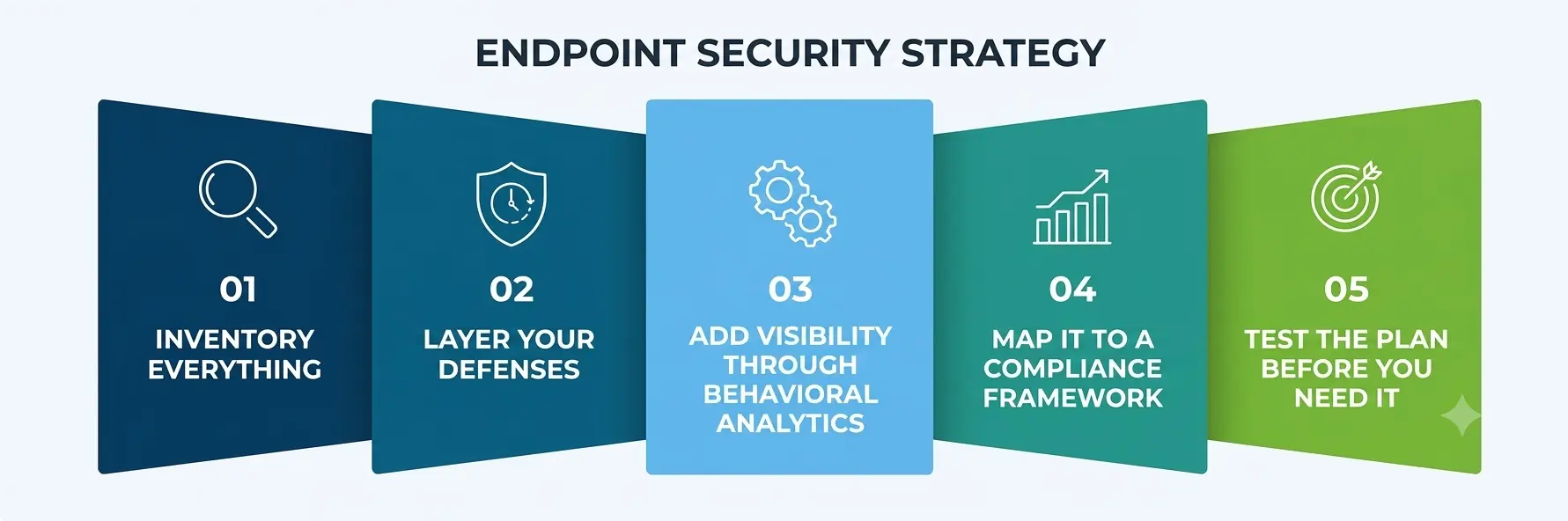
- Inventory everything. You can’t protect a device you don’t know exists. Start with a complete, continuously updated list of every endpoint touching company data.
- Layer your defenses. Combine device protection, application-approval controls, and data encryption rather than relying on any single tool.
- Add visibility through behavioral analytics. Static defenses stop known threats; this layer catches the ones that slip through.
- Map it to a compliance framework. Use recognized compliance requirements as a structure, not an afterthought, so nothing gets missed.
- Test the plan before you need it. A tested incident response plan, run through regularly rather than filed away, is what separates organizations that recover in hours from those that take weeks.
Common Mistakes Organizations Still Make
A few patterns show up again and again, even at well-resourced organizations, and most of them come down to treating protection as a one-time project rather than an ongoing responsibility:
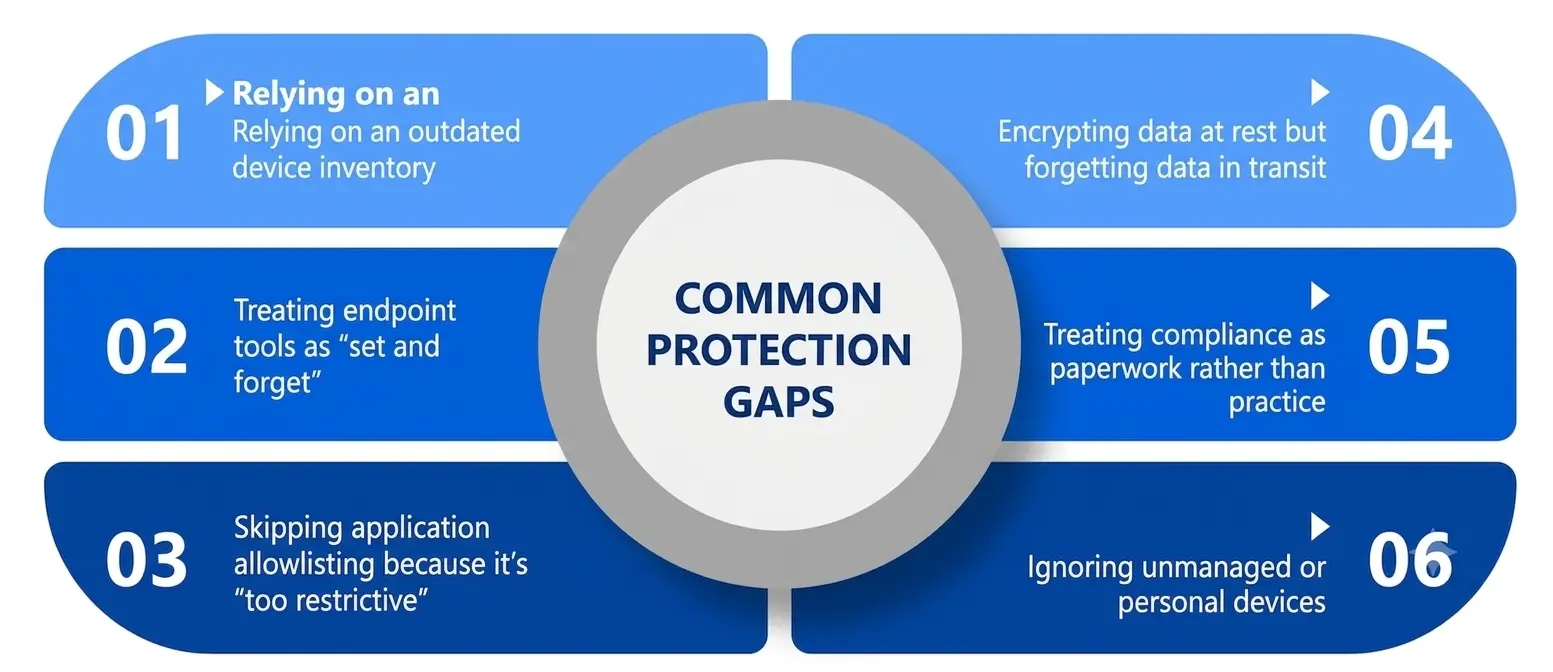
- Relying on an outdated device inventory. If the list of connected endpoints isn’t kept current, security teams end up defending a network they don’t fully understand.
- Treating endpoint tools as “set and forget.” Protection software that isn’t updated or monitored is barely better than nothing.
- Skipping application allowlisting because it’s “too restrictive.” The short-term convenience often isn’t worth the long-term exposure.
- Encrypting data at rest but forgetting data in transit. Encryption only works if it covers the full journey of the information, not just where it’s stored.
- Treating compliance as paperwork rather than practice. Passing an audit isn’t the same as being secure.
- Ignoring unmanaged or personal devices. BYOD policies without real endpoint protection controls create blind spots attackers actively look for.
Where Is This Headed?
Looking at where the field is trending, a few shifts stand out. Organizations are leaning harder on AI-assisted behavior monitoring to keep pace with AI-assisted attacks. Security researchers at Huntress note that balancing AI autonomy with human oversight has become one of the defining questions of the year, since fully automated decisions without a human check can go wrong quickly.
Ransomware tactics are also evolving past simple encryption toward multi-layered extortion combining data theft and public pressure, which puts even more weight on strong device-level protection and fast detection.
At the same time, research on endpoint security risks points toward unified platforms that combine detection, automated response, and visibility in one place, rather than organizations stitching together a dozen disconnected tools. For anyone studying this field, the underlying lesson holds steady even as the tools change: Endpoint security management works best as a coordinated system, not a pile of individual products.
A Personal Note
I’ve spent enough time around security teams to notice a pattern: the organizations that struggle aren’t usually the ones with smaller budgets. They’re the ones treating endpoint protection as a checklist item instead of an ongoing habit. If you’re a student just getting into this field, my honest advice is to spend less time memorizing tool names and more time understanding why each pillar exists.
Every layer—from the software running on a device to how information gets scrambled to which programs are allowed to execute to how unusual behavior gets flagged to how it all gets documented and audited—solves a different failure mode. Once you understand the failure, the tool makes a lot more sense, and that mindset will outlast whatever software happens to be popular by the time you graduate.