I still remember the first time an individual called me panicking because their email “disappeared.” It hadn’t disappeared—they’d just filtered it into a folder by accident—but for five minutes, that felt like the biggest problem in the world to them. That’s the job. Not servers humming in a data center somewhere.
People are stuck, needing someone calm on the other end of the line. If you’re thinking about breaking into tech and you don’t have a computer science degree sitting in a drawer, this is where most people actually start.
This guide walks through what a good help desk technician training program actually looks like, why it’s still one of the smartest ways into IT, and what nobody tells you before you enroll.
Why is the Help Desk Still the Front Door to IT?
Every industry that touches a computer — which, at this point, is every industry — needs someone to answer the phone when a laptop won’t turn on or a password won’t reset. That’s not going away. If anything, the more complicated company tech stacks get, the more this entry point matters.
A structured help desk technician training course teaches you the fundamentals employers actually screen for: how operating systems work, how to talk someone through a problem without making them feel stupid, and how to document what you did so the next technician isn’t starting from zero.
It’s less about memorizing trivia and more about building muscle memory for troubleshooting under mild pressure. Here’s the thing people underestimate: this role is a launchpad, not a dead end.
Technicians who spend a year or two on a service desk routinely move into network administration, cybersecurity, systems administration, or cloud support. The help desk is where you learn the language of IT before you specialize in a dialect.
What a Solid Help Desk Technician Training Program Covers
Not all courses are built the same, and a lot of cheap ones skip the parts that actually matter on the job. When you’re evaluating a help desk technician training program, look for these building blocks.
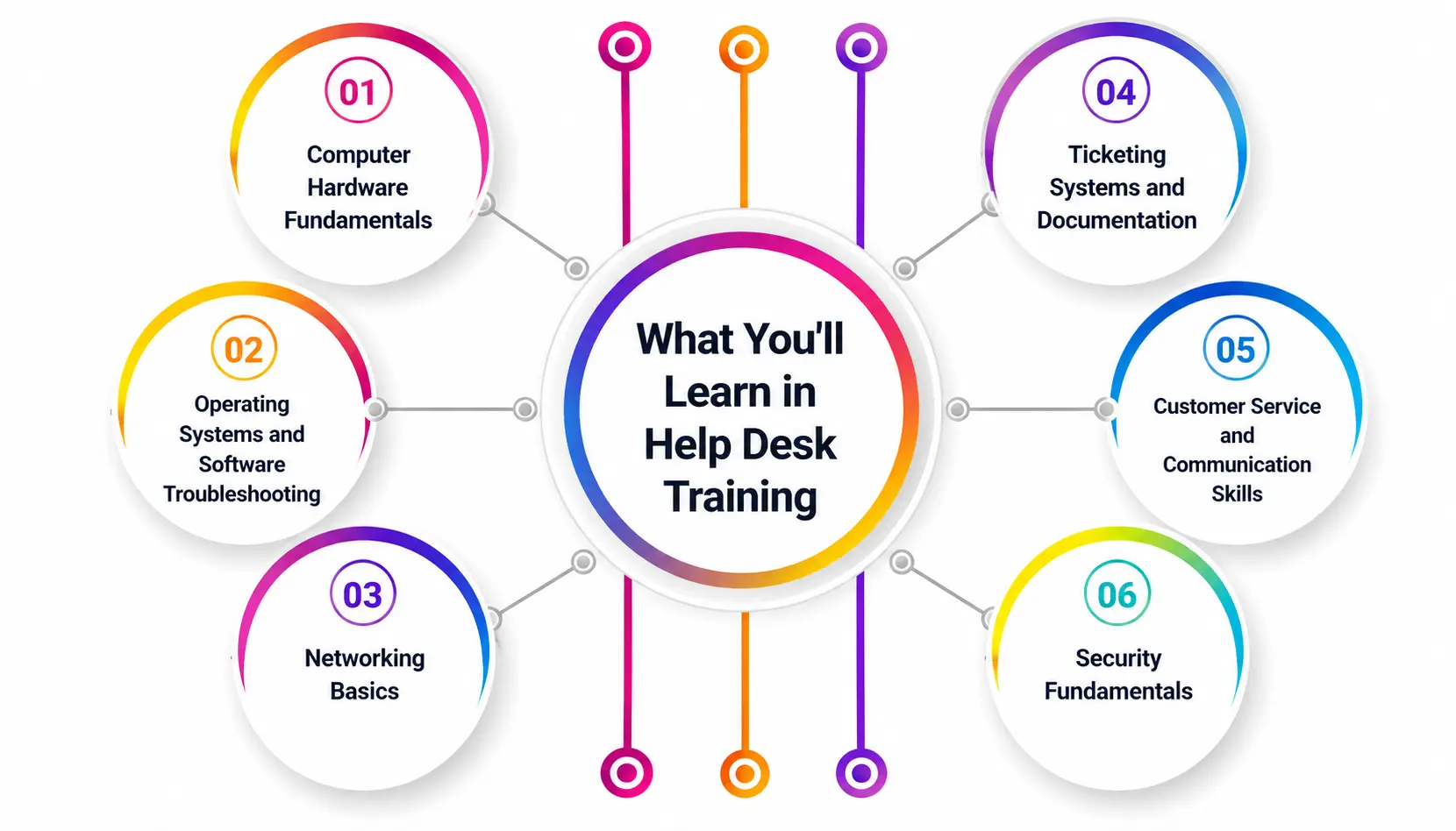
1. Computer Hardware Fundamentals
You need to know what’s inside the box before you can fix what’s wrong with it. That means understanding computer hardware—motherboards, RAM, storage drives, power supplies, peripherals—well enough to diagnose a dead machine over the phone just from the symptoms someone describes to you. A tech who’s comfortable with computer hardware can tell the difference between “this is a software glitch” and “this stick of RAM is failing” in under a minute, which saves everyone time.
2. Operating Systems and Software Troubleshooting
Windows still dominates most corporate environments, but macOS and increasingly Linux show up too. Good training covers file systems, user account management, driver conflicts, and the classic “Have you tried restarting it?” logic tree—except with the actual technical reasoning behind why that works so often.
3. Networking Basics
You don’t need to be a network engineer, but you need to understand IP addresses, DNS, Wi-Fi troubleshooting, and VPN connections well enough to walk a remote employee through reconnecting to the company network without either of you losing your patience.
4. Ticketing Systems and Documentation
This is the part nobody glamorizes, and it’s arguably the most important. Every service desk runs on ticketing systems — platforms like ServiceNow, Zendesk, Freshservice, or Jira Service Management — where every request gets logged, categorized, and tracked until it’s resolved. Learning to write a clean ticket is a skill on its own: clear problem description, steps taken, resolution, and time spent. Recruiters and hiring managers specifically ask about ticketing systems experience because it signals you already understand how a professional IT service desk actually runs day to day.
5. Customer Service and Communication Skills
Half the job is technical. The other half is emotional. People calling a help desk are often frustrated, sometimes on a deadline, and occasionally rude—not because they’re bad people, but because their computer just ate three hours of unsaved work. Training that includes soft-skills coaching, active listening, and de-escalation techniques produces technicians who last longer in the role and get promoted faster.
6. Security Fundamentals
Phishing recognition, password hygiene, multi-factor authentication basics, and knowing when to escalate a potential security incident instead of trying to fix it yourself. This is increasingly non-negotiable, since help desk staff are often the first line of defense against social engineering attacks.
Certifications Worth Pursuing Alongside Training
Certifications don’t replace hands-on skill, but they get your resume past the automated filters that reject applications before a human ever sees them.
The most widely recognized starting point is CompTIA A+, which requires passing two separate exams—Core 1 and Core 2. As of 2026, each exam voucher runs roughly $253 to $265, putting the total certification cost around $500 to $530 before study materials, and CompTIA’s Academic Marketplace can knock a meaningful percentage off that for students with a verified academic email.
Beyond A+, many technicians layer on CompTIA Network+ for networking depth or Microsoft’s certifications if their target employer runs heavily on Microsoft infrastructure. None of these are mandatory to get hired, but they shorten the distance between “I finished a course” and “I can prove I know this.”
What Do the Job Titles Actually Mean?
One confusing part of job-hunting in this space is that the same role gets listed under wildly different titles. Here’s a quick breakdown of how they typically differ, so you know what you’re actually applying for.
|
Job Title |
Typical Focus |
Usually Requires |
|
Help Desk Technician |
First point of contact, basic troubleshooting, ticket logging |
Entry-level; A+ often preferred |
| Broader it support across hardware, software, and users |
Entry-level with 1 year experience |
|
|
Service Desk Analyst |
Structured ticket triage within a formal it service desk framework, often ITIL-aligned |
Entry to mid-level; ITIL Foundation helpful |
|
Support Engineer |
More technical escalations, scripting or automation involved |
1–3 years experience |
|
Desktop Support Technician |
On-site hardware and device support, less phone-based |
Entry to mid-level |
A service desk analyst role, for instance, often leans more heavily on process — following ITIL frameworks, tracking SLAs (service level agreements), and managing ticket queues at scale — while a support engineer position usually expects you to handle more complex escalations that a first-tier technician couldn’t resolve.
A strong foundation from help desk technician training makes it much easier to move between these titles later, since the underlying troubleshooting logic barely changes even as the job title does. Knowing the distinction between them also helps you target your applications instead of blasting your resume at everything with “IT” in the title, and it helps you talk convincingly about a support engineer career path in an interview if that’s where you eventually want to land.
What You Can Realistically Expect to Earn?
Salary data varies a fair amount depending on the source and how a company labels the role, but the 2026 numbers cluster in a fairly predictable range. According to data, the average annual pay for an entry-level help desk technician in the United States is around $48,154 a year, or roughly $23.15 an hour, with the bulk of salaries falling between $40,000 and $54,000 annually.
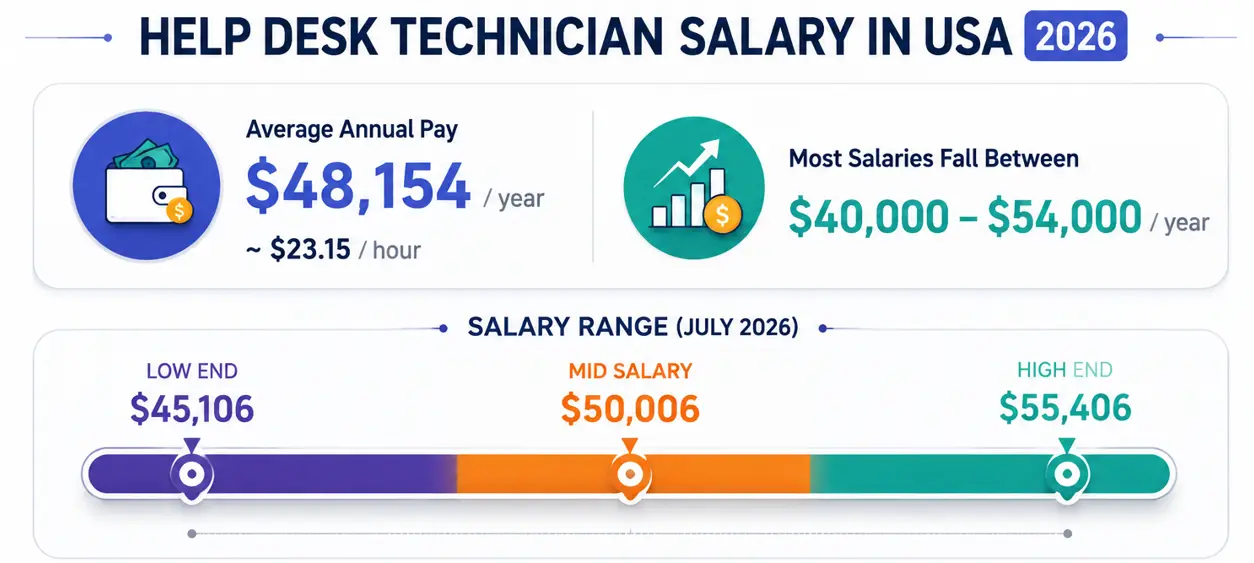
The July 2026 data shows a similar band, with help desk technician salaries ranging from about $45,106 to $55,406, with a mid-salary near $50,006, and notes that moving up to a Help Desk Technician II role typically brings roughly a 16% pay increase.

It’s worth knowing that pay climbs steadily with tenure and title changes. Glassdoor’s broader help desk technician data shows salaries trending from about $61,548 at the entry point up to roughly $93,523 at the highest seniority levels and highlights that industries like aerospace and defense pay some of the highest median compensation for this role. None of this is guaranteed, and location, industry, and certifications all move the needle—but it confirms this isn’t a role you get stuck in financially if you keep building skills.
You can check current, location-specific numbers directly on Salary.com or Glassdoor before negotiating an offer.
How to Choose the Right Training Program?
Not every bootcamp or course claiming to prepare you for IT support work is worth your money. A few things to check before you enroll:
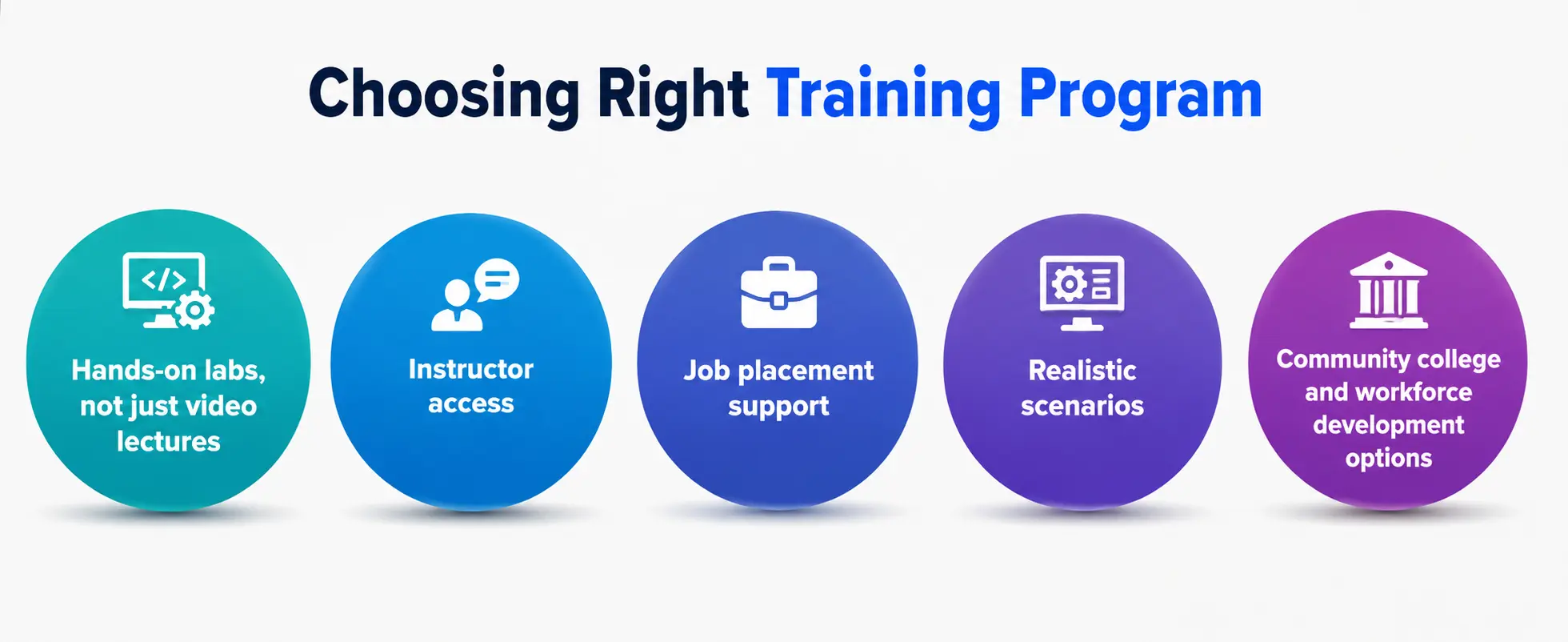
- Hands-on labs, not just video lectures. You should be actually navigating a simulated ticketing system, not just watching someone else do it.
- Instructor access. If you get stuck at 11 p.m. before a mock interview, is there someone to ask?
- Job placement support. Some programs partner directly with employers; others just hand you a certificate and wish you luck.
- Realistic scenarios. The best courses simulate actual angry-customer calls, not scripted, polite ones.
- Community college and workforce development options. These are often dramatically cheaper than private bootcamps and can include exam vouchers in the tuition, sometimes covered by workforce grants.
If you’re weighing free YouTube tutorials against a paid structured course, the honest answer is free resources can teach you concepts, but structured help desk technician training gives you the practice environment and credential recognition.
A Realistic First 90 Days on the Job
Training ends, and then reality starts. Here’s roughly what to expect once you land that first role:
Weeks 1–2: Shadowing. You’ll sit with experienced technicians, listen to calls, and learn the company’s specific tools and ticketing systems setup. Don’t worry about how slow you feel — everyone starts here.
Weeks 3–6: Supervised handling. You start taking calls or tickets yourself, usually with someone reviewing your work before it’s closed out.
Weeks 7–12: Independent ticket ownership. You’re handling your own queue, hitting response-time targets, and starting to notice patterns—the same three issues account for 60% of your tickets, and you start solving them faster.
By month three, most new technicians report feeling like they’ve “found their footing”—not experts yet, but no longer panicking at every unfamiliar error message.
A Personal Note
I’ll be straight with you: nobody grows up dreaming of being a help desk technician. But some of the sharpest, most resilient IT professionals I’ve come across started exactly there—answering calls, resetting passwords, and getting yelled at over printer jams. What separates the ones who moved up fast from the ones who stayed stuck wasn’t raw talent.
It was that they treated every ticket as a small lesson instead of a chore, and they kept learning even after the shift ended. If you’re about to start this path, be patient with yourself in the first few months.