If you’ve spent even ten minutes browsing IT job boards, you already know that almost every listing for a system admin role asks for “relevant certification preferred.” But nobody tells you which one. There are dozens of options; they all sound impressive on paper, and half of them cost more than your monthly rent. So how do you actually pick?
I’ve been down this rabbit hole myself, and I want to save you the headache. This isn’t a generic list copy-pasted from a vendor’s marketing page. It’s a straightforward look at what a system administrator certification actually does for your career, which one fits your specific situation, and how to avoid wasting money on the wrong path.
Why Bother With a Certification at All?
Let’s get the obvious question out of the way first. Can you become a sysadmin without any credentials? Sure, some people do. But a system administrator certification exists for a reason — it tells an employer, in a language they instantly understand, that you know how to keep servers running, secure a network, and fix problems before they become disasters.
Think about it from a hiring manager’s side. They’re staring at 200 resumes for one opening. They don’t have time to test everyone’s actual skill in an interview. A relevant credential is a shortcut. It says “this person already proved they can do the basics” without the company having to babysit your onboarding for six months.
There’s also the money angle, which nobody likes talking about but everyone thinks about. Certified professionals in IT infrastructure roles consistently report higher starting salaries and faster promotions than uncertified peers doing the same job.
That’s not a guarantee, but it’s a pattern that shows up again and again across salary surveys, and it’s one more reason a well-chosen system administrator certification tends to pay for itself within the first year on the job.
The Real Question: What Kind Of Sysadmin Do You Want To Be?
Here’s the thing most “top 10 certifications” articles skip. The old idea of a system administrator — one person managing a server room in the basement — barely exists anymore. Today’s admins split into a few different lanes:
- People who manage physical or virtual servers day to day, doing hands-on server administration
- People who run infrastructure on AWS, Azure, or Google Cloud full time
- People who live inside Linux environments and lean on a linux certification to prove it
- People who focus on routers, switches, firewalls, and traffic as their main specialty
Getting a network-heavy credential when you actually want to work in cloud infrastructure is a common and expensive mistake, and it’s exactly the kind of mismatch a thoughtful strategy should avoid from the start.
Here’s a longer look at how these paths tend to overlap in the real world. Someone doing traditional server administration today is very likely to end up touching cloud-based tools within a year or two, simply because most companies now run hybrid environments—part on-premise, part in the cloud.
Meanwhile, a networking specialist rarely stays purely on that side of the house either; firewalls, VPNs, and cloud networking all blend together once you’re a few years into the job. Recognizing this overlap early can save you from picking too narrow a certification path.
Breaking Down The Top Certifications
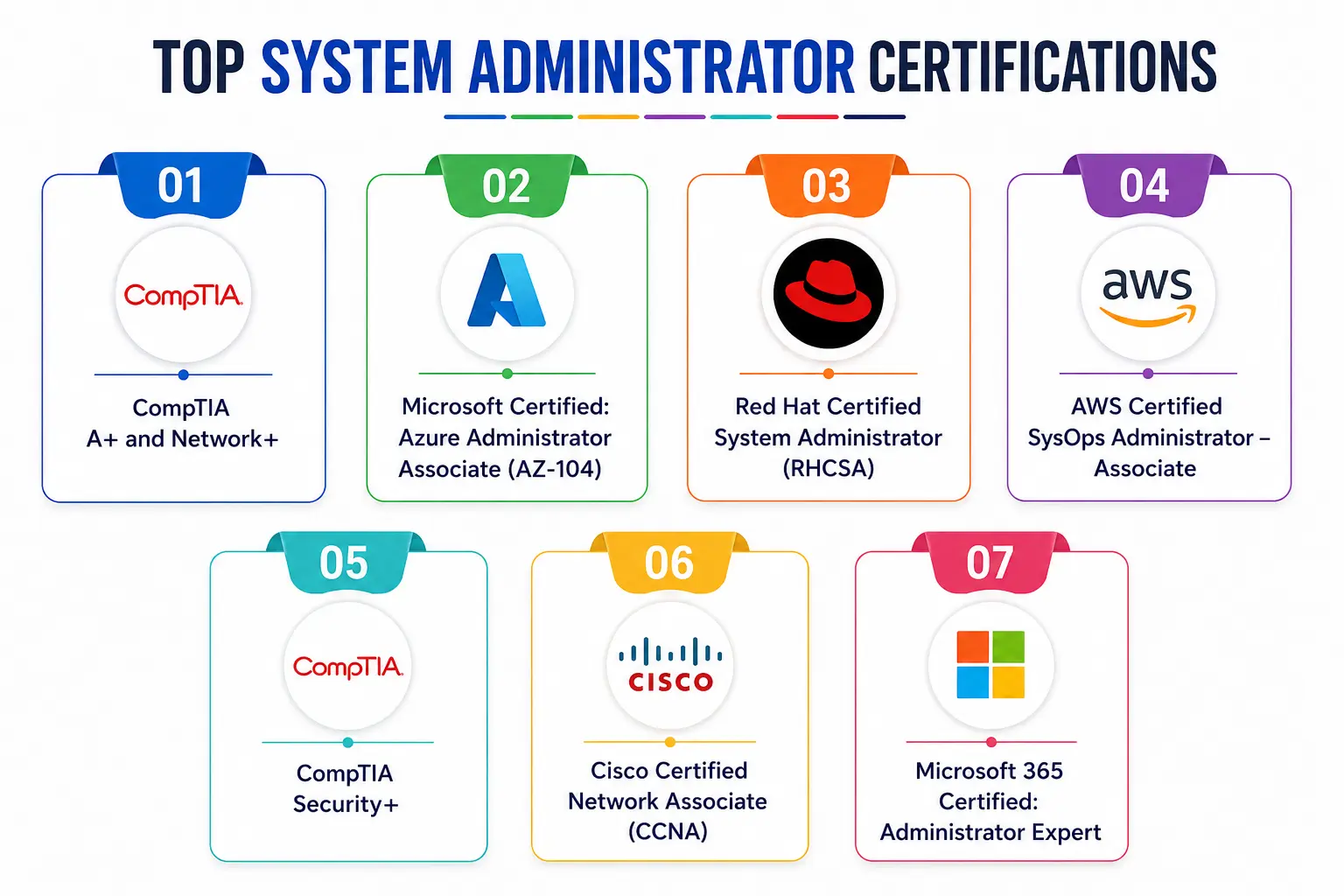
1. CompTIA A+ and Network+ (The Starting Line)
If you’re brand new to IT, don’t skip straight to an advanced credential. They’re vendor-neutral, meaning they don’t lock you into one company’s ecosystem, which makes them a smart first step before you specialize in any particular track.
CompTIA also maintains detailed exam objectives and updates them regularly, so it’s worth checking their official page before you register—CompTIA Certifications.
2. Microsoft Certified: Azure Administrator Associate (AZ-104)
This one has become almost unavoidable if you’re aiming to work in cloud infrastructure. The Azure Administrator Associate certification exam evaluates a candidate’s ability to manage core Azure services and infrastructure, with a focus on practical administration tasks that are commonly performed in enterprise cloud environments.
Given how many companies have moved their infrastructure to Azure, this credential shows up constantly in job postings for hybrid infrastructure and general IT operations roles.
According to industry discussion boards, while the Azure Solutions Architect Expert certification gets mentioned often, real-world sysadmins and Reddit forums confirm that AZ-104 is the certification that actually matches day-to-day admin work, with the architect-level cert being more of a next step up.
You can review the official exam guide here: Microsoft Azure Administrator Associate.
3. Red Hat Certified System Administrator (RHCSA)
If your world is Linux — and a huge chunk of enterprise servers run on Linux — this is the credential that consistently comes up as the gold standard for open-source infrastructure work. It’s hands-on, meaning you’re tested in a live environment rather than just answering multiple-choice questions, which employers respect because it proves real capability, not just memorization.
Preparation for this one really does require practice. A homelab is considered essential since you can’t pass this exam without hands-on practice—installing Red Hat Enterprise Linux or a free equivalent like AlmaLinux or Rocky Linux on a virtual machine and working through every exam objective until it becomes second nature.
Official details are here: Red Hat RHCSA.
4. AWS Certified SysOps Administrator – Associate
If your company runs on Amazon Web Services instead of Azure, this is your equivalent path into cloud infrastructure work. It’s built specifically around the operational side of AWS — monitoring, deployment, and managing resources — rather than the broader architecture-focused exams.
As one detailed breakdown put it, while the AWS Certified Solutions Architect – Associate is the most widely recognized AWS credential across HR departments and design roles, the SysOps Administrator – Associate exam is considered the more “pure” system administrator certification for people doing hands-on operational work.
Check current exam details at AWS Certified SysOps Administrator.
5. CompTIA Security+
Security isn’t optional anymore for anyone in this field. Every server admin, cloud administrator, and network administrator eventually has to answer for the security of what they manage. Security+ is often paired with other credentials rather than taken alone, and it’s frequently a baseline requirement for government or defense-adjacent IT roles.
One important update to know is the older SY0-601 version of this exam retired in mid-2026, and the newer SY0-701 version is now the only one available, reflecting the current security landscape.
You can confirm the latest exam version directly at CompTIA Security+.
6. Cisco Certified Network Associate (CCNA)
For anyone leaning toward becoming a network administrator, CCNA remains one of the most respected entry points. It covers routing, switching, IP addressing, and network security fundamentals — the backbone skills that keep any organization’s infrastructure connected and functioning.
Official exam information is available here: Cisco CCNA.
7. Microsoft 365 Certified: Administrator Expert
For organizations heavily invested in Microsoft’s productivity ecosystem, this expert-level credential shows you can manage identity, security, compliance, and collaboration tools across an entire company. This is one of the certifications frequently grouped alongside AZ-104, MD-102, AZ-800, and MS-700 as core Microsoft system administrator credentials.
A Quick Side-By-Side Comparison
Sometimes a table just makes life easier, whether you’re weighing a cloud administrator path against a network administrator’s one. Here’s how these stack up:
|
Certification |
Best For | Focus Area |
Difficulty Level |
|
CompTIA A+ / Network+ |
Complete beginners | General IT & basic networking |
Beginner |
|
Azure Administrator (AZ-104) |
Cloud-focused roles | Azure infrastructure management |
Intermediate |
|
RHCSA |
Linux-focused environments | Open-source infrastructure management |
Intermediate to Advanced |
|
AWS SysOps Administrator |
AWS-based companies | Cloud operations |
Intermediate |
|
CompTIA Security+ |
Anyone needing security fundamentals | Security across all IT roles |
Intermediate |
|
Cisco CCNA |
Network-heavy roles | Routing and switching fundamentals |
Beginner to Intermediate |
|
Microsoft 365 Admin Expert |
Microsoft ecosystem companies | Identity, compliance, collaboration tools |
Advanced |
How To Actually Choose?
Stop trying to collect every certification like trading cards. Instead, ask yourself three honest questions:
1. What does my current or target company actually use?
If your workplace runs entirely on AWS, an Azure certification won’t help you nearly as much, no matter how good it looks on paper.
2. Where do I want to be in 3 years?
A system administrator certification is a stepping stone, not a finish line. Pick the one that opens the door to the specialization you actually want, whether that’s deeper infrastructure work, cloud-focused operations, or a leadership track in networking.
3. Can I actually study for this properly?
Some of these exams, especially RHCSA, require real hands-on lab time. Don’t sign up for an exam date before you’ve built a home lab and practiced the objectives until they’re muscle memory.
What About Cost and Time Commitment?
This is the part people often research last, when it should probably be researched first. Exam fees for a system administrator certification typically range anywhere from 150 to 400 US dollars, and that’s before you factor in study materials, practice exams, or a retake if you don’t pass the first time.
Reading a study guide cover to cover is not the same as being ready for a hands-on exam. If your target role involves heavy infrastructure work or a deep Linux-based credential like RHCSA, budget real lab time every week, not just weekend cramming before the test date. Cloud-focused exams tend to move a little faster if you already have some hands-on exposure through a work sandbox account or a personal cloud trial subscription.
A good rule of thumb: don’t schedule the exam date until you can complete every objective in the official exam guide without checking notes. Scheduling too early, just to force yourself to study, often backfires and costs you the retake fee.
Common Mistakes People Make
A lot of professionals rush into the most “famous” certification instead of the most useful one for their situation. Others try to stack five certifications in a year, burn out, and retain almost none of it. The better approach is slower and more deliberate: master one system administrator certification path, apply it in real work, and then layer on the next one once the first has actually paid off in practical experience.
It’s also worth noting that certifications expire or get updated. Vendors like CompTIA and Microsoft regularly retire old exam versions, so always double-check the current, active version before you register and pay the exam fee.
Another mistake worth flagging: treating certification study as separate from your actual job. If you’re already working in IT support or a junior admin role, look for ways to practice exam objectives using real tickets and real infrastructure at work.
Nothing cements a concept faster than applying it to an actual problem instead of a practice question on a screen. This is especially true for anyone pursuing a Linux certification, where muscle memory matters more than memorized definitions.
A personal note
I’ve watched too many talented people burn out chasing every certification under the sun instead of picking one that actually matched where they wanted to go. If there’s one thing I’d tell my younger self, it’s this—a system administrator certification only matters if it lines up with the work you actually want to do every day. Don’t collect badges. Build a career.