

I almost skipped this certification. I’d already spent a year running production clusters, writing Helm charts, and fielding the occasional 2 a.m. page about a crashing pod, and I figured that was proof enough that I understood Kubernetes security.
Then a hiring manager asked me, mid-interview, how I’d lock down a cluster where a single compromised pod could reach every service account in the namespace. I talked in circles for two minutes before admitting I’d never actually solved that problem—only reacted to smaller versions of it.
That conversation is the reason I went and earned a Kubernetes security certification, and it’s the reason I’m writing this instead of another generic “top certifications to get in 2026” listicle.
This post walks through what a Kubernetes security certification actually tests, why cloud security teams are starting to treat it as a baseline rather than a bonus, and what you need to know about access management, vulnerability assessment, zero trust security, security auditing, and incident response before you book the exam. I’m writing this as someone who studied for it, sat it, and now uses the material weekly—not as a course reseller trying to get you to click “enroll.”
Why Do Cloud Security Teams Suddenly Care About This Certification?
For years, Kubernetes expertise and security expertise lived in different parts of the org chart—platform engineers ran the clusters, and security teams audited from a distance, often without the hands-on context to catch what mattered. That gap is closing fast, and the data backs up why.
According to the Kubernetes security report, 78% of organizations reported a cloud infrastructure or service misconfiguration in the prior twelve months, and managed clusters on major providers received their first attack attempt within 18 to 28 minutes of going live. Attackers are not waiting for a slow security review cycle—they’re scanning for exposed API servers the moment a cluster appears on the internet.
A Kubernetes security certification exists specifically to close that gap between “can run a cluster” and “can defend one.” The Certified Kubernetes Security Specialist (CKS) credential, administered by the Linux Foundation and the Cloud Native Computing Foundation, is currently the clearest, most recognized version of that proof.
Unlike IT certifications built on memorized facts, this certification is 100% hands-on: a two-hour, performance-based exam inside a live cluster, no multiple-choice shortcuts. You either lock down the workload correctly or you don’t.
What makes it relevant to cloud security hiring specifically is the prerequisite structure. You can’t sit this exam without an active Certified Kubernetes Administrator (CKA) credential first, which means anyone holding a Kubernetes security certification has already proven baseline cluster operations knowledge before security was even added to the picture.
Recruiters increasingly understand that stacking, which is part of why this credential now shows up in job descriptions that never mentioned Kubernetes two years ago.
What the Exam Actually Covers?
The current curriculum runs the Kubernetes environment on version 1.35 as of late 2026, with the testing environment updated within four to eight weeks of each new minor release. That update cadence matters more than people realize—it means the certification’s body of knowledge doesn’t go stale the way some older vendor certifications do.
Kubernetes Security Certification Exam Domains at a Glance
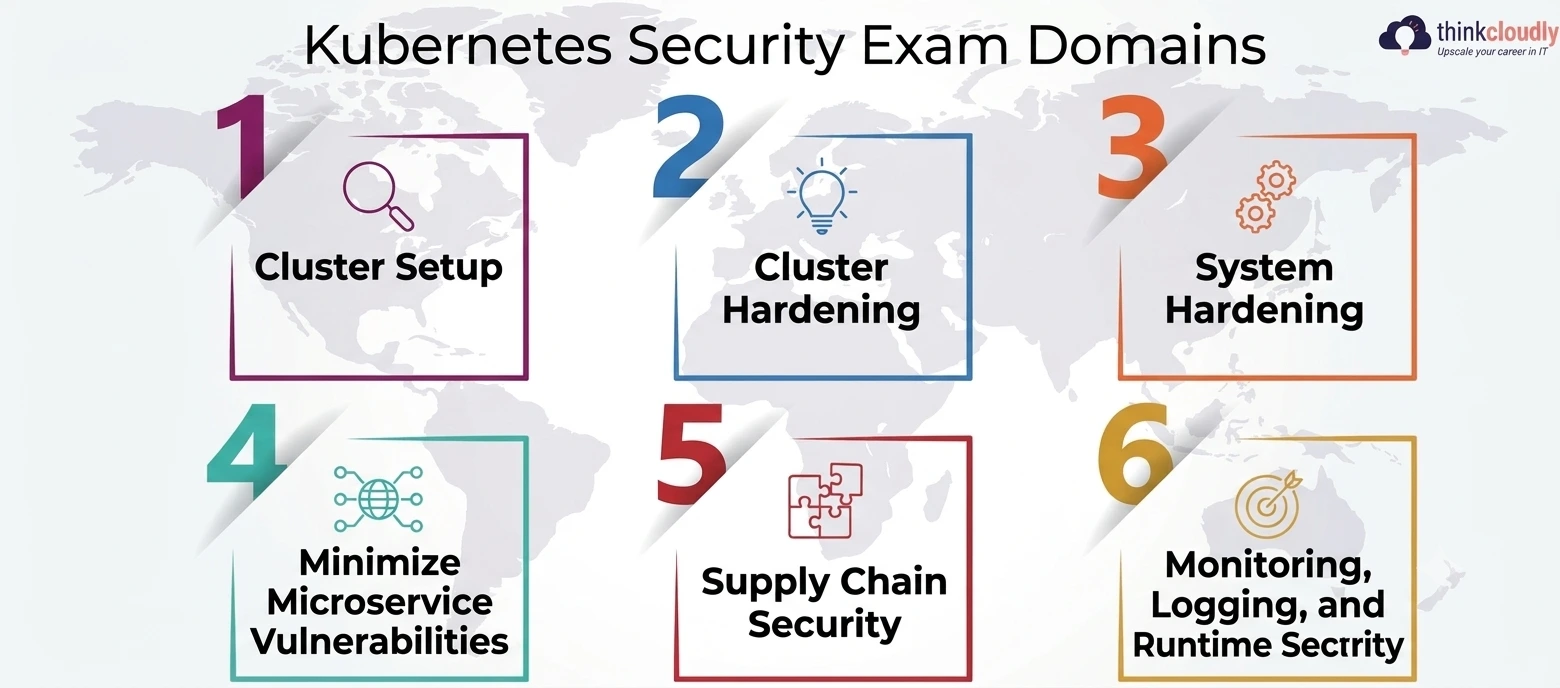
- Cluster Setup—network policy design, ingress controls, and secure cluster provisioning from the ground up
- Cluster Hardening—role-based permissions, API server restrictions, and minimizing the attack surface of the control plane
- System Hardening—host-level protections, kernel hardening, and restricting unnecessary privileges at the node level
- Minimize Microservice Vulnerabilities—pod security standards, secrets management, and runtime isolation between workloads
- Supply Chain Security—image scanning, registry and dependency checks, and verifying artifact provenance before deployment
- Monitoring, Logging, and Runtime Security — API audit logging, anomaly detection, and response workflows at the workload level
Notice how heavily the last three domains lean toward exactly the skills cloud security teams hire for—together, they make up 40% of the exam. This isn’t a credential built around cluster administration dressed up with a security label; it’s built around the actual day-to-day work of a cloud security engineer who happens to operate on Kubernetes.
Access Management: The Domain Most Candidates Underestimate
Access management inside Kubernetes is deceptively simple to describe and genuinely hard to get right under exam pressure. Role-Based Access Control (RBAC) looks straightforward on paper—Roles, RoleBindings, ClusterRoles, ClusterRoleBindings—until you’re staring at a cluster with dozens of overlapping bindings, hunting for the one that grants more access than it should.
A few access management habits that consistently separate people who pass from people who don’t:
- Default to namespace-scoped roles and role bindings; reserve ClusterRoleBindings for genuinely cluster-wide needs
- Audit wildcard permissions (verbs: [“*”] or resources: [“*”]) aggressively, since they’re the single most common source of accidental privilege escalation
- Disable automatic service account token mounting on pods that never call the API server
- Treat cluster-admin bindings as an exception that needs a documented reason, not a default convenience
- Compare effective permissions across namespaces rather than trusting a role’s name alone
I failed a practice task once, assuming a namespace-scoped RoleBinding couldn’t interact with a ClusterRole that had broader implications. It can. These mistakes rarely look dramatic when you make them—they look like a reasonable-sounding binding that quietly grants far more than anyone intended.
Vulnerability Assessment: Catching the Problem Before It Ships
Vulnerability assessment on Kubernetes isn’t a single scan you run once. It’s a pipeline: scanning base images during CI, re-scanning registries when new CVEs are published, and continuously matching vulnerable image digests against what’s actually running in production.
That last step is the one teams skip most often, and it shows. Sysdig’s research, cited in the Cloudaware report, found roughly 5.5% of running workloads still carried critical or high-severity vulnerabilities that were already known and scannable.
The exam tests vulnerability assessment from both the supply chain angle (is this image safe to deploy?) and the runtime angle (is a vulnerable image already running somewhere it shouldn’t be?). Trivy, admission controllers that block unscanned images, and policies rejecting images without signed provenance are all fair game.
Candidates who’ve only ever used a scanning dashboard without understanding how the underlying policy enforcement actually blocks a bad deployment tend to struggle here, because the exam wants you to configure the enforcement, not just read a report about it.
Zero Trust Security Inside the Cluster, Not Just Around It
Most organizations already apply zero trust security at the network perimeter—VPNs, identity providers, and conditional access policies. Fewer apply the same discipline inside the cluster itself, and that’s exactly where this exam focuses attention. Applying that same model inside Kubernetes means treating every pod-to-pod connection as something that needs explicit permission, not implicit trust just because both pods happen to live in the same cluster.
In practice, that means:
- Default-deny network policies on every namespace, with explicit allow rules for documented dependencies only
- Pod Security Standards enforced at the admission level, not just documented in a wiki nobody reads
- Workload identities (via service accounts or a service mesh) instead of shared credentials between services
- Treating a single compromised pod as a contained incident, not a foothold into the rest of the cluster
The interview question that sent me toward this certification in the first place—how to stop one compromised pod from reaching everything else—is a zero trust security problem at its core. A cluster built with default-allow networking and shared service accounts fails that test immediately, no matter how good its perimeter defenses look from the outside.
Security Auditing and Incident Response: The Domains Hiring Managers Ask About First
Of everything this certification covers, these two domains tend to come up first in actual interviews, because they’re the skills that determine how fast a team notices and contains a real problem.
Security auditing in a Kubernetes context starts with enabling API server audit logs and actually retaining enough detail—who made the request, what they did, and the result—enough to reconstruct what happened. A cluster where none of this is enabled isn’t insecure in a theoretical sense; it’s a cluster where, if something goes wrong, nobody will ever know exactly how or when.
Incident response builds directly on that foundation. The exam and the real job both expect you to know:
|
Incident Response Step |
What It Involves |
Common Mistake |
|
Detection |
Watching for unexpected shell access, privilege escalation, or anomalous API calls flagged by security auditing logs |
Treating log collection as “done” once logs exist, without alerting on them |
|
Containment |
Isolating the affected pod or namespace via NetworkPolicy, revoking compromised service account tokens |
Restarting the pod before preserving evidence of compromise |
|
Eradication |
Removing the vulnerable image or misconfiguration that allowed entry, not just the symptom |
Patching only the caught pod, missing identical images elsewhere |
|
Recovery |
Restoring from backups with tested RPO/RTO targets into a clean environment |
Restoring into the same configuration that caused the incident |
|
Review |
Feeding results back into scanning pipelines and RBAC policy |
Treating the postmortem as a formality instead of a policy input |
A plan that only exists on paper, never rehearsed, tends to fall apart under real pressure the same way under-practiced exam candidates do. This exam doesn’t just ask you to define these steps — it hands you a live, broken, or compromised scenario and asks you to execute them inside a time limit.
What This Credential Actually Does for Your Career?
- Cloud security engineer postings listing container and Kubernetes security experience as a requirement, not a nice-to-have
- DevSecOps positions bridging platform engineering and security review, where access management and security auditing responsibilities overlap
- Site reliability engineering roles that have absorbed incident response ownership for containerized workloads
- Security architect postings asking specifically for zero trust security design experience across multicloud Kubernetes fleets
- Compliance-adjacent roles where vulnerability assessment reporting now needs to cover container registries, not just traditional infrastructure
The pay data backs up why employers list it explicitly. According to KORE1’s cloud security engineer salary guide, US base salaries for cloud security engineers range from roughly $105,000 for associate-level roles up to $300,000+ for staff and principal positions, and Kubernetes or container security responsibilities add a measurable premium — in the $15,000 to $25,000 range — on top of the base band when it’s a standing part of the role.
A Realistic Study Approach, Not a Shortcut
If you’re coming from a general cloud security background without heavy Kubernetes experience, give yourself a real runway — most people treat six to eight weeks of consistent practice as reasonable, not a weekend crash course. A few things that actually move the needle:
- Get comfortable with kubectl and YAML editing speed before worrying about security topics; the exam punishes slow typing as much as knowledge gaps
- Build and deliberately misconfigure NetworkPolicies, then fix them, rather than only reading about default-deny patterns
- Practice reading Falco or audit log output cold, without a tutorial explaining each line
- Treat the official Kubernetes security documentation as your primary reference, since it’s the same material the exam environment itself links to
- Run at least two full-length timed mock exams before registering, and review every missed task the same day rather than batching reviews for later
- Don’t skip supply chain security tasks because image scanning feels tedious — it’s 20% of the exam and a growing share of real incidents
The Linux Foundation’s official certification page is worth bookmarking directly, since exam pricing and policy details do shift and a third-party summary can lag behind the source.
A Personal Note
I went into this certification a little defensive, honestly. A year of running real clusters felt like it should have counted for more, and rebuilding NetworkPolicies from scratch under a clock humbled me faster than I expected. But the thing that actually changed how I think about my job wasn’t the badge. It was realizing how much of what I’d been calling “security” was really just “things working correctly most of the time.”
None of this is a set of separate checkboxes you clear once. It’s a way of assuming, by default, that something will eventually go wrong in your cluster, and building so that when it does, you already know what happens next.
If you’re on the fence about whether this certification is worth the study hours, I’d say this: it won’t make you feel more confident going in. It’ll make you more honest about what you didn’t actually know — a far more useful thing to walk away with.