Most networks don’t get breached because a firewall failed. They get breached because a firewall was installed years ago and never revisited. Attackers don’t need a zero-day when a perimeter still has a “temporary” rule from 2022 letting in traffic from anywhere.
That’s the real story behind the 2026 Verizon Data Breach Investigations Report, which found that vulnerability exploitation overtook stolen credentials as the single biggest way attackers get in—the first time that’s happened in nineteen years of the report’s history.
A firewall is still the first real line of defense a network has, but only if it’s configured, watched, and maintained like one. This guide covers firewall best practices that will hold up in 2026, written for students and early-career IT people who want the mechanics, not a checklist to memorize.
By the end, you’ll understand where a dedicated appliance fits versus host-based protection, why deep inspection catches what older setups miss, and why one specific gap keeps showing up in breach reports. These seven practices work as a set—skipping one undoes the value of the rest.
Why Firewall Best Practices Matter More in 2026 Than They Did Five Years Ago?
The threat landscape firewalls defend against has changed shape. Per the 2026 DBIR, breaches involving a third party jumped 60% year-over-year and now account for 48% of all breaches—a network’s exposure increasingly depends on vendors a security team doesn’t directly control.
Attackers are also using AI to compress the time between a vulnerability’s disclosure and its active exploitation, shrinking what used to be a months-long window to hours. Vendors are responding to that shift.
Palo Alto Networks was named a leader in the 2026 Gartner Magic Quadrant for Hybrid Mesh Firewall for the second year running, and Gartner’s research points to a clear direction: enterprises are consolidating fragmented setups into unified platforms with AI-driven threat prevention and cloud-based management.
None of that changes the fundamentals. A firewall, however advanced, only protects a network to the extent someone configured—and keeps configuring—it correctly.
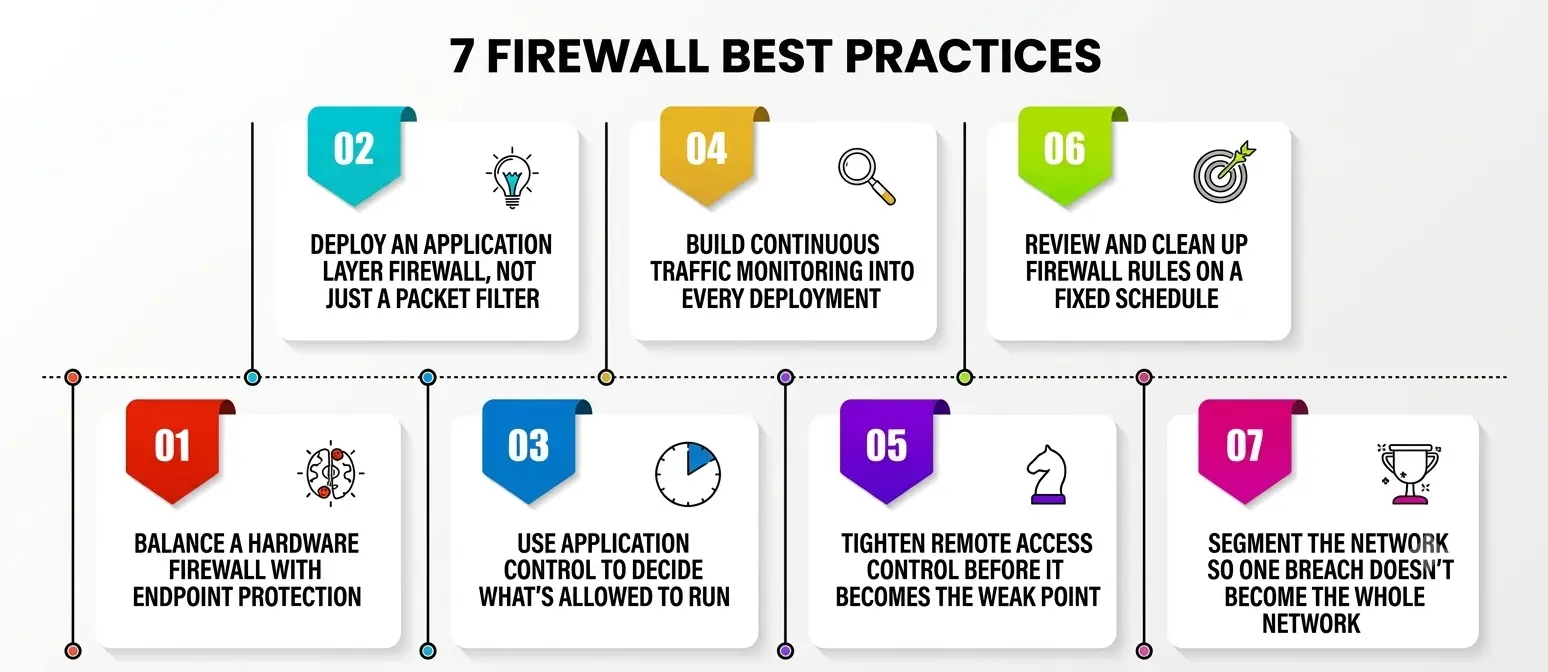
1. Balance a Hardware Firewall with Endpoint Protection
The first decision behind solid firewall best practices is architectural. A hardware firewall is a dedicated physical appliance placed at the edge of a network, inspecting and filtering traffic before it reaches internal servers or devices. It’s the standard choice for offices, campuses, and data centers because it handles high traffic volumes without competing for resources with anything else running on the network.
A software firewall, by contrast, runs on an individual device—a laptop, a server, or a virtual machine—and filters traffic at that single endpoint. It’s cheaper to deploy at scale, but it depends on the health of the device it’s installed on; if that device is compromised at the operating-system level, the protection sitting on it can be tampered with too.
Most well-defended networks use both. The appliance guards the perimeter, filtering unwanted traffic before it gets deep into the network, while endpoint-level protection catches anything a compromised device tries to send or receive internally.
Relying on only one leaves a predictable gap: a perimeter box alone can’t stop a threat already inside from moving laterally, and a software-only approach leaves no consistent edge protection. Choosing the right combination is the foundation everything else on this list builds on.
2. Deploy an Application Layer Firewall, Not Just a Packet Filter
Older firewalls made decisions based on IP addresses and port numbers alone—useful, but blind to what was actually inside the traffic. An application layer firewall solves that by inspecting traffic at Layer 7, where it can tell the difference between legitimate web traffic and an attack disguised to look like it. This is what lets a firewall block an SQL injection attempt or a malicious file upload riding on ordinary-looking HTTP traffic that a basic packet filter would simply wave through.
An application layer firewall is especially important for anything customer-facing: a login page, a checkout flow, or an API endpoint. These are the surfaces attackers probe constantly, because they’re reachable from anywhere and often connect straight to a database.
Deploying this kind of inspection — often built into a next-generation firewall or run as a standalone web application firewall — means malicious requests get blocked before they ever reach the application code itself. Any serious set of firewall best practices treats Layer 7 inspection as mandatory for anything a network exposes to the public internet.
3. Use Application Control to Decide What’s Allowed to Run
Application control is the practice of explicitly defining which programs are permitted to run on a network or send traffic through it, blocking everything not on that list by default. It’s a shift from the older model of blocklisting every known-bad program—a losing race against new malware—to an allowlist model where only approved software operates at all.
NIST’s Guide to Application Whitelisting frames this approach as one of the most effective ways to reduce an environment’s attack surface, precisely because it doesn’t depend on recognizing a threat in advance.
In practice, application control on a firewall means setting policies that identify traffic by the program generating it, not just the port it’s using, so a firewall can distinguish approved business software from an unauthorized file-sharing tool or a command-and-control channel blending in on a commonly open port.
Attackers increasingly rely on legitimate-looking applications specifically to avoid detection, and a tight allowlist is exactly the kind of gap that solid firewall best practices are designed to close.
4. Build Continuous Traffic Monitoring Into Every Deployment
A firewall making decisions with nobody reviewing what it sees is only half a defense. Traffic monitoring means continuously reviewing the connections, volume, and patterns it processes, so unusual behavior—a 3 a.m. spike in outbound connections, repeated attempts to reach a blocked destination—gets noticed instead of scrolling past in a log nobody reads.
Effective traffic monitoring turns a firewall’s logs into an early-warning system rather than a record checked only after something has gone wrong. Many modern firewalls feed this data into a SIEM or dashboard, correlating logs with activity elsewhere on the network to catch attacks no single entry would reveal alone. Skip this step and the firewall blocks the obvious stuff while slow, quiet reconnaissance sits unnoticed for weeks.
5. Tighten Remote Access Control Before It Becomes the Weak Point
Remote access has become one of the most heavily targeted parts of any network, and firewall-level remote access control is the discipline of restricting exactly who and what can connect in from outside.
The CISA Guide to Securing Remote Access Software recommends blocking both inbound and outbound connections on common remote-access ports at the network perimeter by default and requiring that any authorized remote tool only be used over an approved VPN or virtual desktop connection rather than exposed directly to the internet.
Good remote access control on a firewall typically combines several layers: geo-restricting connections to regions the business actually operates in, requiring multi-factor authentication before a session is even allowed to negotiate, and logging every remote connection attempt so an unusual pattern stands out quickly.
Many costly breaches trace back to a remote-support tool left open with a weak or reused password—a gap that closes almost entirely, since an unapproved attempt never reaches the point where a password even matters.
6. Review and Clean Up Firewall Rules on a Fixed Schedule
Firewall rule sets grow the way a junk drawer does—one exception added at a time, each reasonable in isolation, until nobody fully understands what the full set actually permits. A rule opened for a project that ended two years ago, a “temporary” allowance for a vendor that no longer exists, and an overly broad “allow any” rule added under deadline pressure and never revisited—these accumulate quietly, and each one is a potential opening.
A disciplined review catches this before it becomes a liability: identifying unused or shadowed rules, tightening anything scoped too broadly, and confirming every rule still maps to an actual business need. This doesn’t need to happen constantly, but it does need a fixed, non-negotiable schedule—quarterly for most organizations, more often for anything handling sensitive data.
Firewall best practices that stop at initial configuration and never get revisited tend to degrade quietly until the setup is technically running but effectively full of holes nobody remembers creating.
7. Segment the Network So One Breach Doesn’t Become the Whole Network
The final piece is designing the network itself so a firewall isn’t defending one flat, undivided space. Segmentation uses internal firewall rules to split a network into smaller zones—separating guest WiFi from internal servers, say, or a point-of-sale system from the rest of a retail network—so a compromise in one zone doesn’t automatically grant access to every other zone.
Perimeter defense, however strong, occasionally fails. When it does, segmentation decides whether an attacker who gets past the edge reaches one device or the entire environment. Combined with Layer 7 inspection between zones and a tight allowlist limiting what can run within each one, segmentation turns a single breach into a contained incident instead of a company-wide one.
It’s the item most often skipped because it takes real planning to retrofit onto an existing network, but it’s also the one that most changes the outcome when something eventually does get through.
Firewall Best Practices at a Glance
|
Practice |
What It Solves | Typical Approach |
Risk If Skipped |
|
Hardware firewall + endpoint mix |
Coverage at both the perimeter and the device | Dedicated appliance at the edge, host-based protection on each device |
Lateral movement goes unchecked once one device is compromised |
|
Application layer firewall |
Attacks hidden inside normal-looking traffic | Layer 7 inspection, web application firewall rules |
SQL injection and similar attacks pass straight through |
|
Application control |
Unauthorized or disguised software on the network | Allowlisting approved programs, blocking everything else by default |
Malware masquerading as legitimate traffic goes undetected |
|
Traffic monitoring |
Slow, quiet attacks that don’t trip an obvious alert | Continuous log review, SIEM correlation, anomaly alerting |
Reconnaissance and data exfiltration sit unnoticed for weeks |
|
Remote access control |
Exposed or poorly authenticated remote connections | VPN/VDI enforcement, MFA, port restrictions, connection logging |
Remote tools become an open door with no real gatekeeper |
|
Rule base cleanup |
Rule sprawl and forgotten exceptions | Scheduled quarterly audits, removing unused or shadowed rules |
The rule base quietly fills with holes nobody remembers approving |
|
Network segmentation |
One breach spreading to the entire network | Internal zones, restricted inter-zone traffic |
A single compromised device becomes a company-wide incident |
Read down that list and a pattern shows up: nearly every risk in the right-hand column happens when a firewall is treated as a one-time install instead of an ongoing practice.
Common Mistakes That Undo Otherwise Solid Firewall Best Practices
A handful of mistakes show up again and again, even at organizations that clearly invested real money into their setup. Buying a capable next-generation appliance and leaving it on factory default rules is one of the most common — the hardware does a fraction of what it’s capable of.
Treating allowlisting as a one-time setup rather than something to keep updating as new software gets adopted is another; the list goes stale, and either legitimate tools get blocked or exceptions pile up until the control loses its value.
Skipping regular traffic monitoring is especially common on smaller networks, where logs get collected for a compliance checklist but nobody looks at them until something’s gone wrong.
Loose remote-access discipline remains one of the most exploited gaps of all — a support tool installed for a one-time fix, left running with default credentials months later, is still a common way attackers get their first foothold. None of this requires a sophisticated attacker, just nobody circling back to finish the job.
A Personal Note
The thing that surprised me most while researching this topic wasn’t any single statistic — it was how consistently real breaches trace back to something boring. Not a novel attack technique, but a rule nobody cleaned up, a remote tool nobody locked down, a log nobody read.
If I were setting up a network from scratch today, I wouldn’t chase the most feature-heavy appliance on the market first. I’d get the fundamentals genuinely right: a sensible split between edge and endpoint protection, an allowlist turned on and actually maintained, and a calendar reminder for the quarterly rule review that’s easy to skip when nothing’s on fire.
Firewall best practices aren’t glamorous, and that’s exactly why they get neglected — but they’re also the difference between an attacker hitting a wall and an attacker finding the door somebody forgot was still unlocked.