
If you’ve spent any time around developers or DevOps folks lately, you’ve probably heard the word “Kubernetes” thrown around like everyone just knows what it means. Nobody explains it properly. They just say “we run it on Kubernetes” and move on, leaving you nodding along while quietly Googling it under the table.
So that’s what this blog is going to do — no jargon dump, no assuming you already know what a “pod” or a “cluster” is. Just a straight, honest walk-through of what Kubernetes actually is, why it exists, and why it matters if you’re a student trying to get into tech. By the end, you’ll actually understand Kubernetes — not just be able to repeat the word.
So, What Is Kubernetes Really?
Let’s start simple. According to the official Kubernetes documentation, Kubernetes is an open-source system for automating the deployment, scaling, and management of containerized applications. It’s often shortened to “K8s” — because there are eight letters between the K and the S, and developers love a good abbreviation.
Here’s the plain-English version: Kubernetes is a system that takes care of your applications after you’ve packaged them into containers. It decides where those containers run, keeps them alive if they crash, spreads the workload across multiple machines, and scales things up or down depending on demand — all without a human needing to babysit every single container by hand.
Google originally built Kubernetes based on more than a decade of experience running enormous workloads internally, and then open-sourced it in 2014. Today it’s maintained by the Cloud Native Computing Foundation (CNCF), and it has basically become the industry standard for running applications at scale.
Think of it this way: if you’ve ever tried managing a group project where everyone keeps forgetting their tasks, missing deadlines, and not talking to each other. Kubernetes is like the strict, extremely organized project manager who makes sure every single piece is doing exactly what it’s supposed to, all the time, without needing to be reminded.
Why Does Kubernetes Even Exist?
Back in the day, most applications ran as one big chunk of code on one server. If that server went down, your app went down. If you needed more capacity, you bought a bigger server. It wasn’t elegant, but it was simple to reason about.
Then containers came along. A container runtime — the software responsible for actually running a container on a machine — lets developers package an app along with everything it needs (libraries, dependencies, configuration) into one neat, portable unit.
Suddenly, teams could break big applications into dozens or hundreds of smaller, independent pieces called microservices, each running in its own container. Every container still needed something underneath it actually running it—that’s the container runtime’s job—but that solved one problem and created a new one.
Now you have hundreds of containers to keep track of instead of one server. Which container is running where? What happens when one crashes at 3 a.m.? How do you scale just the piece of your app that’s under heavy load, without wasting money scaling everything else too?
That’s exactly the gap Kubernetes fills. It watches over your containers, restarts the ones that fail, moves them to healthy machines when something breaks, and constantly works to make sure the actual state of your system matches the state you told it you wanted.
This is often called “deployment automation”—you describe what you want your application to look like, and Kubernetes keeps making it true, over and over, without you lifting a finger every time something changes.
How Does Kubernetes Actually Work?
I’m not going to pretend Kubernetes architecture is simple—it isn’t. But the core idea is manageable once you break it into pieces.
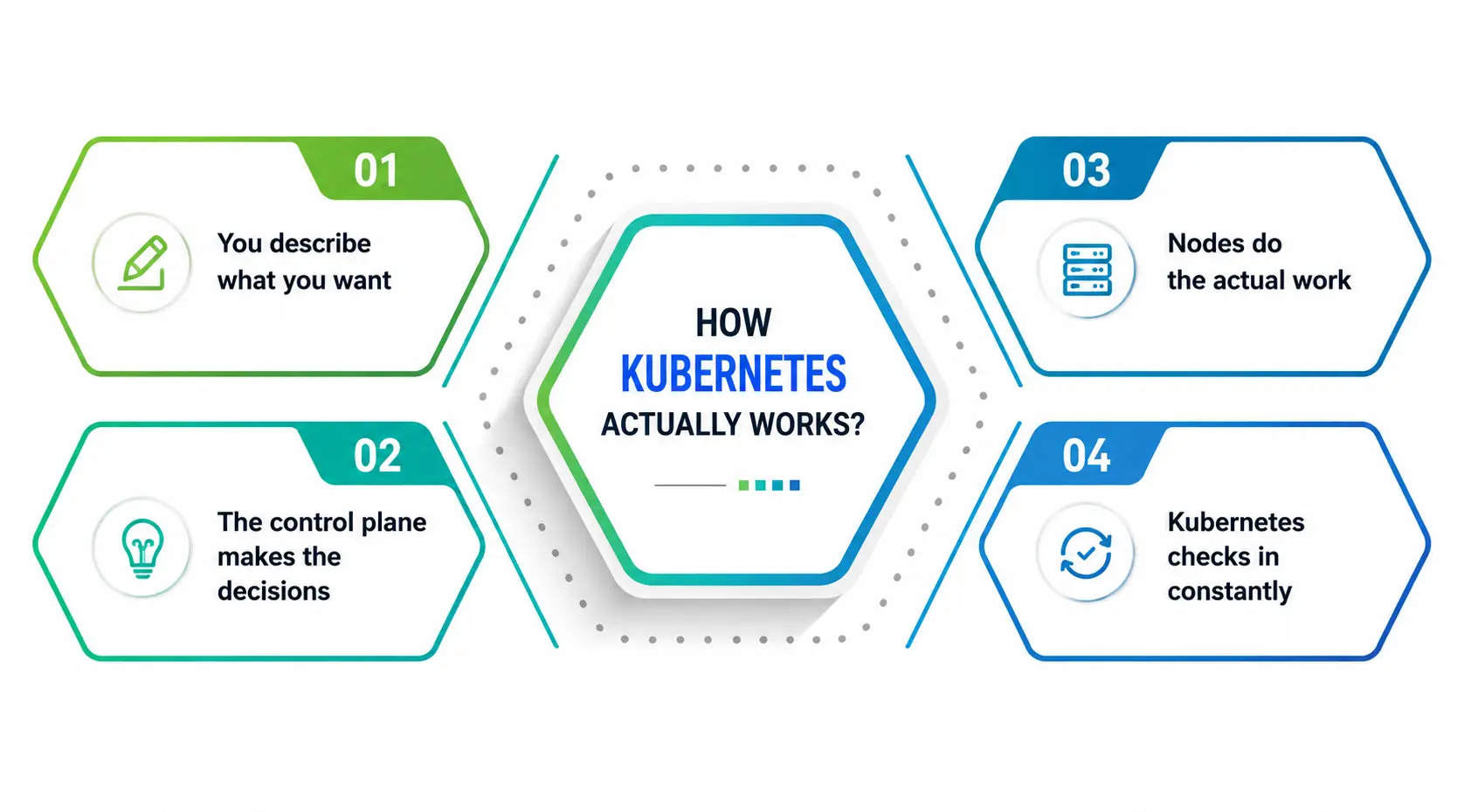
1. You describe what you need
Rather than manually starting containers one at a time, you write a configuration file that says something like “run three copies of my app, using this container image, with this much memory.”
2. Control plane makes decisions
This is the “brain” of Kubernetes. It determines which machines (called nodes) run which containers depending on such things as available capacity and specified rules.
3. Nodes do the heavy lifting
On each node there is an agent that communicates with the control plane and receives instructions on what to do. The agent then communicates with the container runtime to start and stop containers as needed.
4. Kubernetes checks in constantly
If a container crashes, Kubernetes sees it. And restarts it. If a whole node dies, Kubernetes reschedules the containers on healthy nodes. You don’t have to catch the problem yourself—the system is built to notice and self-correct.
That is the whole philosophy of Kubernetes, this never-ending loop of “check current state, compare it with the desired state, fix any difference.” This is not a one-time setup utility. It is a constant, continuous system.
Key Kubernetes Concepts Every Beginner Should Know
|
Term |
What It Means in Plain English |
|
Pod |
The smallest deployable unit in Kubernetes is usually one container (sometimes a few tightly linked ones) that share resources and run together |
|
Node |
A single machine (physical or virtual) that runs your containers |
|
Cluster |
A group of nodes working together, managed as one system |
|
Deployment |
A configuration that tells Kubernetes how many copies of your app to run and how to update them without downtime |
|
Container Registry |
A storage system (like Docker Hub) where container images are kept and pulled from when Kubernetes needs to start a new container |
|
Service |
A stable way to expose a group of pods to the network, even as individual pods come and go |
|
Horizontal Scaling |
Adding more copies (pods) of your app to handle more traffic, rather than making one copy bigger |
|
Resource Allocation |
Defining how much CPU and memory each container is allowed to use, so nothing hogs the whole machine |
Keep this table nearby the first few times you read about Kubernetes—these terms come up constantly, and once they click, everything else gets much easier to follow.
Deployment Automation: The Real Superpower
If there’s one thing that makes Kubernetes genuinely useful, it’s deployment automation. Before Kubernetes, rolling out a new version of an app often meant manually stopping old versions, starting new ones, and praying nothing broke in between.
With Kubernetes, you define a deployment strategy — typically a rolling update — and the platform handles the rest. It brings up new containers gradually, checks that they’re healthy, and only then starts shutting down the old ones. According to Portainer’s deployment guide, this approach keeps traffic flowing throughout the process, and if something breaks mid-rollout, Kubernetes can pause or roll back automatically, so users never notice an outage.
This is deployment automation doing exactly what it’s meant to do: removing the manual, error-prone parts of shipping software so teams can release updates more often, with far less fear of breaking production.
And because deployment automation is baked into Kubernetes itself rather than bolted on as an afterthought, it works the same way whether you’re shipping your first small project or your hundredth production release.
Resource Allocation and Why It Matters
One thing beginners often overlook is resource allocation. Every container needs CPU and memory to function, and if you don’t set limits, one misbehaving container can eat up resources meant for everything else on that machine.
Kubernetes lets you define exactly how much CPU and memory each container is allowed to use. This isn’t just a technical nicety—it’s what keeps a shared cluster stable. Without proper resource allocation, one buggy microservice could quietly starve every other service running alongside it, and you’d spend hours figuring out why your app slowed to a crawl for no obvious reason.
Getting resource allocation right is one of the first real skills you build when you start working hands-on with Kubernetes, and it’s a big part of what separates a stable cluster from a constantly-on-fire one.
Horizontal Scaling: Handling Traffic Without Panic
Imagine your app suddenly gets featured somewhere and traffic spikes overnight. In the old world, that meant scrambling to provision a bigger server. With Kubernetes, horizontal scaling means you simply run more copies of your app across your existing cluster, and traffic gets spread across all of them.
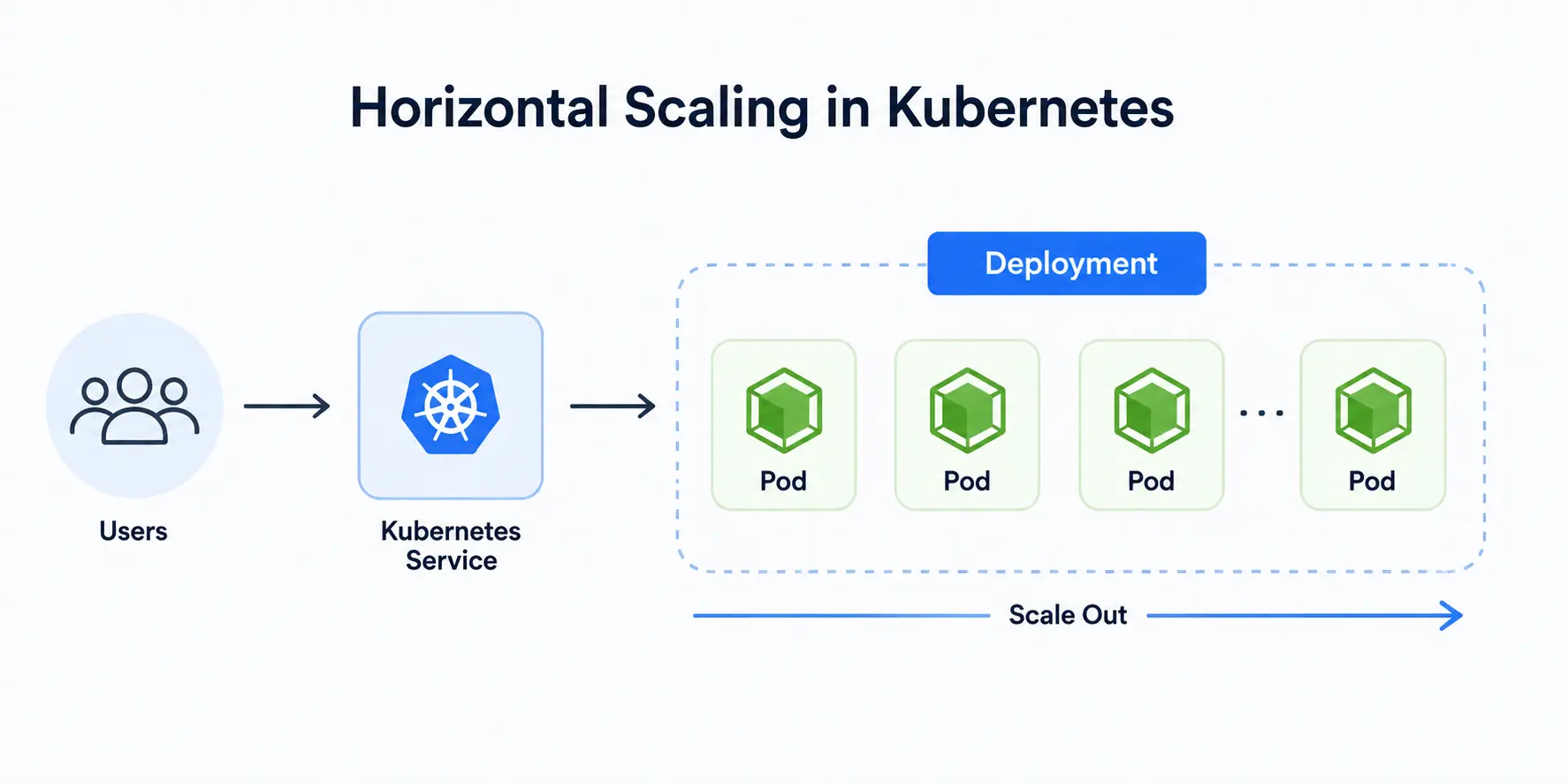
Kubernetes can even do this automatically through something called a Horizontal Pod Autoscaler, which watches metrics like CPU usage and adds or removes copies of your app as demand changes. When traffic drops back down, it scales back in, so you’re not paying for capacity you don’t need.
This is a genuinely elegant solution to a problem that used to cause a lot of sleepless nights for engineering teams. Horizontal scaling means growth doesn’t have to mean panic — it just means Kubernetes quietly does more of what it was already doing.
Most beginners find horizontal scaling one of the easier concepts to grasp, mainly because the idea of “just run more copies” maps so closely to how we’d solve the problem intuitively anyway.
The Container Registry Connection
Kubernetes doesn’t build your application — it runs it. But it needs to get the actual container image from somewhere, and that’s where a container registry comes in: essentially a storage and distribution system for container images, similar to how GitHub stores code.
When you tell Kubernetes to run a deployment, it pulls the specified image from a container registry (public ones like Docker Hub or private ones companies run internally), and the container runtime on the node then starts the container from that image.
If the image isn’t available in the registry or the credentials are wrong, that deployment simply won’t start—one of the most common early debugging headaches beginners run into.
Understanding this connection between Kubernetes and a container registry helps demystify a lot of “why isn’t my app starting” moments when you’re first learning.
Is Kubernetes Overkill for Beginners to Learn?
Honestly? No — and here’s why. Even if you’re not managing production infrastructure yet, understanding Kubernetes gives you a mental model for how modern software actually runs in the real world. Nearly every cloud-native job posting, internship, and tech interview these days assumes at least a basic familiarity with it.
You don’t need to master every corner of it immediately. Start by understanding pods, deployments, and services. Get comfortable with the vocabulary. Try spinning up a small local cluster using a tool like Minikube or Kind, and deploy a simple app just to see the pieces move.
According to the CNCF’s learning resources, working through fundamentals and hands-on labs before diving into certifications is the recommended path for anyone brand-new to the ecosystem—building the mental models first makes everything after it click faster.
Wrapping Up
Kubernetes isn’t magic, and it isn’t as intimidating as it first sounds. At its core, it’s a system that takes the tedious, error-prone work of running containers—starting them, restarting them, scaling them, and updating them—and automates it so teams can focus on building instead of babysitting servers. Once you understand the core building blocks — pods, nodes, deployments, and services — the rest of the ecosystem starts to make a lot more sense.
If you’re a student or someone just starting out in tech, don’t feel like you need to know everything about Kubernetes on day one. Nobody does. Learn it in layers, get your hands dirty with a small local cluster, and let the concepts build on each other naturally.
A Personal Note
I’ll be honest with you — the first time I opened a Kubernetes tutorial, I closed the tab within ten minutes. It felt like being handed a manual for a spaceship when all I wanted to do was understand what a container was.
What actually helped me was ignoring the fancy terminology at first and just focusing on the problem Kubernetes solves: keeping software running reliably without a human manually fixing every little thing.
Once that clicked, the rest of it stopped feeling like a wall of jargon and started feeling like a really well-designed system. If you’re just starting out, give yourself permission to be confused for a while. It genuinely does get easier.