What is Multi-Factor Authentication?
In short, MFA, or multi-factor authentication, refers to a security method. It is a security technique that necessitates the provision of at least two authentication credentials to access your account. Instead of simply providing a username and password to access your account, MFA requires you to authenticate in another way in addition to entering a password.
Having only a password is insufficient, as it can be stolen, guessed, reused, phished, or leaked through data breaches. Even a strong password is no guarantee of security if a site has been hacked or if a user is approached by a scammer masquerading as a site and differentially soliciting their password through a fake login page.
The three factors of authentication
The equation behind multi-factor authentication states that it consists of something you know, possess, and are.
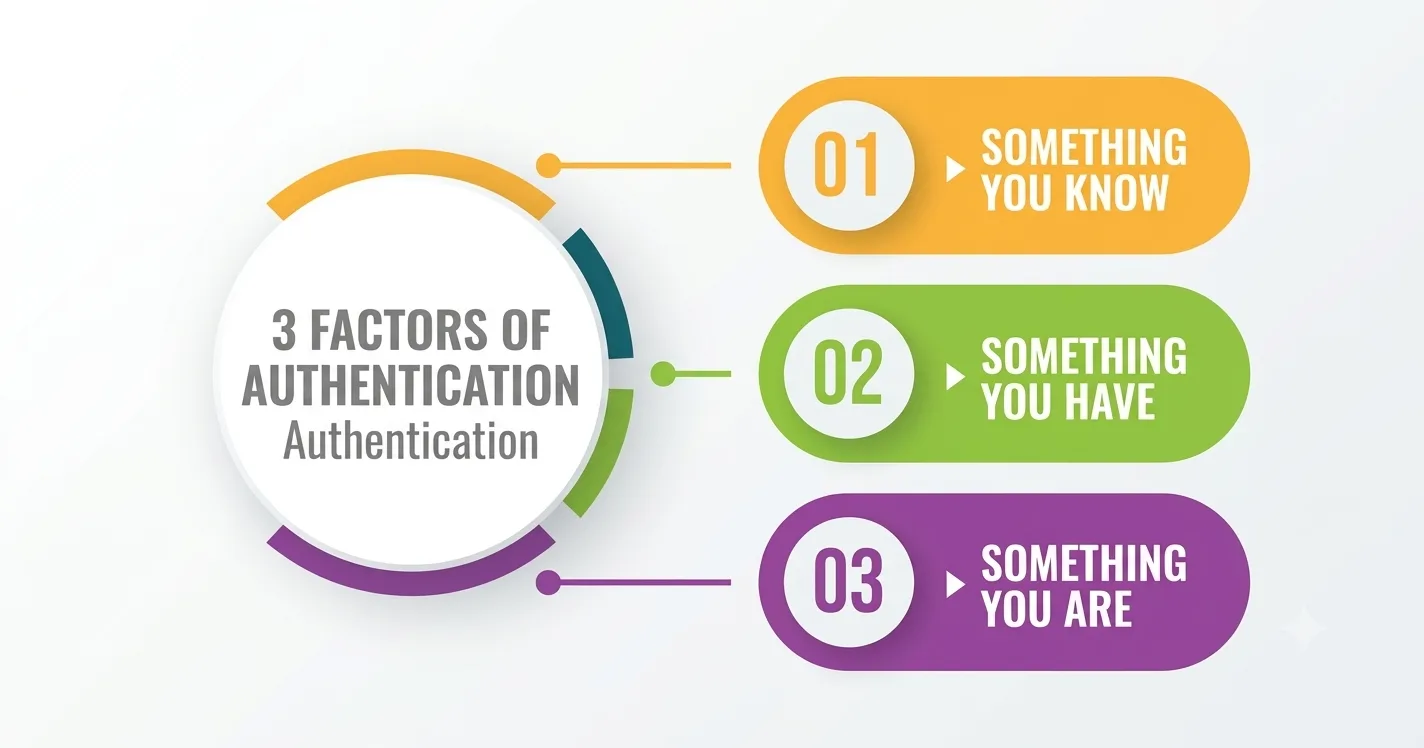
1. Something You Know
This refers to knowledge that only you should know.
- Password or passphrase
- PIN (numbers you use to access ATM cash)
- Answers to security questions (e.g., your pet’s name)
2. Something You Have
This is a physical or digital object.
- Mobile phones receiving a created text message
- Authentication apps (like e.g., Google Authenticator)
- Physical security
3. Something You Are
This is a unique biometric characteristic.
- Fingerprint scanning
- Facial recognition (e.g., FaceID)
- Voice or retina identification
How Does Multi-Factor Authentication Work
The system verifies the login credentials first when a user enters his/her username and password. If the password is wrong, access is denied. If the password is correct, the system prompts the user to enter a second authentication factor. This can be an OTP, an authenticator app code, a security key, or biometric verification.
The system then authenticates the second factor. If the second factor is wrong or the login request looks suspicious, access is denied, and a security alert may be triggered. If both factors of authentication are successfully verified, the user is granted access to the account.
Some Common Types of MFA
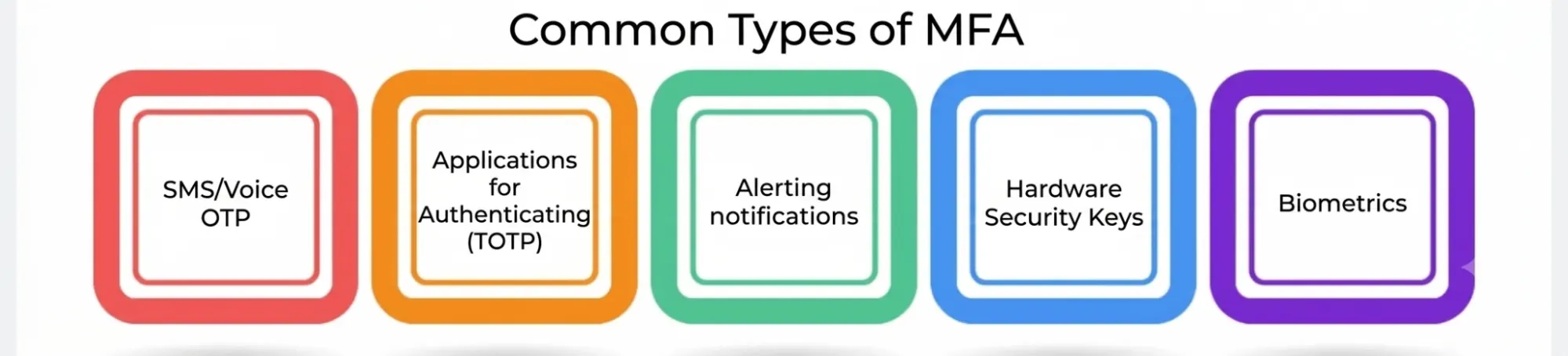
- SMS/Voice OTP: This is where you receive a code through a call or via message, which is easy to use. Though this is a convenient method, it is less secure because hackers can hack your number through the SIM-swap method.
- Applications for Authenticating (TOTP): Programs like Microsoft Authenticator as well as Google Authenticator create 6-digit codes that are produced every 30 seconds. This method is convenient since the codes are generated on devices; thus, the internet is not needed to make the verification, which is what makes it safer than SMS-based OTPs in such a sense.
- Alerting notifications: There is no need to type in the code, as the user simply gets the alert to accept/reject the login. This is implemented by modes such as Duo, Google Prompt, and Okta Verify. It is important to mention that even though the method is super easy and fast, one should never approve anything without initiating the request.
- Hardware Security Keys: Hardware security keys are tangible devices that can either be plugged into or tapped onto the device to verify users’ identity. In addition, hardware security keys follow different standards such as FIDO2/WebAuthn and hence provide substantial protection against phishing attacks, for the reason that they reach out to users in a secure way by making sure that they are logging into a legitimate website.
- Biometrics: Biometrics involve the use of one’s biometric data, such as fingerprints and facial recognition, in order to verify their identity. In most instances, one’s biometric characteristics will only unlock either the device or the security key, leading to the completion of the authentication process locally rather than sharing users’ biometrics to the website.
One Password Is Not Enough: Password Protection Goes Beyond Just One Password
Think about if we have just logged into a company, and that company is currently experiencing a security breach. In this case, the password has already been breached, meaning that it is now compromised and, therefore, renders our account vulnerable.
So with only the password available to the hacker, entry can be made into the account immediately, as one password would still allow access to an account when it is in the hands of a criminal.
As a result of this scenario, full account takeover can occur, giving the hacker access to all personal files, emails, and even sensitive information. He can sometimes even try to use ransomware or just move around our network.
Now think of what happens in the same scenario when we have the password as well as MFA. In this case, no matter how compromised our password is, the hacker will still have to deal with the second factor. This second factor can be an OTP, hardware key, or biometric, and without it, the hacker just will not be able to log in.
According to research, multifactor authentication prevents most attempts to take over an account even when the password is already compromised.
- MFA Best Practices: Multi-Factor Authentication is more beneficial when it is used and installed appropriately. Here are some of the best practices: Use hardware security keys rather than SMS. If there is an option, it is reasonable to use something like SMS, which is still less secure and may be attacked by various forms of attacks, such as SIM swapping.
- Activate MFA on all key accounts supporting this feature. Such accounts include email accounts because access to email accounts is usually required to reset the passwords of other accounts. • Store the backup or recovery passwords somewhere safe. The best approach is to store them offline, separate from the accounts for which they serve as protection. Storing the codes in the same email would not be sufficient in case of hacking of that email account.
- Ignore the MFA requests that were not initiated by you. If you get a number of login confirmations suddenly, it is not advisable to approve any request to stop the continuous notifications. It could be a case of MFA fatigue circumscribed by constant activities of an attacker who wants the victim to approve the requests. • Businesses have to make Multifactor Authentication (MFA) compulsory as a policy. Instead of relying upon individuals to implement MFA themselves, organizations can use platforms like Microsoft Entra ID Conditional Access, Google Workspace Admin, and AWS policies to manage MFA.
- Organizations should enforce MFA through central security policies. Instead of depending on every employee to enable it themselves, companies can enforce MFA using tools such as AWS policies, Google Workspace Admin, or Microsoft Entra ID Conditional Access.
Common Mistakes Around MFA
MFA ensures additional security. Still, there are common mistakes that reduce or nullify its protection.
- Thinking SMS-based MFA is sufficient for critical accounts. SMS may be better than not using MFA at all, but it can lead to issues such as SIM-swapping.
- Accepting an unexpected MFA notification. Some users may accept such notifications to eliminate the repeated alarms.
- Storing backup codes in the same account. For instance, keeping recovery codes in the same email account, which can be accessed only through those codes.
- Deactivating MFA for convenience. Users might deactivate MFA for a while, but they can forget to activate it once again.
- Making the wrong assumption that using MFA means there is no need to have a good password. MFA adds an extra layer of security, but it does not eliminate the need for a strong password either.
Summary
Passwords provide the answer to the above question, which is, “Are you aware of the secret?” but secrets always leak. Therefore, Multi-Factor Authentication presents us with a more complicated question to answer, which is “Do you also have the device, key, or biometric of this account?” In combination with the cloud security measures outlined in Part 1—limited allowance of information sharing, encryption, auditing, and monitoring—MFA fills the biggest gap in security in today’s world of online platforms within a matter of minutes.