





Open a cloud team’s tool budget from three years ago and set it next to this year’s, and the shift is hard to miss. Dashboards that used to track CPU and memory now track model latency and token spend. Tickets that used to read “scale the cluster” now read “the agent redeployed something overnight and we’re still figuring out why.”
That’s the unglamorous, practical reason AI tools for cloud engineers have stopped being a side curiosity and started showing up as a dedicated line in infrastructure budgets, right next to networking and storage.
This isn’t another “AI is changing everything” piece, and it isn’t a sponsored list either. It’s a working reference: twenty tools cloud engineers are actually adopting in 2027, grouped by the problems they solve, with a plain explanation of what each one does and where it fits into a real environment rather than a demo.
If you manage infrastructure for a living, this is meant to save you the three weekends of research it would otherwise take to sort hype from genuinely useful software and to give you a shortlist you can bring into a planning meeting without apologizing for it.
Why AI Tools for Cloud Engineers Matter More in 2027 Than They Did a Year Ago?
The honest answer is that infrastructure got more complicated faster than teams got bigger. Multi-cloud footprints, Kubernetes sprawl, and AI workloads bolted onto existing platforms have all added operational surface area, while headcount budgets mostly haven’t moved.
Something had to absorb that gap, and increasingly it’s software that can read logs, propose a fix, or flag an anomaly before a human notices it. The honest tradeoff is that none of it removes the need for judgment—it just changes where that judgment gets spent, from firefighting toward reviewing and approving what the tooling already found.
A few forces are driving this at once. Kubernetes environments have grown dense enough that manual troubleshooting doesn’t scale, which is why Kubernetes management tools with built-in diagnostic reasoning are becoming standard rather than optional.
Cloud bills have grown just as unpredictable, especially with GPU-backed inference workloads, which is pushing cloud cost optimization from a quarterly finance exercise into something engineers monitor weekly. And attack surfaces have widened enough that cloud security automation is no longer a “nice to have” bolted onto a compliance checklist—it’s closer to table stakes.
There’s also a quieter driver worth naming: engineers are simply spending less time hand-writing boilerplate than they used to. Terraform modules, deployment manifests, and alert rules increasingly get a first draft from software before a human ever opens an editor, which frees up hours that used to disappear into repetitive, low-judgment work. That shift alone explains a lot of why interest in this category has stopped being theoretical and started showing up in actual headcount and tooling budgets.
Put together, AI tools for cloud engineers now cover five fairly distinct jobs: writing and reviewing code, managing containers and clusters, provisioning infrastructure, securing environments, and controlling spend. The list below is organized around exactly those five jobs.
The Five Categories of AI Tools for Cloud Engineers
Before the full list, it helps to see how these categories relate to each other, since most engineers don’t need all five on day one.
|
Category |
What It Solves |
Typical Signal It’s Needed |
|
AI coding assistants |
Faster, more accurate code and config generation |
Engineers spending more time writing boilerplate than solving problems |
|
Kubernetes management tools |
Faster root-cause analysis and self-healing clusters |
On-call fatigue from repetitive pod and node issues |
|
Infrastructure as Code tools |
AI-assisted provisioning, drift detection, and review |
Terraform or Pulumi codebases too large to review by hand |
|
Cloud security automation |
Continuous posture checks instead of periodic audits |
Security findings piling up faster than teams can triage them |
|
Cloud cost optimization |
Real-time anomaly detection and rightsizing |
Monthly cloud bills that surprise finance more often than not |
This table is the map; the twenty tools below are the territory. One quick caveat before diving in: these categories aren’t perfectly separate in practice. A cluster-focused tool might also flag a cost anomaly, and a security platform might ping you about a misconfigured autoscaling policy. Treat the table as a starting lens for sorting the options, not a hard boundary between them.
10 AI Tools for Cloud Security Automation and Kubernetes Management
These ten tools cover the two areas where AI has made the fastest practical difference: keeping clusters healthy and keeping environments secure without adding headcount.
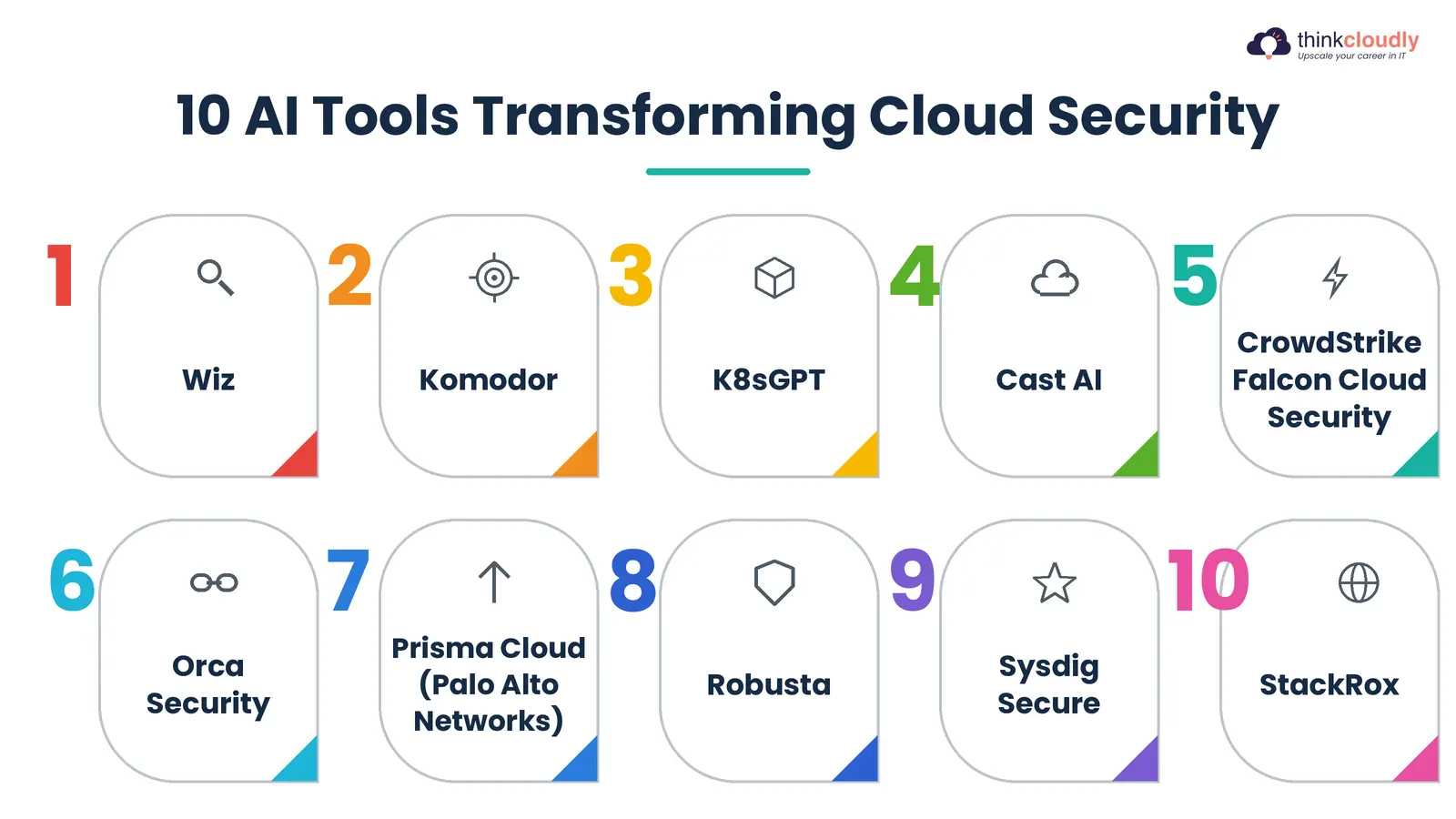
- Wiz—A cloud-native application protection platform that correlates misconfigurations, exposed secrets, and identity risk into a single attack-path view, a core example of cloud security automation done well.
- Komodor (with its Klaudia AI agent)—An AI SRE layer for Kubernetes that diagnoses root causes and, increasingly, remediates certain incidents without a human in the loop, a genuine leap for Kubernetes management tools, as reported by CloudNativeNow.
- K8sGPT—An open-source diagnostic tool that scans a cluster and explains, in plain English, why a pod is crash-looping or a deployment is stuck, popular precisely because it lowers the bar for newer engineers troubleshooting Kubernetes for the first time.
- Cast AI—Focuses on automated Kubernetes rightsizing and node optimization, blending cost control with cluster health in one of the more mature AI-driven Kubernetes platforms on the market.
- CrowdStrike Falcon Cloud Security – Extends endpoint-style behavioral detection into cloud workloads, a strong fit for teams that already lean on CrowdStrike and want their cloud security posture managed under one console.
- Orca Security—Uses agentless scanning to build a full risk graph across cloud accounts, another practical way to automate security posture checks for teams wary of deploying agents everywhere.
- Prisma Cloud (Palo Alto Networks)—Combines posture management, workload protection, and identity risk scoring, often chosen by larger enterprises standardizing automated security checks across business units.
- Robusta—Built specifically around Kubernetes alerting and automated playbooks, giving on-call engineers one of the more approachable Kubernetes automation tools for smaller teams.
- Sysdig Secure – Pairs runtime threat detection with compliance scanning, a dependable choice when automated posture checks need to satisfy an auditor as much as an engineer.
- StackRox (via Red Hat Advanced Cluster Security) – Focused on Kubernetes-native security policies and admission control, rounding out this list of Kubernetes management tools with a policy-first approach.
10 AI Tools for Coding, Infrastructure as Code, and Cost Control
The second half of this list covers the AI tools for cloud engineers that get used daily rather than only during an incident: writing code faster, provisioning safely, and keeping spend honest. This is also where the line between “developer tool” and “infrastructure tool” has mostly dissolved, since the same assistant that writes an application feature now just as often writes the pipeline that deploys it.
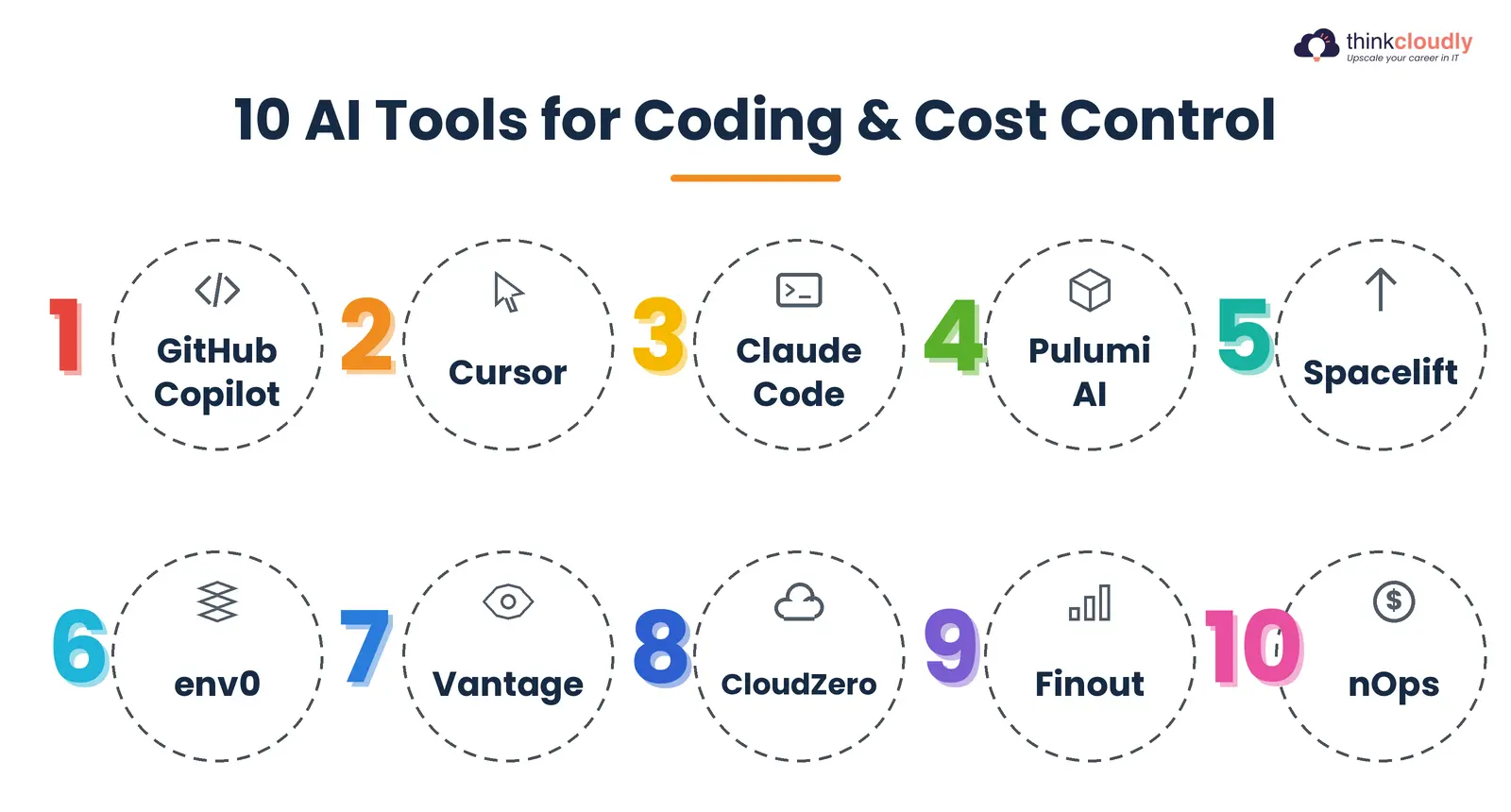
- GitHub Copilot—Still the most widely deployed of all AI coding assistants, now tuned well enough for YAML, Terraform, and shell scripting that it’s become a default in most cloud teams’ editors.
- Cursor—One of the more capable AI coding assistants built as a full editor rather than a plugin bolted onto a traditional IDE, especially useful for refactoring large Infrastructure as Code tools repositories.
- Claude Code—A terminal-based coding agent built for working across a whole repository at once, useful for cloud engineers who want one of their AI coding assistants to run multi-step changes rather than single-line suggestions.
- Pulumi AI—Generates and explains infrastructure code in general-purpose languages instead of a domain-specific syntax, which shortens the learning curve for engineers coming from a software background rather than a traditional operations one.
- Spacelift—Adds AI-assisted drift detection and policy checks on top of Terraform and OpenTofu workflows, described well in Spacelift’s own breakdown of AI in IaC workflows, and a solid example of how Infrastructure as Code tools are absorbing review work that used to sit entirely with humans.
- env0—Focuses on self-service infrastructure provisioning with AI-assisted guardrails, aimed at organizations that want Infrastructure as Code tools available to more than just a central platform team.
- Vantage—A cloud cost optimization platform that unifies AWS, Azure, and Google Cloud billing into one view with anomaly alerts.
- CloudZero—Ties cloud spend directly to specific features or customers, turning spend visibility into a product decision rather than just a finance report.
- Finout—Consolidates cost data across clouds and even SaaS tools into one dashboard, built specifically for teams scaling cost visibility past a single provider.
- nOps—Combines automated rightsizing recommendations with Reserved Instance and Savings Plan management, a practical pick for teams that want cloud cost optimization to run quietly in the background rather than as a monthly fire drill.
How to Actually Choose, Instead of Adopting All Twenty at Once?
The mistake most teams make isn’t picking the wrong tool—it’s picking too many at the same time, rolling out a coding assistant, a cost dashboard, and a security scanner in the same sprint, and then being unable to tell which one actually moved the needle. A more realistic approach follows a simple order.
Start with whichever category is currently costing the most engineering hours, not whichever category sounds most impressive in a vendor deck. A team drowning in Kubernetes incidents doesn’t need a new coding assistant first; it needs one of the Kubernetes management tools on this list running quietly in the background for a month before anything else gets added.
Pilot on one team, not the whole organization. AI tools for cloud engineers tend to generate false confidence fast, because early results often look better than they’ll hold up once the tool meets a messier, older part of the environment — a legacy service, an undocumented pipeline, a cluster nobody has fully mapped. A four-to-six-week pilot on a single service tells you far more than a week of demos ever will.
Keep a human in the approval loop for anything destructive. Automated remediation in Kubernetes clusters and automated policy changes in security posture platforms are genuinely useful, but the safest rollouts start in “recommend” mode before graduating to “auto-apply,” especially for production workloads where a bad automated call is expensive to unwind.
Document what changed, and why. Whichever tool gets picked first, write down what it touched and when, especially for anything that ran in an automated mode without a human clicking approve. Six months from now, someone troubleshooting an unrelated incident will thank you for leaving a trail instead of discovering a silent automated change by accident.
Measure what actually changed. Fewer pages at 2 a.m., a lower mean-time-to-resolution, a smaller monthly bill, fewer open security findings — these are the signals that justify expanding a tool’s footprint, far more than how polished its dashboard looks in a sales call. If none of those numbers move within a quarter, it’s worth questioning the tool before questioning the rollout plan.
A Personal Note
I’ve sat in enough platform team retros to notice a pattern: the teams getting real value out of AI tools for cloud engineers are rarely the ones that adopted the most tools. They’re the ones that picked one real, nagging problem — a Kubernetes cluster nobody wanted to be on call for, a bill that kept quietly climbing — and let one tool solve it well before reaching for the next one.
I’ve also noticed the opposite pattern just as often: a team buys five tools in one quarter, nobody fully onboards any of them, and six months later half the licenses are sitting unused while the original problem is still there. Tooling doesn’t fix a process nobody owns.
If you’re staring at this list wondering where to start, don’t start with all twenty. Start with whichever line in your last postmortem made you the most tired, and go from there. Everything else can wait a quarter.