Most companies don’t fail at AWS cloud migration because they picked the wrong tools. They fail because they treated migration like a single event—a weekend cutover—instead of a sequence of decisions that starts weeks before anything actually moves. By 2026, that mistake is harder to excuse.
Gartner now projects worldwide IT spending will hit $6.31 trillion this year, a 13.5% jump driven in large part by hyperscale cloud demand, with data center systems alone growing 55.8% as providers race to keep up with that demand. The money is moving to the cloud whether or not a given organization has a real plan for getting there.
This guide walks through what a serious AWS cloud migration actually looks like in 2026—not the marketing-slide version, but the sequence a competent team follows from the first assessment meeting to the day legacy servers get powered down for good. It’s written for students and early-career IT professionals who want to understand this well enough to work on a real migration project, not just recognize the vocabulary.
What Is AWS Cloud Migration?
At its simplest, AWS cloud migration is the process of moving applications, data, and infrastructure from on-premises data centers (or another cloud provider) onto Amazon Web Services. But that definition undersells how much judgment is involved.
A migration isn’t just copying files to a new address—it’s a series of trade-off decisions about cost, downtime tolerance, compliance requirements, and how much of the existing system is worth preserving versus rebuilding.
That’s why moving to AWS is usually described as a program rather than a project. A single database move might take an afternoon. A full enterprise migration—hundreds of servers, dozens of interdependent applications, years of accumulated technical debt—can run 18 months or longer, in phases, with different applications following different paths depending on how critical and how fragile each one is.
Why Is AWS Cloud Migration Accelerating in 2026?
A few forces are pushing organizations toward AWS cloud migration faster than in previous years. On-premises hardware refresh cycles are colliding with rising energy and real estate costs, making data center ownership a harder number to defend to a finance team.
AI workloads need elastic compute that most private infrastructure simply wasn’t built for, and that single factor is doing a lot of the work behind the 55.8% jump in data center spending Gartner tracked this year.
Regulatory pressure in several industries now favors providers that can demonstrate mature security certifications and audited compliance controls, which cloud providers generally do better than aging internal systems that were never designed with today’s audit requirements in mind.
None of that means the move to AWS is risk-free or automatically cheaper. It means the pressure to move has grown, and the organizations that plan carefully are the ones capturing the upside instead of getting stuck with a stalled, half-finished project and two infrastructure bills instead of one.
The 7 Rs: Choosing the Right Cloud Migration Steps
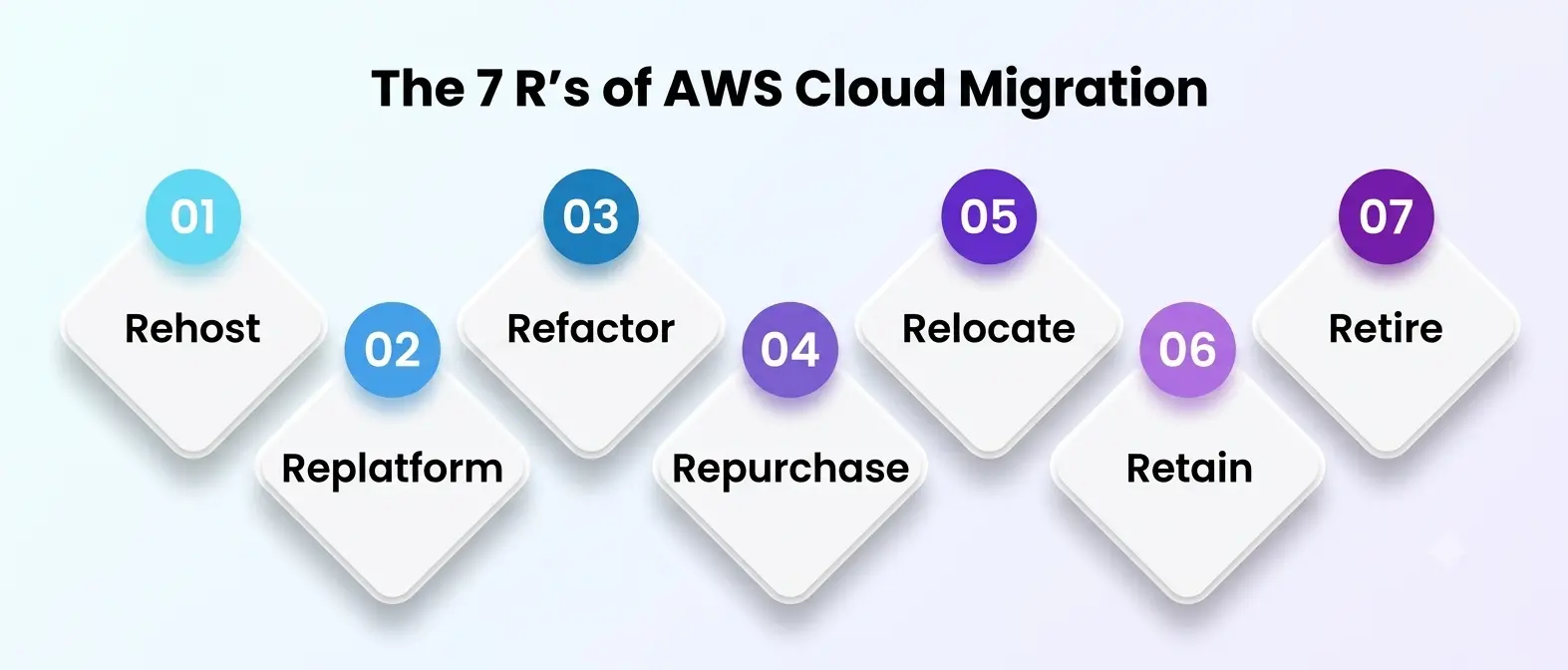
Before touching a single server, a team needs to decide how each application will actually move. AWS formalized this decision into what’s commonly called the 7 Rs—a framework AWS documents in detail for practitioners—and it forms the foundational cloud migration steps that shape everything downstream:
-
Rehost—move an application “as-is” onto AWS infrastructure, commonly called lift-and-shift. Fast, low-risk, but leaves legacy inefficiencies in place.
- Replatform—make small optimizations during the move, like swapping a self-managed database for Amazon RDS, without rewriting the application itself.
- Refactor—rebuild the application to be cloud-native, often breaking a monolith into microservices. Slower and more expensive, but unlocks the most long-term value.
- Repurchase—replace the existing system with a SaaS alternative instead of migrating it at all.
- Relocate—move an entire VMware-based environment to AWS without re-architecting, useful for fast, large-scale exits from a data center.
- Retain—deliberately leave a workload where it is, usually because it’s not worth the migration cost yet or has a compliance constraint.
- Retire—decommission an application nobody actually needs anymore, which happens more often than most teams expect once a full inventory is done.
Sequencing these cloud migration steps correctly—deciding which applications move first and in what order—matters just as much as picking the right strategy for each individual workload. Picking the wrong strategy for a given workload is one of the most common reasons an AWS cloud migration runs over budget.
A brittle, business-critical application forced through a rushed rehost tends to reappear as an incident a few months later; a low-value internal tool over-engineered through a full refactor wastes months of engineering time it never needed.
Building a Migration Checklist Before You Touch a Single Workload
A migration checklist is what separates a controlled migration from an improvised one. Skipping this step is the single most common reason projects blow past their timeline. It generally covers:
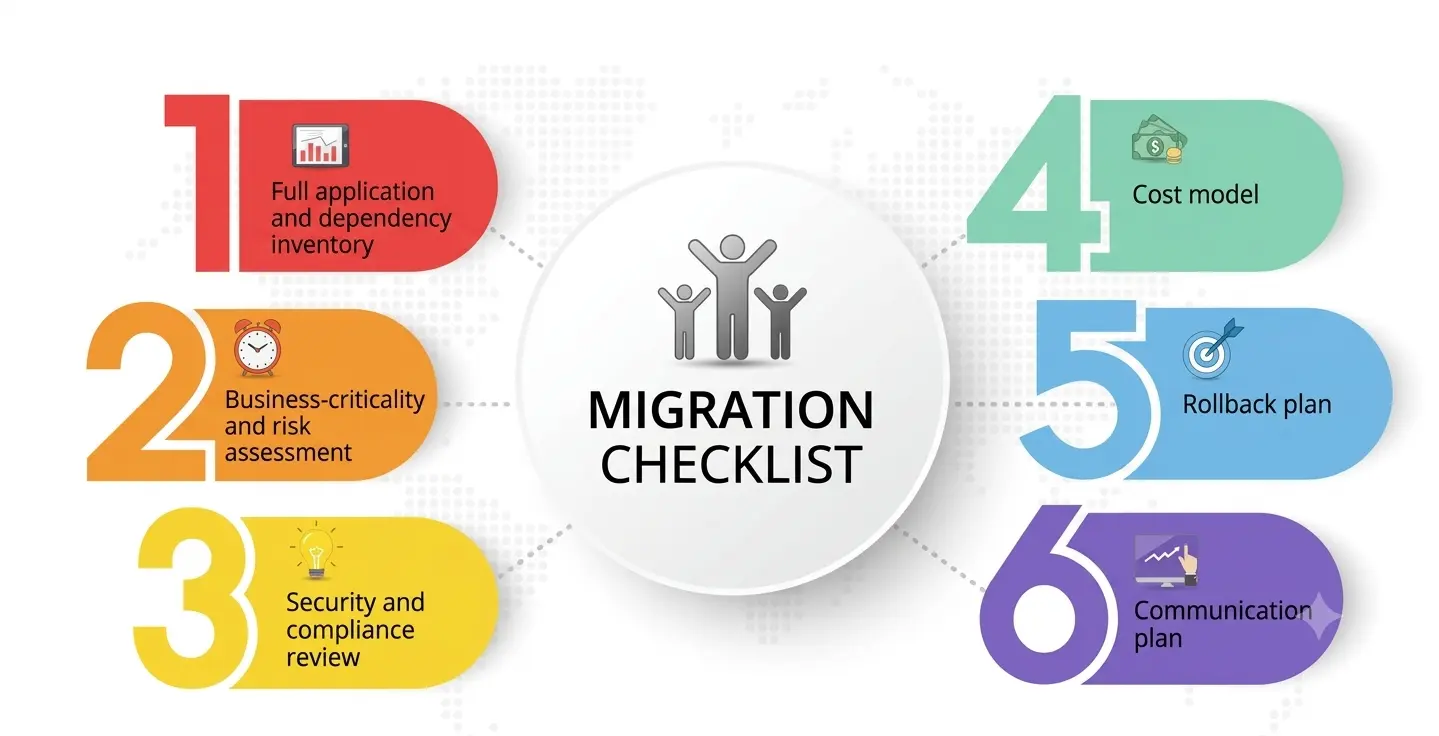
- A full application and dependency inventory—what exists, what talks to what, and what breaks if one piece moves without the other.
- A business-criticality and risk assessment—which systems can tolerate downtime, and which ones cannot fail even briefly.
- A security and compliance review—data residency rules, encryption requirements, and industry-specific regulations that apply once workloads sit on AWS.
- A cost model—realistic projected AWS spend compared against current infrastructure costs, including the migration project itself, not just the destination environment.
- A rollback plan—a tested way back to the original environment if something goes wrong mid-migration, because “it worked in testing” isn’t the same as “it worked in production.”
- A communication plan—who gets notified before, during, and after each migration wave, especially for customer-facing systems.
Teams that write this checklist down—rather than keeping it in someone’s head—catch far more problems before they become expensive. It’s worth pressure-testing on a single low-risk workload before applying it enterprise-wide: run one small application through every item on the list, see where it breaks down in practice, and fix the process itself before it’s responsible for something that actually matters to the business.
A checklist that only exists on paper and has never been rehearsed tends to fail quietly, right when it’s needed most.
Server Migration: Rehosting with AWS Application Migration Service
For most rehost-style projects, server migration runs through AWS Application Migration Service (AWS MGN), AWS’s dedicated tool for converting physical, virtual, or cloud-based source servers into native EC2 instances.
AWS MGN handles continuous, block-level replication in the background while the source system keeps running normally, which is what makes low-downtime rehosting realistic for production workloads instead of something that only works in a lab environment.
The service supports two paths: an agentic mode where automation handles agent installation, network mapping, and configuration with minimal manual work, and a self-directed mode for teams that want granular, console-level control over each step.
Either way, rehosting through AWS MGN also opens the door to modernization during the cutover itself—operating system upgrades, license conversion, or building in disaster recovery—rather than treating the move as a strictly like-for-like copy. For a student learning this space, MGN is a useful case study in how much production risk can be engineered away with the right automation.
Data Replication: How AWS DMS Keeps Databases in Sync
Databases deserve their own conversation because getting this piece wrong is far more damaging than getting the server side wrong. A corrupted or incomplete server can be rebuilt; corrupted production data is a different kind of problem entirely.
AWS Database Migration Service (AWS DMS) is built specifically for this—AWS reports the service has been used to migrate more than 1.5 million databases, spanning both homogeneous moves (PostgreSQL to PostgreSQL, for instance) and heterogeneous conversions (Oracle to Aurora, as one common example).
What makes AWS DMS useful for real production systems is that data replication continues while the source database stays fully operational, with built-in validation that checks for data loss or mismatches and automatically re-synchronizes anything that drifts. That continuous synchronization is what allows a cutover window to shrink from a risky, multi-hour outage down to a short, coordinated switch—often minutes rather than a full weekend of downtime.
Worth noting: DMS Fleet Advisor, the discovery add-on many teams used for early-stage database assessment, is being retired in 2026, so teams should confirm what discovery tooling they’re relying on before planning around it.
Infrastructure Modernization: Why Lift-and-Shift Isn’t the Finish Line
Rehosting gets workloads onto AWS quickly, but stopping there leaves real value on the table. Infrastructure modernization is the follow-on work that turns a “cloud-hosted” environment into one that’s actually taking advantage of what cloud infrastructure offers: autoscaling instead of fixed capacity, managed database services instead of self-administered ones, and infrastructure-as-code instead of manually configured servers that drift out of sync with each other over time.
It doesn’t have to happen all at once, and trying to force it into the initial migration timeline is a common planning mistake. Many teams rehost first to stop paying for two environments, then modernize in a second phase once the pressure of the original deadline is gone and there’s room to redesign properly instead of rushing it.
Treating infrastructure modernization as an ongoing discipline, not a one-time initiative after the move, tends to be what separates teams that keep improving their AWS footprint from teams whose cloud environment quietly becomes exactly as messy as the data center it replaced.
Reference Blog: Mastering Cloud Automation Through AWS and Ansible
Where AWS Cloud Migration Projects Go Wrong?
A few patterns show up repeatedly once teams start working through their cloud migration steps, and most of them stall the project or blow the budget:
- Underestimating dependencies. An application that looks self-contained often isn’t, and discovering a hidden dependency mid-migration is far more expensive than finding it during the assessment phase.
- Skipping a realistic cost model. Cloud costs behave differently from data center costs — pay-as-you-go pricing punishes untuned resources in a way a fixed on-premises budget never did.
- No rollback plan. Teams that treat migration as one-directional get stuck when something breaks, because there’s no tested way back.
- Rushing the database cutover. Compressing timelines to hit an arbitrary deadline is one of the most common causes of post-migration data integrity issues.
- Treating migration as the end goal. A migration that stops the moment workloads land on AWS, without any infrastructure modernization plan, usually needs a second, more expensive project a year or two later to fix what the first one left unfinished.
Testing and Validating Before You Call It Done
None of this is finished the moment the last server powers off in the old environment. A proper close-out includes performance testing under realistic load, a security review confirming nothing was left more open than intended during the rush of cutover, and a cost check comparing actual AWS spend against the projections built during planning.
Skipping this step is how a technically successful move quietly turns into a budget or security problem that surfaces months later, once nobody’s paying close attention anymore. Building this validation stage into the original timeline, rather than treating it as optional cleanup, is one of the cheapest insurance policies in the entire process.
A Practical Migration Checklist Summary
|
Migration Phase |
Core Activity | Primary Tool or Practice |
| Assessment | Inventory applications, dependencies, and risk |
Discovery tools, stakeholder interviews |
|
Strategy |
Assign each workload one of the 7 Rs |
Business-criticality scoring |
|
Planning |
Build the migration checklist and rollback plan |
Wave planning, cost modeling |
|
Server migration |
Replicate and cut over compute workloads |
AWS Application Migration Service (MGN) |
|
Data replication |
Sync databases with validation and minimal downtime |
AWS Database Migration Service (DMS) |
|
Modernization |
Optimize what’s now running on AWS |
Managed services, infrastructure-as-code |
|
Review |
Confirm cost, performance, and security match the plan |
Post-migration audit |
A Personal Note
The migration projects I’ve seen go sideways almost never fail because of a technical limitation — AWS’s tooling for rehosting and database sync is mature enough to handle nearly anything you throw at it.
They failed because someone skipped the boring part: the inventory nobody wanted to do, the checklist nobody wanted to write, the rollback plan nobody thought they’d need. If you’re a student getting into this field, resist the pull toward the flashy parts of cloud engineering and spend real time getting good at the unglamorous groundwork instead.
The people who are actually trusted to run a large-scale migration aren’t the ones who know the most services — they’re the ones who ask “what happens if this specific piece breaks at 2 a.m.” before anyone else in the room thinks to.