If you’ve spent any time browsing job boards lately, you’ve probably noticed how often “DevOps Engineer” shows up—usually with a salary range that makes people pause and think, “Okay, maybe I should look into this.”
I get asked about this a lot, and my answer is always the same: DevOps isn’t some mystical, unreachable skill set reserved for wizards in hoodies. It’s a practical mix of habits, tools, and technical know-how that anyone with patience can build, one piece at a time.
This blog is meant to be the guide I wish someone had handed me when I was starting out a clear, no-fluff breakdown of the DevOps engineer skills that actually matter for beginners in 2026. No overwhelming jargon dumps, no pretending you need to master fifteen tools before you write your first line of code. Just the real DevOps engineer skills, explained the way a mentor would explain them over coffee.
What Does a DevOps Engineer Actually Do?
Before diving into the skills themselves, it helps to understand the role. A DevOps engineer sits at the intersection of software development and IT operations. Their job is to make sure code moves from a developer’s laptop to a live, working product as smoothly, quickly, and safely as possible.
That means automating repetitive tasks, keeping systems stable, watching for problems before they become disasters, and constantly asking, “How can this process be faster and more reliable?”
Because the role touches so many parts of the software lifecycle, the required DevOps engineer skills span a wide range—from the command line to cloud infrastructure to security practices. Building strong DevOps engineer skills doesn’t happen overnight, but breaking them into categories makes the whole journey far less intimidating. Let’s go through them one at a time.
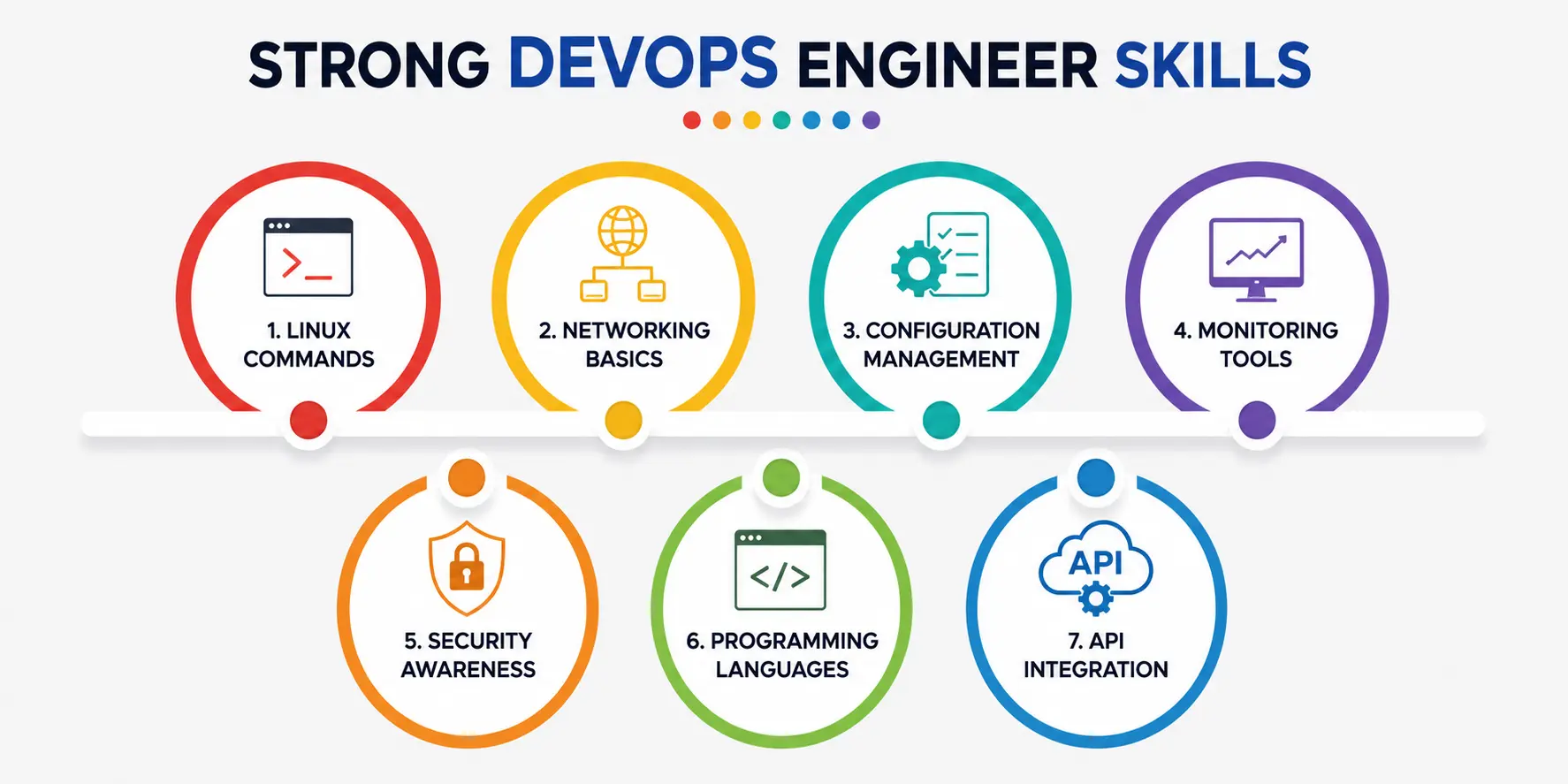
1. Linux Commands — The Foundation of Everything
Almost every server you’ll ever touch as a DevOps engineer runs on Linux. It’s the quiet backbone of the internet, and that’s not an exaggeration—the vast majority of cloud servers, containers, and production environments run on some flavor of it. If you’re not comfortable navigating a Linux terminal, you’re going to struggle with nearly every other tool in the DevOps toolbox.
Start with the basics: ls, cd, and pwd for navigating the filesystem; cat, grep, and tail -f for reading and searching files and logs in real time; and chmod/chown for managing permissions and ownership. Add ps and top for checking running processes, df for disk usage, and ssh for connecting to remote machines, and you already have a toolkit that covers most day-to-day server work. According to one detailed breakdown of Linux commands for DevOps engineers, commands like “tail -f” are considered essential precisely because they let you monitor logs live—which is often how real production issues get caught and solved.
Learning them isn’t a one-time task, either. You’ll keep discovering new flag combinations and command chains for years. The good news is that once the basics feel natural, everything else in DevOps gets noticeably easier, because so many other tools assume you’re already fluent at the terminal.
2. Networking Basics — Because Nothing Runs in Isolation
Servers don’t exist on their own private islands. They talk to each other constantly — over HTTP, over SSH, through load balancers, across firewalls, and through DNS records that quietly decide where traffic goes.
If you don’t understand networking basics, you’ll eventually hit a wall where an application “just isn’t working,” and you won’t know whether the problem is a misconfigured port, a DNS issue, or a firewall blocking traffic.
At minimum, beginners should get comfortable with concepts like IP addressing, subnetting, DNS resolution, the difference between TCP and UDP, and how ports and firewalls control access to services.
You should also understand what a load balancer does and why HTTPS matters for secure communication. None of this requires becoming a network engineer — it just requires enough working knowledge to troubleshoot confidently when something breaks.
This matters even more once you move into cloud environments, where these fundamentals translate directly into concepts like Virtual Private Clouds (VPCs), security groups, and subnets on platforms like AWS or Azure. If the underlying logic doesn’t make sense to you, the cloud version will feel like a black box.
3. Configuration Management — Consistency at Scale
Imagine manually configuring fifty servers by hand, one at a time, making sure every setting matches exactly. Now imagine doing it again next week because requirements changed. This is exactly the kind of repetitive, error-prone work that configuration management tools were built to eliminate.
This ties closely into the broader practice of Infrastructure as Code (IaC), which one 2026 industry overview describes as crucial for building reproducible and scalable systems rather than relying on manual, error-prone setups.
For beginners, Ansible is usually the friendliest entry point since it doesn’t require agents installed on every server and uses relatively readable YAML syntax. Getting comfortable with configuration management early pays off massively later, because it’s the difference between “it works on my server” and “it works everywhere, every time.”
4. Monitoring Tools—You Can’t Fix What You Can’t See
A DevOps engineer without visibility into their systems is flying blind. Monitoring tools give you eyes on your infrastructure — tracking CPU usage, memory, response times, error rates, and dozens of other signals that tell you whether things are healthy or heading toward trouble.
The industry has moved well past simple uptime checks. As per NovelVista 2026 industry analysis, monitoring today is no longer just about alerts—it’s about true observability, meaning you understand system behavior through metrics, logs, and traces combined. Popular monitoring tools like Prometheus (for collecting metrics), Grafana (for visualizing them), and the ELK Stack (for centralized logging) form a common combination in many production environments.
For beginners, the goal isn’t to master every monitoring tool on day one. It’s to understand the mindset: set up alerts before something breaks, not after. Proactive monitoring, as opposed to purely reactive monitoring, is what separates teams that catch issues early from teams that get paged at 3 a.m. because customers noticed the outage first.
5. Security Awareness — Baked In, Not Bolted On
Security used to be treated as a final checkbox before launch. That approach doesn’t hold up anymore. Modern DevOps — often called DevSecOps — treats security awareness as something woven into every stage of the pipeline, not an afterthought tacked on at the end.
This “shift-left” approach means catching security issues early, when they’re cheaper and easier to fix, rather than discovering them in production.
Practical security awareness for beginners includes understanding least-privilege access (only giving people and systems the permissions they actually need), encrypting sensitive data both in transit and at rest, and safely managing secrets like API keys and passwords instead of hardcoding them into scripts.
According to a detailed look at essential DevOps security skills, tools such as HashiCorp Vault for secrets management, along with security testing practices like SAST and DAST, are becoming standard expectations for engineers in this space.
You don’t need to become a certified security expert overnight. But even a baseline awareness of common vulnerabilities and safe configuration practices will set you apart from beginners who treat security as “someone else’s job.”
6. Programming Languages — Automation Needs a Voice
DevOps is fundamentally about automating things that used to be manual, and automation needs code. You don’t need to be a full-stack software engineer, but you do need enough programming comfort to write scripts that save time and reduce human error.
Python and Bash are consistently on the top of the list of programming languages recommended for DevOps beginners, largely because Bash handles quick system-level tasks naturally, while Python is flexible enough for everything from automation scripts to API interactions to small tools that glue different systems together.
One 2026 overview of the field notes that Python and Bash remain the most valuable scripting languages for DevOps work and that pairing them with solid Git skills is what really unlocks efficient automation.
You’ll be surprised how quickly a script that used to take you twenty manual minutes gets reduced to a single command.
7. API Integration — Making Systems Talk to Each Other
Modern infrastructure rarely lives in one neat, self-contained box. You’ll be connecting cloud services, monitoring dashboards, CI/CD pipelines, chat notification tools, and internal systems — and most of that communication happens through APIs.
Understanding API integration means knowing how to send requests, handle authentication (like API keys or OAuth tokens), parse JSON responses, and deal gracefully with errors when something doesn’t return what you expected.
Whether you’re pulling metrics from a monitoring service, triggering a deployment through a CI/CD tool’s API, or connecting a Slack channel to your alerting system, this skill shows up constantly in real DevOps work.
Beginners often underestimate how central API integration is until they hit their first project that requires two tools to “talk” to each other. Once you’ve built a script that pulls data from one API and pushes it into another system, the whole ecosystem of DevOps tooling starts to feel a lot less mysterious.
Bringing It All Together
Here’s the thing nobody tells beginners clearly enough: you don’t need to master all of these DevOps engineer skills simultaneously. Growing your DevOps engineer skills is a gradual process, not a race. Real DevOps engineers built their expertise gradually, usually starting with Linux and scripting, then layering in networking, configuration management, monitoring, security, and API work as projects demanded it.
What matters most in the beginning is consistency. Spend thirty minutes a day in a Linux terminal. Write one small automation script a week. Set up a basic monitoring dashboard for a personal project. These small, repeated actions compound faster than people expect.
DevOps Engineer Skills at a Glance
|
Skill Area |
What It Covers |
Why Beginners Need It |
|
Linux Commands |
File navigation, permissions, processes, logs |
Nearly all servers and tools run on Linux |
|
Networking Basics |
DNS, IP addressing, ports, firewalls, load balancers |
Diagnoses why systems can or can’t communicate |
|
Configuration Management |
Ansible, Puppet, Chef, Infrastructure as Code |
Ensures consistent, repeatable server setups |
|
Monitoring Tools |
Prometheus, Grafana, ELK Stack |
Provides visibility to catch issues before users do |
|
Security Awareness |
Least privilege, encryption, secrets management |
Protects systems and data at every pipeline stage |
|
Programming Languages |
Python, Bash, sometimes Go or Ruby |
Powers automation and reduces manual work |
|
API Integration |
Authentication, JSON handling, error management |
Connects tools and systems across the pipeline |
A Personal Note
I’ll be honest — when I first looked at a Linux terminal, it felt like staring at a wall of nonsense. Networking basics made even less sense; VPCs and subnets sounded like a foreign language. What changed things wasn’t some brilliant shortcut.
It was just showing up daily, breaking things on a test server, fixing them, and slowly realizing that every DevOps engineer you admire once sat exactly where you’re sitting now—confused, a little overwhelmed, and one small win away from it clicking. Keep going. It clicks faster than you think.