If you’ve spent any time browsing DevOps job listings or scrolling through tech Twitter, you’ve probably run into the same two words over and over: Docker and Kubernetes. They get mentioned in the same breath so often that a lot of students assume they’re competing tools—like choosing between Photoshop and Illustrator.
They’re not. But the confusion around Docker vs. Kubernetes is real, and it’s one of the most common questions I get from students who are just starting their DevOps or cloud journey.
So let’s settle it properly. In this guide, I’ll walk you through what each tool actually does, how they’re different, and—most importantly—which one you should learn first if you’re a student trying to build a career in DevOps, backend development, or cloud engineering.
Why Does This Question Even Come Up?
Every semester, I see the same pattern. A student learns about containers, gets excited, searches “docker vs kubernetes” out of curiosity, and ends up more confused than before. That’s because most articles online treat them as rivals when they actually work together in nearly every modern production environment.
Here’s the simple truth: Docker packages your application. Kubernetes manages many of those packaged applications when things get big and complicated. One is a tool. The other is a system. Once that clicks, the rest of this becomes a lot easier to follow.
What Is Docker, Really?
Docker is a containerization platform. Its entire job is to take your application — code, libraries, runtime, configuration files, everything it needs to run — and package it into a single portable unit called a container.
Think of it like packing a suitcase. You don’t just throw in clothes and hope the hotel has a hairdryer, a phone charger, and your favorite shampoo. You pack everything you need so that no matter where you land, your routine stays the same.
That’s what Docker does for software. It solves the age-old developer headache of “it worked on my machine” by making sure the application behaves exactly the same on a laptop, a testing server, or a production machine in the cloud.
Docker uses containerization to isolate applications from the underlying operating system, which means you don’t need to worry about mismatched library versions or missing dependencies. According to Docker’s official documentation, containers share the host machine’s OS kernel but run in isolated user spaces, which makes them far lighter than traditional virtual machines.
For a student, learning Docker feels approachable. You install it, write a small file called a Dockerfile, build an image, and run a container — all in an afternoon. That accessibility is one of the biggest reasons beginners are told to start here in almost every Docker vs. Kubernetes discussion. Even basic container management, like starting, stopping, and inspecting containers, becomes second nature within a few practice sessions.
What Is Kubernetes, Really?
Now here’s where things escalate. Say your app becomes popular. You’re not running one container anymore—you’re running fifty, then five hundred, spread across multiple servers. Some crash. Some need more memory. Traffic spikes at 9 AM and drops at midnight. Manually managing all of that is a nightmare.
This is exactly the problem Kubernetes was built to solve, and it’s the core reason container orchestration exists as its own discipline within DevOps. Kubernetes is a container orchestration system, originally developed at Google and now maintained by the Cloud Native Computing Foundation, that automates the deployment, scaling, healing, and networking of containers across clusters of machines.
If Docker is the shipping container, Kubernetes is the entire port—the cranes, the schedules, and the logistics network making sure every container ends up where it needs to be, is replaced the moment it fails, and is scaled up the moment demand rises. That’s container orchestration in action.
Kubernetes doesn’t just run containers — it constantly checks their health, restarts them if they crash, distributes traffic evenly, and can automatically add or remove resources based on load. This is a huge part of why the Docker vs. Kubernetes conversation matters so much once you move from “building an app” to “running an app in production.”
Docker vs Kubernetes: The Core Difference
The cleanest way to understand Docker vs. Kubernetes is this:
- Docker builds and runs individual containers.
- Kubernetes manages large numbers of containers across many machines.
They operate at different layers of the technology stack. Docker is close to the application — it’s about packaging. Kubernetes is close to the infrastructure — it’s about container management at scale.
Interestingly, Kubernetes doesn’t even require Docker specifically to function; it can use other container runtimes like containerd, as explained in the Kubernetes container runtime documentation. But conceptually, most learners still associate the two because Docker popularized the container format Kubernetes was built to orchestrate.
Docker vs Kubernetes: Detailed Comparison Table
|
Feature |
Docker |
Kubernetes |
|
Primary Purpose |
Packaging and running individual containers |
Orchestrating and managing containers at scale |
|
Best For |
Local development, small apps, learning containerization |
Production systems, microservices, large-scale deployments |
|
Learning Curve |
Beginner-friendly, quick to set up |
Steeper learning curve, more concepts to master |
|
Scaling |
Manual or limited (via Docker Swarm) |
Automatic, based on traffic and resource usage |
|
Self-Healing |
Not built-in by default |
Automatically restarts failed containers |
|
Networking |
Simple, single-host focused |
Advanced, multi-node cluster networking |
|
Use Case Example |
Running a single Node.js app locally |
Running hundreds of microservices across a cloud cluster |
|
Ideal For Students |
First tool to learn |
The second tool, after container basics are solid, |
This table alone answers a lot of the Docker vs. Kubernetes confusion. Docker is your starting point. Kubernetes is where you go once you actually need container orchestration.
So, Which One Should You Learn First?
Here’s my honest, author’s-note-style opinion, based on watching hundreds of students go through this exact decision: Learn Docker first, always.
Kubernetes assumes you already understand what a container is, how images work, how networking between containers behaves, and why isolation matters. If you jump straight into Kubernetes without that foundation, you’ll be memorizing YAML files without understanding what any of it is actually doing under the hood. That’s a recipe for frustration, not learning.
Docker gives you the vocabulary. Once you’re comfortable building images, running containers, and understanding containerization as a concept, Kubernetes stops feeling like a foreign language and starts feeling like the logical next step — the tool that solves the exact problems you’ll start running into once your Docker projects get bigger.
This progression is also how most real DevOps teams are structured. Developers work with Docker daily. DevOps engineers and SREs work with Kubernetes to handle container management across environments. Learning in that order mirrors how the industry actually works.
Why Does This Matter for Cloud-Native Development?
If you’re aiming for a career involving cloud-native development, this order becomes even more important. Cloud-native applications are built specifically to run in containers and be managed by orchestration systems, so companies expect engineers to understand both layers.
Nearly every major cloud provider—AWS, Google Cloud, and Azure—offers managed Kubernetes services (EKS, GKE, and AKS, respectively), which shows just how central Kubernetes has become to modern cloud-native development. But every one of those managed services still expects you to hand it a properly built container image—which comes back to Docker.
Docker vs Kubernetes in the Real World
In practice, almost no serious production system uses just one or the other. A typical modern pipeline looks like this: a developer writes code, Docker packages it into a container image, that image gets pushed to a registry, and Kubernetes pulls it down to run, scale, and manage it across a cluster.
Good container management practices at this stage — like tagging images properly and keeping them lightweight — make the eventual move to Kubernetes far smoother. This is why the entire Docker vs. Kubernetes debate is a bit of a myth in 2026. It’s not really “versus”—it”‘s “and.” Recognizing this early will save you a lot of confusion as you build your learning path, especially if cloud-native development is where you eventually want to land a job.
Docker vs Kubernetes and the DevOps Toolkit
Both tools are considered essential DevOps tools today, and job postings for DevOps roles almost always list both as required or preferred skills. According to the CNCF’s annual survey findings, container adoption and Kubernetes usage have both continued climbing steadily year over year, reinforcing just how standard these DevOps tools have become in professional environments.
If you’re a computer science or IT student building a resume, having hands-on experience with both—even basic projects—puts you ahead of peers who’ve only read about them. Employers don’t expect mastery from freshers, but they do expect you to understand the difference and demonstrate that you’ve actually built something using these DevOps tools.
A Simple Learning Roadmap for Students
If you want a practical path, here’s roughly how I’d suggest approaching it:
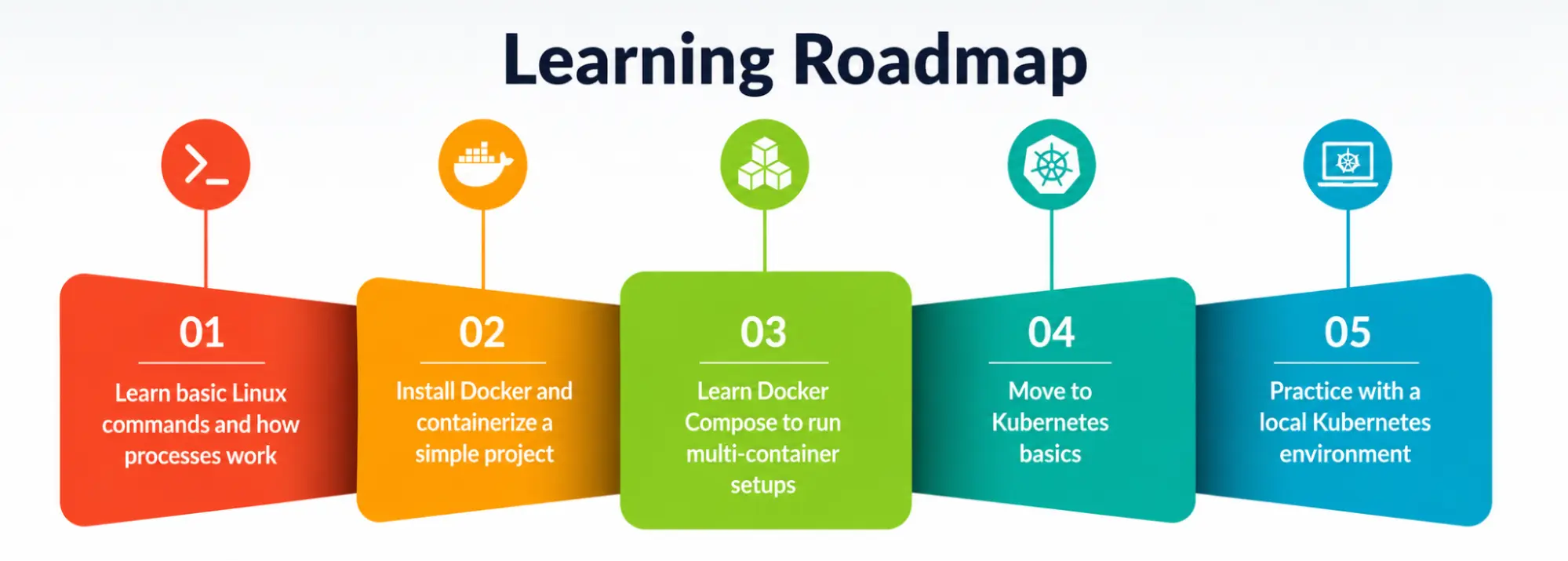
- Learn basic Linux commands and how processes work — this makes containerization concepts click faster.
- Install Docker and containerize a simple project, like a to-do list app or a basic API.
- Learn Docker Compose to run multi-container setups (e.g., an app plus a database).
- Once comfortable, move to Kubernetes basics — pods, deployments, and services.
- Practice with a local Kubernetes environment like Minikube or Kind before touching cloud-based clusters.
This order respects the natural difficulty curve and builds real understanding of container orchestration, rather than surface-level familiarity with commands you don’t fully understand. Along the way, try pairing these DevOps tools with a simple CI/CD pipeline, since that’s usually how they’re used together in an actual job.
My Personal Note
I’ll be honest with you — when I first started learning this stuff, I tried to skip straight to Kubernetes because it looked more impressive on a resume. It backfired. I spent weeks confused by YAML errors that had nothing to do with Kubernetes itself and everything to do with the fact that I didn’t really understand containers yet.
The moment I went back and properly learned Docker first, Kubernetes suddenly made sense. My advice to every student asking about Docker vs. Kubernetes is simple: don’t rush the fundamentals. Learn to walk with Docker before you try to run a cluster with Kubernetes. It’s a slower path in the short term, but it’s the one that actually sticks.